iPhoneAddict Apps
  • Actualités
  • Accueil Apps
  • iPhone
  • iPad
  • Universelles
  • Mac
  • Apple TV
KG KultureGeek
App
iPhone / iPad Télécharger iAddict v5 Mac Télécharger iAddict Mac
  • Actualités
  • Accueil Apps
  • iPhone
  • iPad
  • Universelles
  • Mac
  • Apple TV
  • Archives keynotes
  • Firmwares & iTunes
  • Contactez-nous
  • Comparateur de prix
  • KultureGeek
Accueil » Liste des Apps » Apps Mac » Photo et vidéo » Cutter - Cut & Crop Video
3.1.0 macOS €Gratuit SEASOFT LTD. 0 0 Easily cut and crop any videos with the most powerful video software. Cutter is the best tool for cutting video into high-quality GIFs. Cut and filter videos more intuitively and efficiently with an easy-to-use interface. Exporting videos in various...
Cutter - Cut & Crop Video

Cutter - Cut & Crop Video

macOS / Photo et vidéo

Gratuit au lieu de 10,99€
Obtenir sur l'App Store
Facebook X E-mail

Easily cut and crop any videos with the most powerful video software. Cutter is the best tool for cutting video into high-quality GIFs. Cut and filter videos more intuitively and efficiently with an easy-to-use interface. Exporting videos in various formats for any device has never been easier and faster.

Cut videos easily and accurately
-Supports many videos like mp4, mov, avi, mkv, ts, and more
-Automatic GPU acceleration
-Apply effects to your video in one click
-Add watermarks for copyright protection

Cut video into high-quality animated GIFs
-Create high-resolution GIFs up to 720p
-GIF frame rate from 5 fps to 30 fps
-Best color palette to avoid dithering in GIF

Easily speed up or slow down your videos
-Instantly change video speed
-Speed your video from 0.2X to 16X
-Mute its sound if you want
-Create an amazing post for your social media account

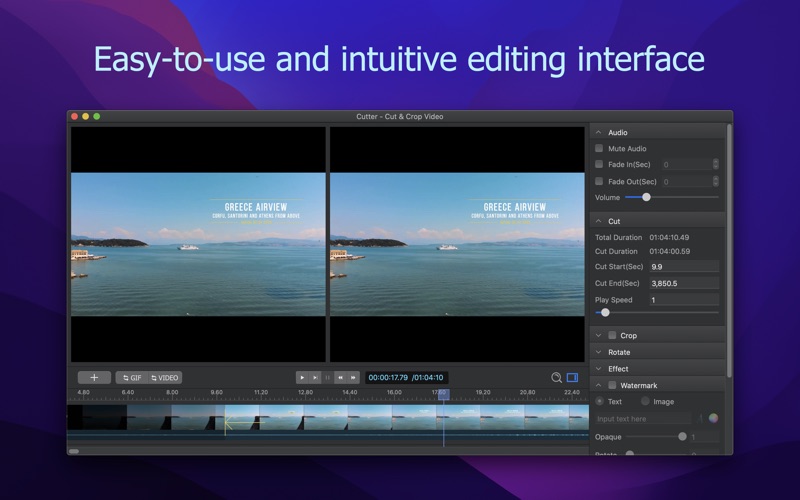
Intuitive and easy-to-use interface
-Instant preview of editing results
-Real-time comparison with original video
-Instant crop to quickly remove black borders from videos
-Edit frame by frame and never miss a moment
-Quickly drag the cursor to clip the video

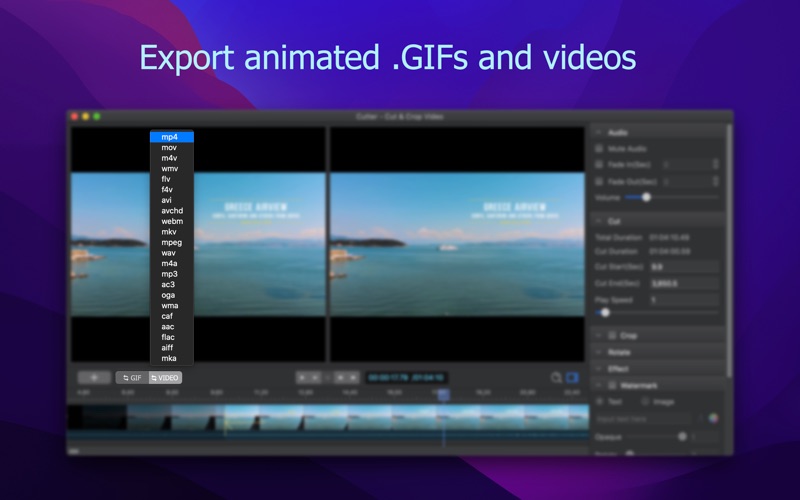
Cut videos for all devices
-Export to mp4, mov, avi and other popular formats.
-Custom export options for all needs
-Automatic export options
-GPU auto-accelerated export

About In-App-Purchase
It’s free to download and try all the features. The free version will have a watermark over the exported videos. You can remove it by upgrading to the standard version using In-App-Purchase.

En voir plus...

Quoi de neuf dans la dernière version ?

-Fixed some bugs

  • Screenshot #1 pour Cutter - Cut & Crop Video
  • Screenshot #2 pour Cutter - Cut & Crop Video
  • Screenshot #3 pour Cutter - Cut & Crop Video

D'autres applications du développeur

Screen SnapshotScreen SnapshotmacOS1Click - Screen Recorder1Click - Screen RecordermacOS1Click - Screen Recorder Lite1Click - Screen Recorder LitemacOSDiskeeperDiskeepermacOSMP3 Audio RecorderMP3 Audio RecordermacOSAudioCraft - Convert & CutAudioCraft - Convert & CutmacOSVoir toutes les apps

Note

(0 note)

Détails sur l'application

Version
3.1.0
Taille
47.2 Mo
Version minimum de macOS
10.13
Dernière mise à jour
19/06/2022
Publié par
SEASOFT LTD.

Newsletter App Store

Recevez chaque jour les meilleures promos

Actualité Apple

Image Les États-Unis ne veulent pas qu’Apple achète de la RAM chinoise
Les États-Unis ne veulent pas qu’Apple achète de la RAM chinoise
Image Apple retire sa pub polémique avec un enfant et un iPhone en Italie
Apple retire sa pub polémique avec un enfant et un iPhone en Italie
Image L’iPhone Ultra pliable va-t-il résoudre les défauts du Galaxy Z Fold 8 ?
L’iPhone Ultra pliable va-t-il résoudre les défauts du Galaxy Z Fold 8 ?
Image Mac : des hackers exploitent la faille du partage d’écran avec un mineur de cryptomonnaie
Mac : des hackers exploitent la faille du partage d’écran avec un mineur de cryptomonnaie
iPhoneAddict Apps

Le catalogue iPhoneAddict pour suivre les nouveautés, mises à jour et baisses de prix de l’App Store.

Apps

Toutes les apps iOS iPhone iPad Universelles Mac Apple TV

iPhoneAddict

Actualité Apple Archives keynotes Contact À propos KultureGeek

Suivez-nous

©2009-2026 i2CMedia. Tous droits réservés.