VideoConvert for iPod
macOS / Photo et vidéo
Turn any video or audio file into the perfect format for your iPod with VideoConvert for iPod. Fast, easy, and powerful, this all-in-one media converter helps you convert movies, music videos, TV shows, and more for smooth playback on iPod devices.
Whether you’re converting MP4, MOV, MKV, AVI, FLV, WMV, or other popular formats, VideoConvert for iPod delivers high-quality results with optimized presets for iPod playback.
Key Features
- Convert videos and audio files for iPod playback.
- Support popular formats including MP4, MOV, AVI, MKV, WMV, FLV, MPEG, MP3, AAC, and more.
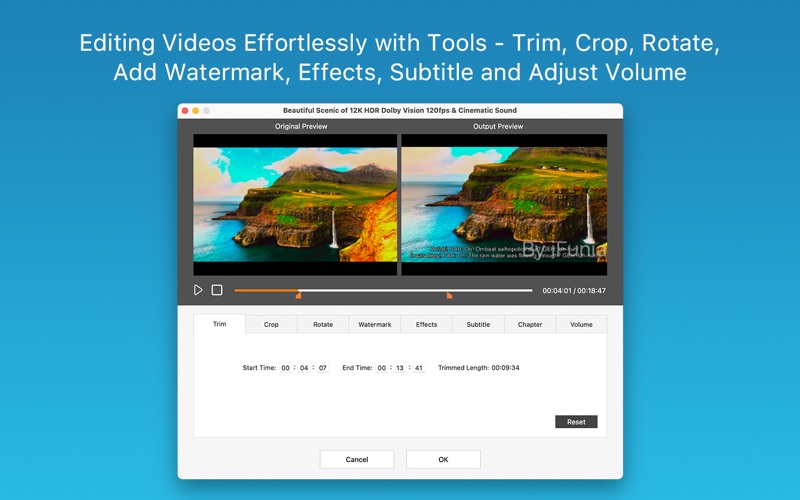
- Trim unwanted scenes, crop video frames, rotate clips, and customize videos with text or image watermarks.
- Add subtitles and chapter markers to create a better viewing experience on iPod.
- Combine multiple video clips into a seamless long video for iPod playback.
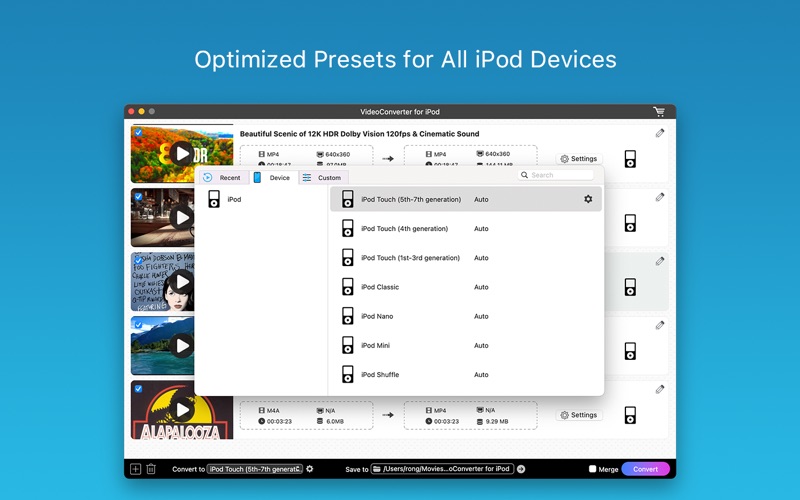
- Ready-made presets to fit for iPod playback without additional settings.
- Support drag-and-drop and batch processing.
- Preserve excellent video and audio quality
Input Formats
- Standard Definition Videos:
3GP, 3GP2, ASF, AVI, AMV, AVR, AVS, CDG, CDXL, Digital Video (DV, DIV), Flash Video (FLV, F4V), GDV, MKV, DVR, MJPEG Video (MJPG, MJPEG), MPG Video (MPG, MPEG, M2V, MPA), MP4, MPV, MTV, MV, MXF, NUT, NSV, Quick Time Video (MOV, QT), Raw Video (H261, H263, H264), Real Video (RM, RMVB), AU, (S) VCD Video (DAT), Video Transport Stream (TS, T2, M2T), WMV, YUV, MOD, TOD, VRO, AMV, IFV, IVF, JV, MLV, DIVX, OGV
-High Definition Videos:
H.264/MPEG4 AVC Video (M2TS, MTS), AVCHD (M2TS, MTS), HD AVI, HD MPEG2 Video (MPG, MPEG), HD MP4, HD TS, HD MOV, HD WMV Video (XWMV)
- Audio Files:
AA, AAC, AAX, AC3, ACM, ACT, ADTS, ADX, ACF, AIFF, ALAW, ARM, APE, APC, AU, CAF, DSF, DTS, FLAC, MP3, MP2, M4A, OGG, OGA, WAV, WMA, MKA, M4R, M4B
Output Formats
iPod Touch (5th-7th generation)
iPod Touch (4th generation)
iPod Touch (1st-3rd generation)
iPod Classic
iPod Nano
iPod Mini
iPod Shuffle
ABOUT SUBSCRIPTION
Your subscription will auto renew unless you canceled at least 24 hours before the end of the current period.
You can manage and cancel your subscriptions in your account settings of the App Store after purchase.
Privacy Policy: https://www.ifunia.com/privacy-policy.html
Terms Of Use: https://www.ifunia.com/terms-of-use.html
SUPPORT
If you have any questions about iFunia VideoConvert for iPod, please feel free to contact us at support@ifunia.com
Quoi de neuf dans la dernière version ?
1. UI Optimized.
2. Conversion performance and quality improved.
3. Supported input formats updated.
4. Bugs fixed.