MarkNode
macOS / Productivité
Plan It as a Map. Write It in Markdown. Restructure by Dragging.
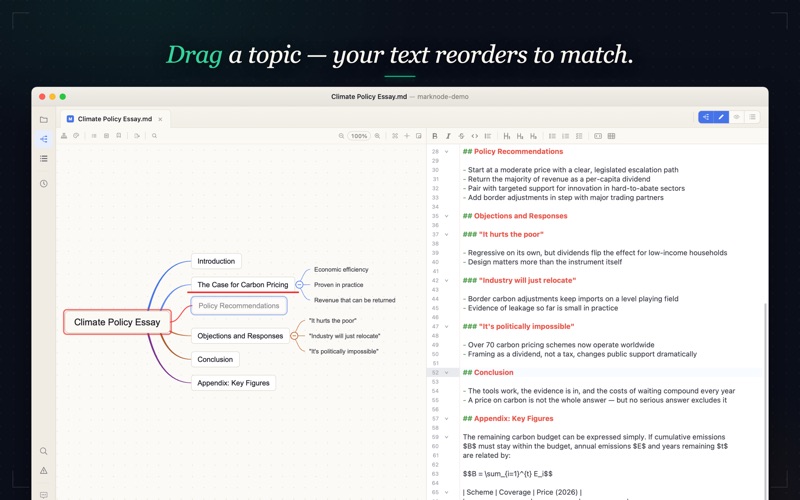
MarkNode (formerly Document Node) is a fast, local-first Markdown editor where the mind map IS your document — edit either view and the other updates instantly. Map out an essay or thesis first, then write each section in Markdown. Outline a book, article, or course as a map, and restructure the draft by dragging nodes — the prose reorders to match. Your files are plain Markdown on your Mac, fully in your control, portable anywhere.
Key Features:
• Live Mind Map Editing — the map is a view of your Markdown, not a separate diagram. Type in the editor and the map updates; drag a node and the Markdown reorders. Both views stay identical, always.
• Live Preview & Outline — see rendered Markdown side by side, with an outline view for quick navigation and custom preview styles to match the look you want.
• Fully Customizable Themes — customize colors, shapes, line styles, and even apply conditional styling with Regex support, across the editor, mind map, and preview.
• Intuitive Folder Structure — drag and drop files to keep your projects organized and accessible.
• Powerful Search — Find & Replace with regex support, plus instant full-text search across your whole project.
• Export & Share — turn your work into DOCX documents, PDF files, or mind map images (PNG) in one step.
• Blazing Fast & Lightweight — built with Rust for unmatched performance and a smooth, efficient workflow.
Free & Pro
The entire local app is free for personal use — Markdown editing, live preview, outline editing, full mind map editing and customization, search, export, multiple project windows, and complete project management. No feature cap, no time limit.
Upgrade to Pro — a one-time purchase, no subscription — for a commercial-use license. Pro unlocks no additional features; it's the right choice if you use MarkNode at work and want to support ongoing development with lifetime updates included.
----
Email Support: support@documentnode.io X: https://x.com/document_node
Privacy Policy: https://marknode.com/privacy Terms of Service: https://marknode.com/terms EULA: https://marknode.com/eula
Quoi de neuf dans la dernière version ?
## MarkNode 2.1.7
### New Features
- **Quick Look Markdown Preview (macOS)**: Press Space on any Markdown file in Finder to see a fully rendered preview — headings, tables, code highlighting, math equations, and diagrams — without opening the app. Works in both light and dark mode and is bundled free with MarkNode.
- **Mermaid Diagrams**: `mermaid` code blocks now render as actual diagrams — flowcharts, sequence diagrams, class diagrams, and more — in the preview pane, in Quick Look previews, and in DOCX export, with colors that follow your theme.
- **Replace in Files**: Find and replace across your whole project. Review every match first, tick or untick individual matches, then apply per file or across the project — with regex support (including named groups) and safe handling of files you have open in the editor.
- **File Explorer Filter Bar**: A toggleable filter bar in the file explorer lets you quickly narrow the file tree to matching files — with the matched characters highlighted — while keeping each file's context for drag and rename.
- **Glob Patterns in Quick Open**: Quick Open now understands glob patterns such as `*.md` or `src/**`, and results are ranked so filename matches appear above matches buried deeper in the path.
### Improvements
- **Open Any Text File**: Files like `.properties`, `.ini`, `.env`, `.csv`, and `.log` — and any other text file, even with an unknown extension — now open directly in the built-in editor instead of an external app, with new syntax highlighting for properties, diff, protobuf, and LaTeX files.
- **Now on the Mac App Store**: MarkNode is available from the Mac App Store as an alternative way to install and stay up to date.
- **Smoother Sign-In**: Cloud sign-in now uses the native macOS authentication sheet, and a sign-in that times out or is cancelled now closes cleanly instead of leaving the flow hanging.
- **Preview Server Security**: The local server behind the browser preview has been hardened — websites you visit can no longer trigger requests against it, and asset access is restricted to your current session.
### Bug Fixes
- **Image Paste Restored**: Pasting images into the Markdown editor — including image files copied from Finder — works again.
- **Moving a Folder Keeps Images Working**: Moving a folder (such as a media folder) now rewrites the image links in affected documents so images keep rendering.
- **Anchor Links Scroll the Preview**: Clicking an in-document `#heading` link in the docked preview now scrolls to the matching heading instead of doing nothing.
- **Preview Stays in Sync After Mind Map Navigation**: Clicking into the editor after selecting a mind map node no longer makes the preview jump to the wrong place.
- **Reliable Window Positions on Multiple Monitors**: Window size and position are now restored accurately across restarts on multi-monitor setups, instead of drifting or growing over time.
- **Calmer App Startup**: Restoring several project windows at launch no longer makes them repeatedly grab focus, and a plain click on the title bar can no longer accidentally nudge the window.
- **Accurate Terminal Selection at Any Zoom**: Selecting text in the integrated terminal now highlights exactly what's under the pointer, and terminal text scales together with the app zoom level.
- **Diff View Fills the Editor**: The side-by-side changes view now stretches to the full height of the editor area instead of stopping at its content.
- **Site-Root Image Paths Render**: Images referenced with site-root-absolute paths such as `/images/photo.png` (common in static-site projects) now display correctly in the preview, DOCX export, and Quick Look.
- **More Reliable Images and Links in Preview**: Responsive images (`srcset`) and video poster frames now load, links and images no longer break from being resolved twice, Windows drive-letter paths resolve correctly, and visible link paths are shown clean without `../` fragments.