Rest
macOS / Productivité
We all know it is sensible to take breaks while using a computer for extended periods of time, in order to help prevent eyestrain, stiff neck, headaches, back aches, and RSI. Sometimes you forget to rest because you are immersed in your work.
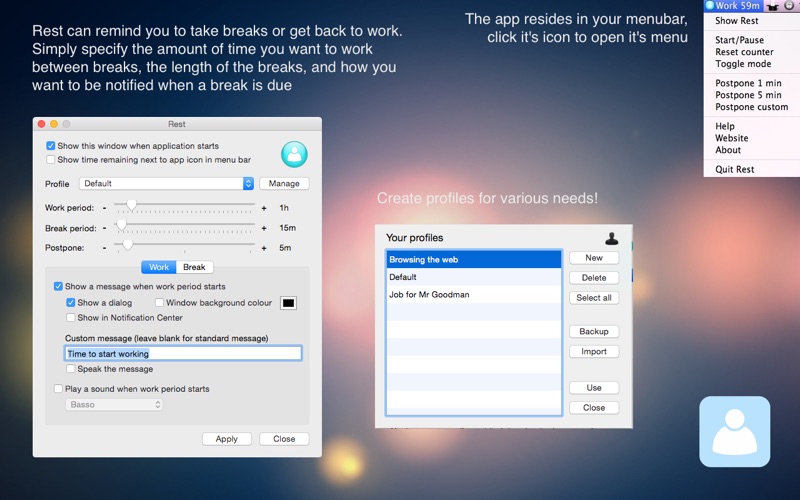
Rest can remind you to take such breaks. Simply specify the amount of time you want to work between breaks, the length of the breaks, and how you want to be notified when a break is due.
The application resides in the status area of your Mac's menu bar, out of the way. It displays an icon and the current mode (Work or Break) along with a countdown of the minutes left.
The icon will be blue during work, and turn green during a break and red during paused mode.
Next to the icon the amount of minutes (and seconds when under one minute left) will be displayed. These minutes correspond to the length of the work or break period and will decrease.
When a work period is over, break mode will automatically begin. When a break is over, the application will enter work mode again.
The application will remind you to take a break at the specified intervals by a popup message and/or sound.
Get up, walk around, relax, grab a drink or have a stretch before returning to your computer.
If you don't want to stop working immediately when a break reminder appears, you can stop the countdown or even postpone the break a little longer.
Create 'profiles' to store different time settings, for example an exercise routine, work etc.
- The app is not to be a replacement for medical advice by a qualified professional, and it will not prevent any illness caused by misuse of your computer.
- If you have a problem contact us, don't leave a bad review. We will always try to help. We have lots of very satisfied customers (visit our website to see their comments!)
Quoi de neuf dans la dernière version ?
64-bit compatible