Tab Launcher
macOS / Productivité
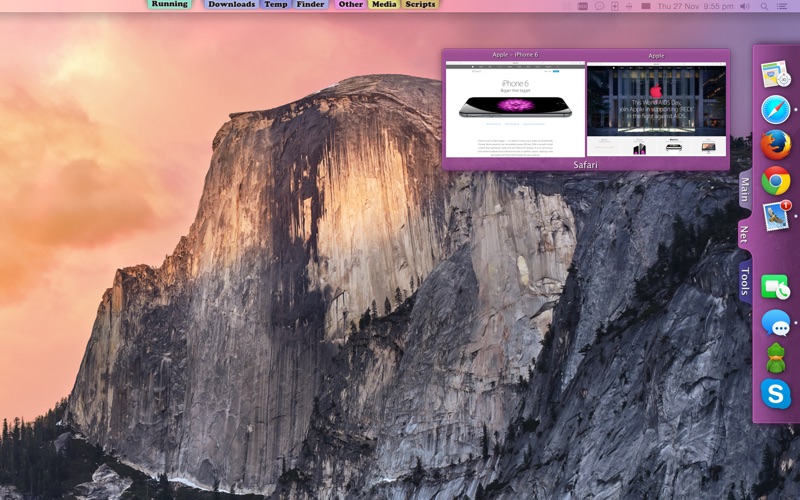
TabLauncher keeps your favorite apps, files, folders and web pages one flick of the mouse away — organized in colorful tabs that sit quietly on any edge of your screen until you need them.
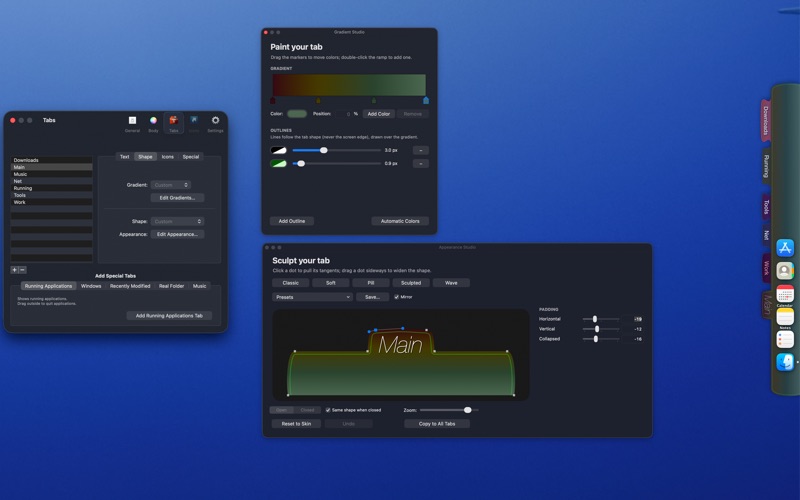
Version 3 is a complete visual rebirth. Tabs used to be static — now they are living, organic shapes you can sculpt. Pick a preset like Classic, Pill or Wave, or open the Shape Studio and drag the curves yourself. Paint each tab with multi-color gradients and outlines, and watch everything move with fluid animations — tabs morph open and closed, icons glide apart to welcome a drop. The whole launcher feels alive.
DESIGN IT YOUR WAY
•Sculpt the exact shape of your tabs: corners, shoulders, curves — every dot and tangent is draggable.
•Gradients with as many color stops as you like, plus ready-made recipes based on your tab color.
•Outline strokes, shadows, transparency, fonts and label styles — make it blend with your desktop or stand out.
•Five hand-tuned shape presets to start from, and your own presets to save and reuse.
STAY ORGANIZED
•Unlimited tabs on any edge of any screen; every screen edge remembers its own layout — including a gap for the camera housing on modern MacBooks.
•Special tabs: currently running apps, recently modified files, real folders that stay in sync, and a music player for your files and internet radio.
•Import your Dock in one click — apps, folders, web links, even the spacers.
•Window previews when you hover a running app's icon.
•Drag anything in: apps, documents, folders, web pages.
MAKE IT WORK LIKE YOU DO
•Choose how the launcher opens: rest or touch the pointer at the edge, hover a tab, click, or keep it always open.
•Choose how it closes: after a delay you set, or when you click an icon, a tab, or anywhere outside.
•Auto-hide completely, leaving elegant gradient markers where your tabs sleep.
•Global keyboard shortcuts for any item, custom AppleScripts per icon, and system-event triggers (wake, login, timers) to launch or quit apps automatically.
•Fully scriptable with AppleScript.
Light on resources, heavy on personality. Your existing tabs and settings migrate automatically.
Not sure yet? Try TabLauncher Lite first — it's free forever and has every feature of the full version, just limited to three tabs.
Quoi de neuf dans la dernière version ?
This update fixes issues you reported to us.
Every message and review reaches us, and it is what decides what we fix next. If something bothers you, or you would like TabLauncher to do something it doesn't, please write to us at info@oktoid.org — small reports have turned into most of the fixes in this update.
Thank you for using TabLauncher, and for all the support!