iPhoneAddict Apps
  • Actualités
  • Accueil Apps
  • iPhone
  • iPad
  • Universelles
  • Mac
  • Apple TV
KG KultureGeek
App
iPhone / iPad Télécharger iAddict v5 Mac Télécharger iAddict Mac
  • Actualités
  • Accueil Apps
  • iPhone
  • iPad
  • Universelles
  • Mac
  • Apple TV
  • Archives keynotes
  • Firmwares & iTunes
  • Contactez-nous
  • Comparateur de prix
  • KultureGeek
Accueil » Liste des Apps » Apps Mac » Style de vie » Alarm Pro
L'application n'est plus disponible sur l'App Store français
1.3.1 macOS €5,99€ smartieAnts Inc. 0 0 Go to sleep and wake up with Alarm Pro. Alarm Pro is the reinvention of the alarm clock. Alarm Pro comes with built in local weather updates. Alarm Pro delivers the current weather as well as a five day forecast to you in a beautifully designed...
Alarm Pro

Alarm Pro

macOS / Style de vie

5,99€
Acheter sur l'App Store
Facebook X E-mail

Go to sleep and wake up with Alarm Pro.

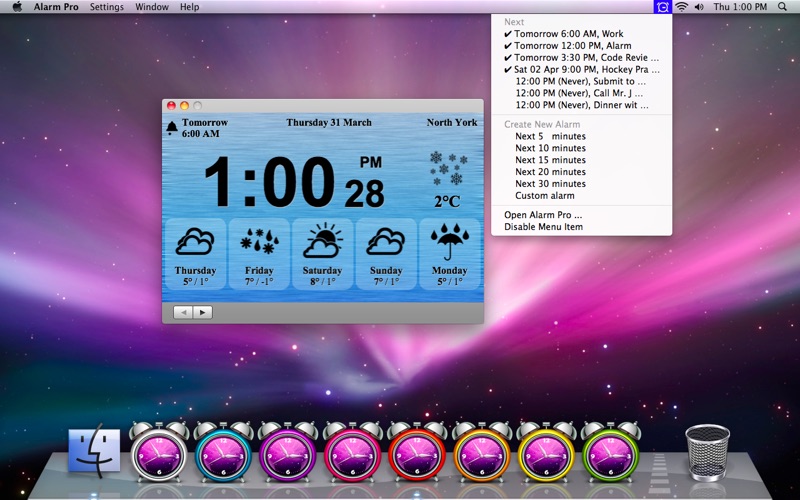
Alarm Pro is the reinvention of the alarm clock. Alarm Pro comes with built in local weather updates. Alarm Pro delivers the current weather as well as a five day forecast to you in a beautifully designed interface. Use Alarm Pro to easily create unlimited number of alarms. Quickly and easily create customized alarms however you like. Alarm Pro comes with 8 background colours for you to choose from. Alarm Pro also works in the menu bar, giving you the power to easily access current alarms or create custom alarms with 5, 10, 15, 20, or 30 minutes in the future. Alarm Pro comes with 10 default alarm sounds and iTunes playlist integration.

Sleep Mode

You must use the "Go To Sleep" feature inside Alarm Pro. Alarm Pro will dim your screen and wake you up when your alarm arrives. Please ensure you have a power source connected to your Mac. If you are using Alarm Pro on a MacBook, please leave the lid open. To put Alarm Pro to sleep, use either of the following options.

Option 1:
- Click on the alarm icon located in the menu bar in the top right corner of your Mac to open a drop down menu.
- In the drop down menu select "Go To Sleep". This will dim your screen and allow your Mac to fall asleep naturally.
- You can also select "Go To Sleep" from the Alarm Pro "Settings" drop down menu.

Option 2:
- Press "Shift+Control+Eject" at the same time.

Features:
- Wakes you up from sleep
- Current and future local weather updates
- iTunes music integration
- Create custom playlist using iTunes library
- Menu bar integration for creating and managing alarms
- Shuffle music
- Fade in
- Snooze

Default alarm sounds
-Alarm Clock
-Beach Waves
-Bell
-Bird
-Cow
-Fireplace
-Machine Gun
-Rooster
-Sunny Day
-Traffic Jam

En voir plus...

Quoi de neuf dans la dernière version ?

- Fixed invisible icon issue

  • Screenshot #1 pour Alarm Pro
  • Screenshot #2 pour Alarm Pro
  • Screenshot #3 pour Alarm Pro

Note

(0 note)

Détails sur l'application

Version
1.3.1
Taille
6.3 Mo
Version minimum de macOS
10.6
Dernière mise à jour
07/09/2012
Publié par
smartieAnts Inc.

Newsletter App Store

Recevez chaque jour les meilleures promos

Actualité Apple

Image Apple bat un record de dépenses en R&D avec 10,2 milliards d’euros dépensés au T3 2026
Apple bat un record de dépenses en R&D avec 10,2 milliards d’euros dépensés au T3 2026
Image iPhone 18 Pro : une hausse de prix de 300 $ est évoquée
iPhone 18 Pro : une hausse de prix de 300 $ est évoquée
Image Apple Car Key bientôt compatible avec les VE Haval du constructeur chinois GWM
Apple Car Key bientôt compatible avec les VE Haval du constructeur chinois GWM
Image Apple franchit 1,5 milliard d’abonnements avec ses services
Apple franchit 1,5 milliard d’abonnements avec ses services
iPhoneAddict Apps

Le catalogue iPhoneAddict pour suivre les nouveautés, mises à jour et baisses de prix de l’App Store.

Apps

Toutes les apps iOS iPhone iPad Universelles Mac Apple TV

iPhoneAddict

Actualité Apple Archives keynotes Contact À propos KultureGeek

Suivez-nous

©2009-2026 i2CMedia. Tous droits réservés.