
iPhoneAddict Apps
  • Actualités
  • Accueil Apps
  • iPhone
  • iPad
  • Universelles
  • Mac
  • Apple TV
KG KultureGeek
App
iPhone / iPad Télécharger iAddict v5 Mac Télécharger iAddict Mac
  • Actualités
  • Accueil Apps
  • iPhone
  • iPad
  • Universelles
  • Mac
  • Apple TV
  • Archives keynotes
  • Firmwares & iTunes
  • Contactez-nous
  • Comparateur de prix
  • KultureGeek
Accueil » Liste des Apps » Apps Mac » Utilitaires » Desktop Inspector
1.2.2 macOS €7,99€ AsramSoftware 0 0 The main purpose of Desktop Inspector is to detect whether, on the Desktop or in any other location, there are unknown invisible items, i.e. files or folders you created unwillingly or by accident, or were created by a third-party software....
Desktop Inspector

Desktop Inspector

macOS / Utilitaires

7,99€
Acheter sur l'App Store
Facebook X E-mail

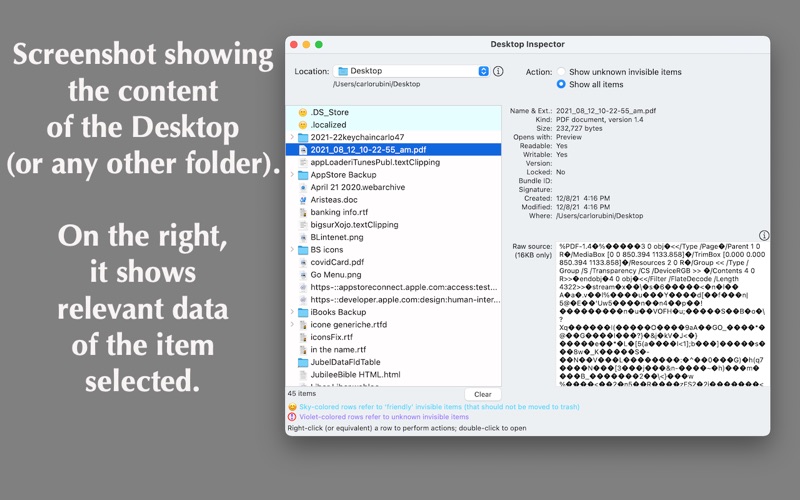
The main purpose of Desktop Inspector is to detect whether, on the Desktop or in any other location, there are unknown invisible items, i.e. files or folders you created unwillingly or by accident, or were created by a third-party software.
Third-party-installed invisible items are usually necessary for a given software to work, although they may also have been planted to act as a malware.

Invisible items (i.e. folders and files) are shown with different icons: 'friendly' (smiley) icons refer to invisible system-files and folders, while 'exclamatory' icons refer to unknown invisible items. In order not to compromise the computer’s expected behavior, ‘friendly’ items by default may not be moved to trash, while unknown invisible ones may be moved to trash. Only enabling the relevant option in the Preferences, ‘friendly’ items too can be moved to trash.
Yet the application, by itself, does not know the names of all the system-files and folders, and obviously does not know which unknown invisible item has been created by a ‘honest’ third-party software. When in doubt, through the ‘Look Up’ function (available right-clicking an item), the name of the selected item will be searched online for you to get an idea about it. Then, should you consider it a friendly one, you can add its name to the internal database.

Of each element, the application shows the Operating System's own description and part of its content in computer language.

En voir plus...

Quoi de neuf dans la dernière version ?

Bug fixing
D'autres applications du développeur

4getMeNot4getMeNotmacOSiFindTextiFindTextmacOSBigBenBigBenmacOSeTuneseTunesmacOSmp3 DJmp3 DJmacOSmultiLibrarymultiLibrarymacOSVoir toutes les apps

Note

(0 note)

Détails sur l'application

Version
1.2.2
Taille
7.4 Mo
Version minimum de macOS
11.1.1
Dernière mise à jour
08/01/2026
Publié par
AsramSoftware

Newsletter App Store

Recevez chaque jour les meilleures promos

Actualité Apple

Image iPhone : Apple a capté 49 % des revenus de smartphones au 2e trimestre, un record
iPhone : Apple a capté 49 % des revenus de smartphones au 2e trimestre, un record
Image L’iPhone Air 2 aurait une Dynamic Island plus petite et d’autres nouveautés
L’iPhone Air 2 aurait une Dynamic Island plus petite et d’autres nouveautés
Image iPhone 18e : les 9 Go de RAM se confirment un peu plus
iPhone 18e : les 9 Go de RAM se confirment un peu plus
Image Apple met à jour Shazam avec des autocollants iMessage pour l’album petal d’Ariana Grande
Apple met à jour Shazam avec des autocollants iMessage pour l’album petal d’Ariana Grande
iPhoneAddict Apps

Le catalogue iPhoneAddict pour suivre les nouveautés, mises à jour et baisses de prix de l’App Store.

Apps

Toutes les apps iOS iPhone iPad Universelles Mac Apple TV

iPhoneAddict

Actualité Apple Archives keynotes Contact À propos KultureGeek

Suivez-nous

©2009-2026 i2CMedia. Tous droits réservés.