Owly - Prevent Display Sleep
macOS / Utilitaires
Say hello to Owly, a cute little menu bar companion that keeps your Mac awake, on your terms.
When you need your screen to stay on, whether you're watching a video, monitoring a download, or keeping live stats visible, Owly steps in and prevents your Mac from dimming, launching screen savers, or going to sleep.
HOW IT WORKS:
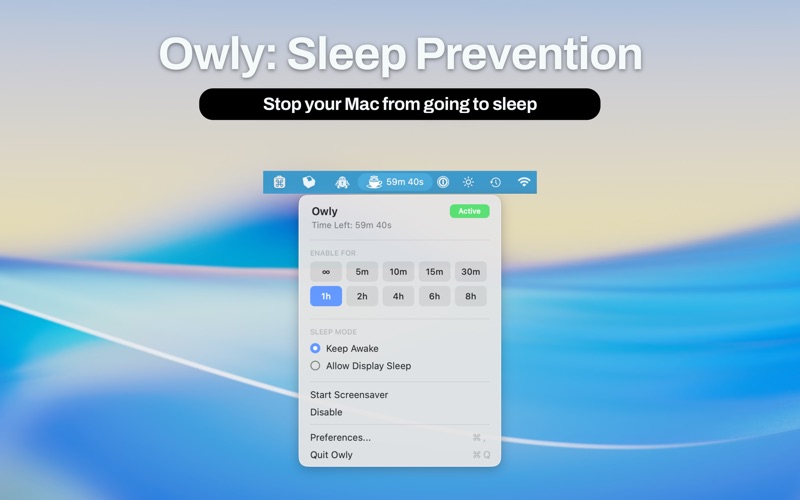
Simply right click the Owly icon in your menu bar to toggle it on or off. When active, the icon lights up so you always know at a glance. Choose a duration right from the menu.
TWO SLEEP PREVENTION MODES:
1. Display + System: keeps both your screen and Mac fully awake
2. Display Only: keeps just the screen on while allowing your Mac to sleep normally
SMART TRIGGERS THAT WORK FOR YOU:
- Schedule: set Owly to automatically activate and deactivate at specific times each day, with overnight support
- Power triggers: automatically enable when you connect or disconnect from power
- App triggers: choose specific apps that automatically activate Owly when they're running
- Battery threshold: Owly steps aside when your battery drops below a percentage you set, so you never accidentally drain to zero
CUSTOMIZABLE TO FIT YOUR SETUP:
- 10 menu bar icon colors to match your style: Default, System Accent, Blue, Purple, Pink, Red, Orange, Yellow, Green, or White
- Optional countdown timer in your menu bar showing how long Owly will stay active
- Global keyboard shortcut to toggle Owly from anywhere
- Launch at login so it's always ready
- Show or hide the dock icon
GREAT FOR:
- Watching videos outside fullscreen mode
- Monitoring live dashboards, stats, or downloads
- Presentations and screen sharing
- Long-running tasks you want to keep an eye on
Quoi de neuf dans la dernière version ?
- Owly has been completely rebuilt for macOS Tahoe
- New inline duration grid: activate with one click
- Two sleep modes: Keep Awake (display + system) or Display Only
- Smart triggers: schedule, power connect/disconnect, and app-based activation
- 10 menu bar icon colors to match your style
- Redesigned preferences with General, Triggers, and About tabs
- Native macOS controls throughout
- Full compatibility with macOS 11.5 and later