iPhoneAddict Apps
  • Actualités
  • Accueil Apps
  • iPhone
  • iPad
  • Universelles
  • Mac
  • Apple TV
KG KultureGeek
App
iPhone / iPad Télécharger iAddict v5 Mac Télécharger iAddict Mac
  • Actualités
  • Accueil Apps
  • iPhone
  • iPad
  • Universelles
  • Mac
  • Apple TV
  • Archives keynotes
  • Firmwares & iTunes
  • Contactez-nous
  • Comparateur de prix
  • KultureGeek
Accueil » Liste des Apps » Apps Mac » Utilitaires » Screenshot Helper
L'application n'est plus disponible sur l'App Store français
2.5 macOS €Gratuit Katsura Shareware 0 0 Screenshot Helper shows a full screen window with a solid color or a desktop picture so that you can take clean screenshots without having irrelevant windows and desktop icons in the background. The easiest way to get a clean desktop for screenshots...
Screenshot Helper

Screenshot Helper

macOS / Utilitaires

Gratuit
Obtenir sur l'App Store
Facebook X E-mail

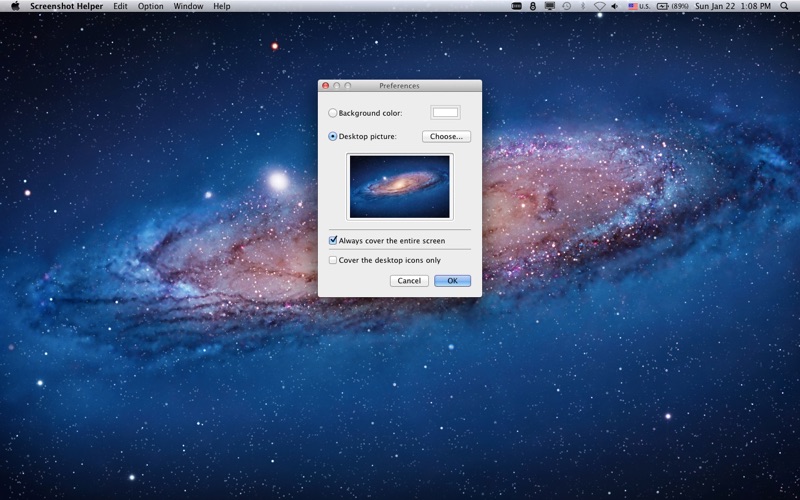
Screenshot Helper shows a full screen window with a solid color or a desktop picture so that you can take clean screenshots without having irrelevant windows and desktop icons in the background.

The easiest way to get a clean desktop for screenshots on macOS is to create a brand-new user account and log in as a brand-new user. But if you need to use your own user account for whatever reason and you have a messy desktop like I do, you can use Screenshot Helper to hide the actual desktop in order to take clean screenshots.

• Support multiple screens.
• Use the Preferences panel to change the color or the desktop picture.
• Shift - drag the window to snap to the edge of screen.
• Press command - B to show/hide the menu bar and the dock.
• Press command - U to show/hide the mouse cursor.
• Press command - E to cover the entire screen.
• Press command - D to cover the desktop icons only.

You can also make the entire screen solid black, white, red, green, or blue to check dead or stuck pixels on your LCD screen, or for a blue or green screen chroma key.

En voir plus...

Quoi de neuf dans la dernière version ?

• Added Ventura and Sonoma default desktop picture support
  • Screenshot #1 pour Screenshot Helper
  • Screenshot #2 pour Screenshot Helper

Note

(0 note)

Détails sur l'application

Version
2.5
Taille
0.3 Mo
Version minimum de macOS
10.13
Dernière mise à jour
03/02/2024
Publié par
Katsura Shareware

Newsletter App Store

Recevez chaque jour les meilleures promos

Actualité Apple

Image iOS 27 bêta 5 : la liste des nouveautés
iOS 27 bêta 5 : la liste des nouveautés
Image iOS 27 affiche désormais 5G+ pour la 5G SA avec la bêta 5
iOS 27 affiche désormais 5G+ pour la 5G SA avec la bêta 5
Image iPhone 18 Pro Max : la batterie avec une plus grosse capacité se confirme
iPhone 18 Pro Max : la batterie avec une plus grosse capacité se confirme
Image Release candidate pour iOS 26.6.1, iOS 18.7.10 et macOS 26.6.2
Release candidate pour iOS 26.6.1, iOS 18.7.10 et macOS 26.6.2
iPhoneAddict Apps

Le catalogue iPhoneAddict pour suivre les nouveautés, mises à jour et baisses de prix de l’App Store.

Apps

Toutes les apps iOS iPhone iPad Universelles Mac Apple TV

iPhoneAddict

Actualité Apple Archives keynotes Contact À propos KultureGeek

Suivez-nous

©2009-2026 i2CMedia. Tous droits réservés.