SketchAndCalc -Area Calculator
macOS / Utilitaires
••• Built entirely from the ground up as a companion app. SketchAndCalc for MacOS shares the same user experience as the web-app with the exception of account management which is centralized on the web-app. •••
Trial or Login with your SketchAndCalc account.
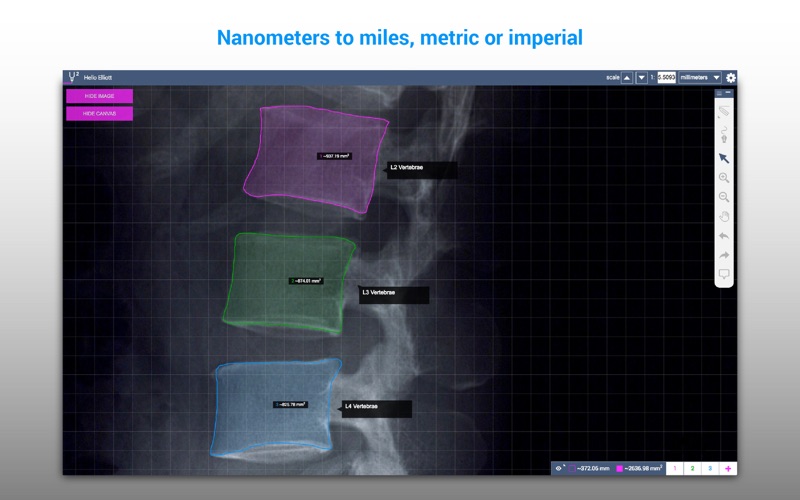
SketchAndCalc™ is the only area calculator capable of calculating areas of uploaded images. The area calculator has a unique feature that allows you to set the drawing scale of any image before drawing the perimeter of the shape. Irregular area’s containing angles or curves are therefore easily calculated without complex geometry math.
• Free trial
• Search map for an address or longitude and latitude coordinates
• Upload any .png .jpg .gif or .pdf image and set drawing scale
• Draw perimeter. Adjust vertices manually or input precise line lengths
• Multiple Drawing layers with Area sum function
* Also available as a Web & Mobile App from SketchAndCalc.com
Simply put, if you have an image you can upload, or a maps address to search, you can calculate the irregular area of the shape regardless of how complex it is just by drawing around the perimeter of the area. The calculator can even sum multiple area calculations together by way of drawing layers. After the first area has been calculated, a new drawing layer can be added, allowing for an unlimited number of area calculations to be performed.
Results of the area calculator are displayed in imperial and metric systems, increasing the calculator's utility and removing the need to convert between different square area measurements. This, alongside the calculators precise drawing tools and magnification, ensures that irregular area’s of every size are calculated accurately.
The area calculator can also accommodate regular polygon shapes with fixed angles and precise line lengths. The constrained drawing tool snaps to common angles, and line lengths can be manually edited using the keyboard, helpful if your irregular area has a straight side or length. And no irregular area calculator would be complete without a curve drawing tool for odd shapes, another unique feature of SketchAndCalc™.
Whilst some area calculator apps allow map searching of address, SketchAndCalc™ takes it a step further to support searching of longitude and latitude coordinates. So whether your area is on agricultural land or sea, you’ll spend less time searching and more time calculating your irregular area.
SketchAndCalc™ has universal utility across many industries, gardeners, building contractors, surveyors or home improvement enthusiasts looking for a floorplan calculator, landscaping calculator, or land area calculator will find their needs met. However, aside from these common uses, many users in the education, medical, science and research fields need a way to find the area of irregular shapes such as cell membranes, or other odd shapes found in biology.
Quoi de neuf dans la dernière version ?
Area in Microns µm. added to the list of measurement systems used to calculate area.
PDF Resolution + 200%. The resolution of imported PDF’s has increased by 200% for greater clarity.
Decluttered Drawing Layers.
New ‘Soft Delete’ to Avoid Accidental File Deletions.
New Save Changes Prompt. Plus Improved File Sync.
Searchable Help Section.
Filenames Appear in the Top Bar when you Open a Saved File.
Vertices of Open Shapes can Now be Moved and Deleted.
Annotations to Open Shapes can Now be Added.