Camelot Pro
iPad / Musique
Camelot is an application created to address the most complex live performance needs with a simple and guided workflow. It combines in one app, a convenient and beautifully designed digital performance workstation that in the past could only be achieved with a complex setup made of connecting different applications and devices together.
Camelot is a Setlist Manager, a Software Instrument & FX Host, a PDF Music Score reader, a Multitrack Audio Player, and the most advanced Audio/MIDI Patchbay and Router. All in one piece of software:
● Hardware Instrument presets:
select your instrument Smart Map and go! With no MIDI knowledge!
● Software instruments and effects (AUv3)
Play with your favorite software sounds & FX (Auv3 format) and enjoy switching from one scene to another WITHOUT SOUND INTERRUPTION!
● MIDI Learn:
Quickly assign hardware controls to plugin parameters with an intuitive MIDI Learn workflow. Map knobs, faders, and pedals in seconds for full hands-on control.
● MIDI keyboards and MPE controllers:
connect any MIDI controller directly or with a USB hub;
● Advanced MIDI routing:
duplicate, filter, and route any MIDI messages with ease;
● Powerful MIDI Transformers:
Message Transformers convert CC messages from one number to another.
Trigger a chord by pressing one note
Remap/rescale any CC or velocity curve.
Easily play different scales or harmonize/shift parts;
● MIDI and Bluetooth remote controls:
Remote scene switching, start/stop buttons, or assign track levels to external pedals, faders, or controllers;
● Smart Scene Switching:
It’s a unique feature on iOS!!! There is no AUv3 host capable of switching sound with NO AUDIO INTERRUPTION and clever MIDI messages management, that does not truncate MIDI instances & routing. Stop using production tools for live performances!
● Tempo Sync with MIDI Clock and Ableton Link, with dedicated output for metronome (click)
● Lyrics and Chords attachments with custom annotations:
each Scene recalls PDF or images that you can visualize during the performance. The attached file can be saved at the desired zoom level and scroll position. Stop using paper chord, lyrics, or music score books!
● Audio backing tracks, Timeline & Automations:
attach Audio Tracks, add auto-play and auto-stop markers, and even add Scene automation. You can have multiple audio tracks with separate audio outputs and, at the same time, use the Timeline to automate Scene switches at specific points in the sequence;
● Audio Inputs and Routing:
Manage any audio input source: mic, guitar, bass, or hardware synth.
Add effects to any internal or external audio source in Camelot.
Endless audio routing options with dedicated audio send connectors;
● Manage your Performance with ease: Forget about the complications of last-minute Setlist changes. Rearrange, move and duplicate Songs with simple Drag & Drop directly on each Setlist.
How Camelot is organized:
● Setlists - a collection of Songs
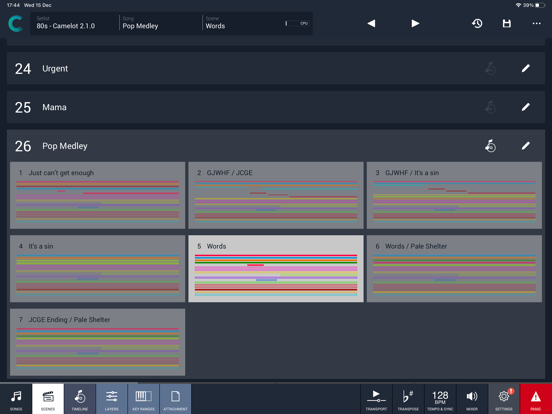
● Songs - can have one or more Scenes that each include a Timeline. When you select a Song in Camelot, you load all the resources needed to play that Song (i.e., Virtual Instruments, FX, and Audio Tracks).
● Scenes - recall and organize Hardware instruments presets, MIDI connections, Software plugin presets, and Music Score Attachments. You can switch freely from one Scene to another with no interruption in the sound.
● Layers - the building blocks of each Scene. Layers allow the connection between MIDI Input Controllers and the Items. Layers manage the MIDI and Audio flow for all the Items that are loaded on them.
● Items - Individual Hardware or Software Instruments and FX.
Quoi de neuf dans la dernière version ?
Release Notes 2.5.3
HOTFIXES
- Fixed a crash that could occur when loading or connecting backing tracks containing invalid or outdated data.
FIXES
- Fixed issues with PC/CC type switching for scene, song, and setlist change mappings, and improved conflict detection alerts.
- General stability improvements.