Face Page Turner Plus
iOS Universel / Musique
Face Page Turner+ (hereinafter called "FPT+") has two features for turning pages back and forth.
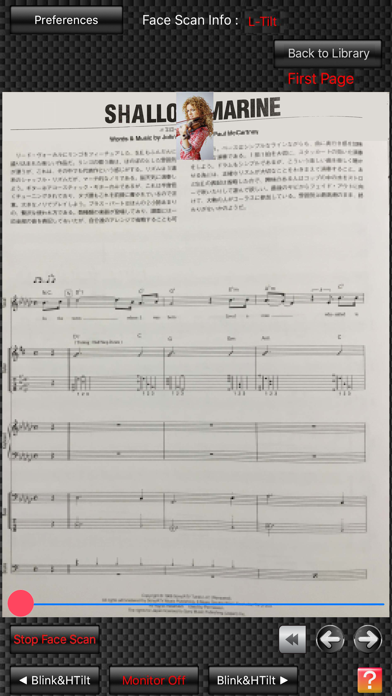
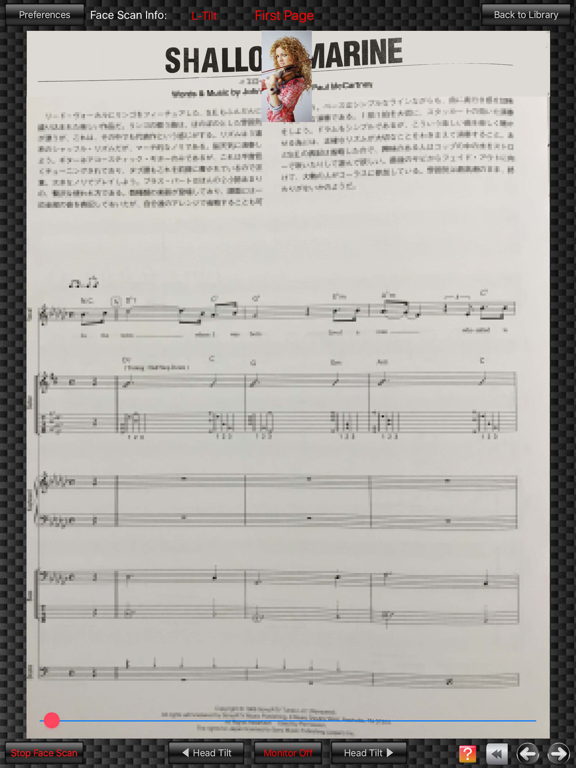
One feature is to turn the pages by detecting your facial expressions, such as "head tilt", "face position", "wink", "blink" and "smile", with your iPad's camera.
The other feature is to turn the pages by recognizing your voice commands, such as "Next page", "Back page / Previous page" and "First page", with your iPad's microphone.
On "Score Viewer" screen for Face Scan, there are two "Select" tabs. If you tap them, "Prev" window and "Next" window appear on the left and right sides of the screen.
Each of the windows has 5 tabs such as "wink", "Blink", "Head Tilt", "Face Pstn" and "Smile" tabs corresponding to the above 5 methods.
You can select a method to turn the pages back/forth by tapping one of the 5 tabs on the respective windows.
For example, if you tap the "Smile" tab on the "Prev" window and the "Blink" tab on the "Next" window, you can turn the pages forth if you blink with both of your eyes and you can turn the pages back if you smile.
On "Score Viewer" screen for Voice Scan, if you say "Next page", "Back/Previous page" or "First page", you can turn the pages of music scores.
In addition, FPT+ has the various ways to import music scores into itself.
1. You can import music scores from music score sheets or music score books directly into FPT+ by taking the music scores with your iPad's camera.
2. You can import music scores into FPT+ via your iPad's "Camera Roll" (more precisely, "Photos" app) or "Screenshots".
3. You can import music scores into FPT+ from a PC by connecting your iPad with the PC and downloading music score image files via the iTunes app in the PC.
FPT+ can accept two types of image files; JPEG files and PDF files.
In addition, you can backup the music score files in FPT+ into the PC via the iTunes app.
4. You can import music scores via the other apps besides FPT+, such as book viewer apps or scanner apps etc., if the apps can export JPEG files or PDF files to FPT+. For example, via the app for connecting your iPad with an image scanner device, you can import the music score images scanned by the image scanner device into FPT+.
5. If you use "Screenshots" function that your iPad itself has, you can import the music score images displayed on a web page or something into FPT+.
In addition, on "Order Editor" screen, you can not only copy, cut or paste the imported music score images, but you can also edit the display order of the music score images.
you can rearrange the music score images in a new order only if you drag one of the images with your two fingers.
※ The available numbers of pages and files are limited before you purchase.You can freely use it within the limit without purchasing.If you purchase the app, the limit will be removed.
Quoi de neuf dans la dernière version ?
・The in-app purchase system that allows users to remove the limit of available numbers of pages and files has been added.
・The incorrect display on 'Preferences Window' at a time when the app was used on iPads was corrected.