• KultureGeek
  • Comparateur de prix
       
iPhoneAddict
 iAddictv5Notre Application iPhone/iPad
  • Accueil Apps
  • Actualité Apple
  • Keynote Apple
  • Firmwares & iTunes
  • Contactez-nous
Accueil » Liste des Apps » Apps Universelles » Musique » Sample Tap Loop!
L'application n'est plus disponible sur l'App Store français
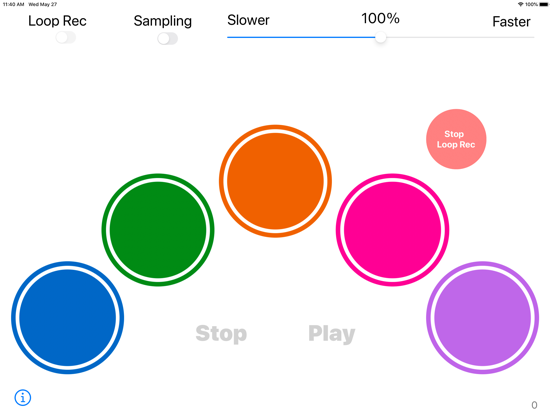
1.1 iOS €Gratuit Takatomo INOUE 0 0 Sample Tap Loop! provides: 1. You can sample a sound from the microphone on your device. 2. You can tap the color pads and play with the sampled sounds. 3. You can make a loop with the sampled sounds. There is no specific usage, so please enjoy...
Sample Tap Loop!

Sample Tap Loop!

iOS Universel / Musique

Gratuit
Obtenir sur l'App Store

Sample Tap Loop! provides:
1. You can sample a sound from the microphone on your device.
2. You can tap the color pads and play with the sampled sounds.
3. You can make a loop with the sampled sounds.

There is no specific usage, so please enjoy this app on your own way!
Find your unique way to use it!

(Instructions)
Sampling
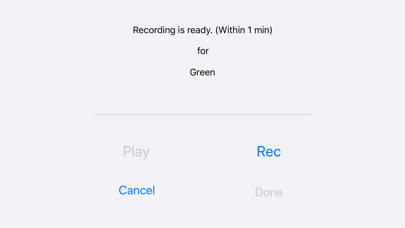
- Turn on the "Sampling" switch and tap a color pad that you choose.
- On the recording view, press "Rec" button to record a sound from the microphone on your device. (Within 1 minute)
- If you press "Done" button, the sound that you sampled will assigned to the color pad.
- If you press "Cancel" button, the assigned sound won't change.

Tap
- Tap the color pads, then you can play the sounds that you sampled. You can play as you like.

Loop
- Practice the pattern that you want to make a loop.
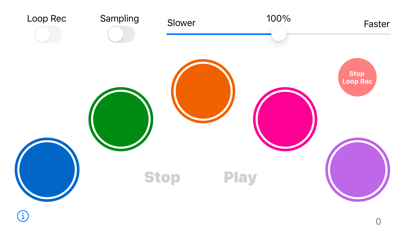
- Turn on "Recording" switch and when you tap any of the color pads, the recording of the loop will begin.
- Press "Stop Rec" button to stop recording the loop. You have to be careful of the timing to press. (Or the recording will stop automatically after 10 minutes))
- If you press "Play" button, then you can play the loop you made.
- To stop playing the loop, press "Stop" button.
- If you adjust the speed of the loop, you can change the value of the slider bar on the top-right of the view.

En voir plus...

Quoi de neuf dans la dernière version ?

Fixed the issues regarding iOS13 compatibility. The app is now reflect the system dark mode setting. The instruction of the app is added.
  • Screenshot #1 pour Sample Tap Loop!
  • Screenshot #2 pour Sample Tap Loop!
  • Screenshot #4 pour Sample Tap Loop!
  • Screenshot #5 pour Sample Tap Loop!

Note

(0 note)

Détails sur l'application

Version
1.1
Taille
5.4 Mo
Version minimum d'iOS
13.0
Dernière mise à jour
28/05/2020
Publié par
Takatomo INOUE

Newsletter App Store

Recevez chaque jour les meilleures promos

Actualité Apple

Image AirTag et harcèlement : Apple est visé par plus de 30 poursuites
AirTag et harcèlement : Apple est visé par plus de 30 poursuites
Image Apple retire le Mac mini M4 avec 256 Go de stockage : le modèle de base devient plus cher
Apple retire le Mac mini M4 avec 256 Go de stockage : le modèle de base devient plus cher
Image Apple explique pourquoi les iPhone 17 ont un taux de satisfaction de 99 %
Apple explique pourquoi les iPhone 17 ont un taux de satisfaction de 99 %
Image Apple miserait sur un prix agressif pour les iPhone 18 Pro
Apple miserait sur un prix agressif pour les iPhone 18 Pro
Partenaires : Actualité iPhone - Culture Geek
©2009-2026 i2CMedia | A propos |