iPhoneAddict Apps
  • Actualités
  • Accueil Apps
  • iPhone
  • iPad
  • Universelles
  • Mac
  • Apple TV
KG KultureGeek
App
iPhone / iPad Télécharger iAddict v5 Mac Télécharger iAddict Mac
  • Actualités
  • Accueil Apps
  • iPhone
  • iPad
  • Universelles
  • Mac
  • Apple TV
  • Archives keynotes
  • Firmwares & iTunes
  • Contactez-nous
  • Comparateur de prix
  • KultureGeek
Accueil » Liste des Apps » Apps Universelles » Musique » StarDrums
L'application n'est plus disponible sur l'App Store français
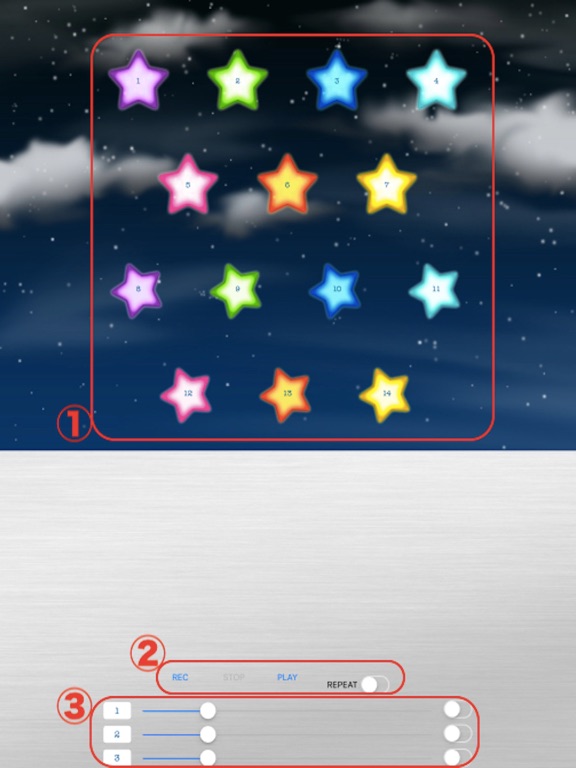
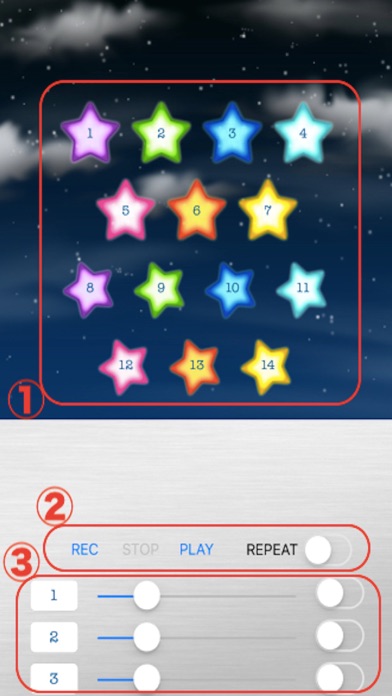
1.0.4 iOS €Gratuit Kazuya Fujita 0 0 ① Tap a star to play. The sound corresponding to the number of the star is as follows. 1, 8: Bass 2, 9: Cymbal 3, 10: Hat 4, 11: Snare 5, 12: Tom 1 6, 13: Tom 2 7, 14: Tom 3 ② You can record and play the performance you tapped in ①. 1. When...
StarDrums

StarDrums

iOS Universel / Musique

Gratuit
Obtenir sur l'App Store
Facebook X E-mail

① Tap a star to play.
The sound corresponding to the number of the star is as follows.
1, 8: Bass
2, 9: Cymbal
3, 10: Hat
4, 11: Snare
5, 12: Tom 1
6, 13: Tom 2
7, 14: Tom 3

② You can record and play the performance you tapped in ①.
1. When you tap "REC", the letter flashes in red and you enter Record mode.
2. Tap "STOP" to end recording mode.
3. Tap "PLAY" to play the sound you hit during the recording mode.
4. When you turn on the "REPEAT" switch, the recorded sound will be played repeatedly.

③ Play the sound of the selected number continuously
1. Tap the leftmost text field and select the number of the sound you want to play continuously.
2. Turn on the switch at the right end to continuously play the selected sound.
3. You can adjust the speed of continuous playback with the middle slider.


Music: 魔王魂

For further information, please contact us
https://twitter.com/corasck

En voir plus...

Quoi de neuf dans la dernière version ?

Bug fixes and performance improvements.
  • Screenshot #1 pour StarDrums
  • Screenshot #2 pour StarDrums
  • Screenshot #4 pour StarDrums
  • Screenshot #5 pour StarDrums

D'autres applications du développeur

Electronic seal[PRO]Electronic seal[PRO]iOS UniverselConvert to JPG,HEIC,PNG - PROConvert to JPG,HEIC,PNG - PROiOS Universel

Note

(0 note)

Détails sur l'application

Version
1.0.4
Taille
13.8 Mo
Version minimum d'iOS
11.0
Dernière mise à jour
27/05/2020
Publié par
Kazuya Fujita

Newsletter App Store

Recevez chaque jour les meilleures promos

Actualité Apple

Image iPhone 18 Pro et Ultra : les précommandes samedi plutôt que vendredi ?
iPhone 18 Pro et Ultra : les précommandes samedi plutôt que vendredi ?
Image iPhone 17 : le smartphone d’Apple pourrait battre un record vieux de 15 ans
iPhone 17 : le smartphone d’Apple pourrait battre un record vieux de 15 ans
Image L’Apple Watch en céramique ferait bientôt son retour
L’Apple Watch en céramique ferait bientôt son retour
Image Le récap Apple de la semaine : iPhone Ultra, Apple Watch, IA et hausses de prix au menu
Le récap Apple de la semaine : iPhone Ultra, Apple Watch, IA et hausses de prix au menu
iPhoneAddict Apps

Le catalogue iPhoneAddict pour suivre les nouveautés, mises à jour et baisses de prix de l’App Store.

Apps

Toutes les apps iOS iPhone iPad Universelles Mac Apple TV

iPhoneAddict

Actualité Apple Archives keynotes Contact À propos KultureGeek

Suivez-nous

©2009-2026 i2CMedia. Tous droits réservés.