iPhoneAddict Apps
  • Actualités
  • Accueil Apps
  • iPhone
  • iPad
  • Universelles
  • Mac
  • Apple TV
KG KultureGeek
App
iPhone / iPad Télécharger iAddict v5 Mac Télécharger iAddict Mac
  • Actualités
  • Accueil Apps
  • iPhone
  • iPad
  • Universelles
  • Mac
  • Apple TV
  • Archives keynotes
  • Firmwares & iTunes
  • Contactez-nous
  • Comparateur de prix
  • KultureGeek
Accueil » Liste des Apps » Apps Universelles » Photo et vidéo » MyImageToVideo
L'application n'est plus disponible sur l'App Store français
6.0.0 iOS €Gratuit MekeFactory 0 0 This app generates videos from multiple images. ---- Function * Tutorial video 1. Press the play button at the top left of the top screen to play the tutorial video. * Make videos from images. 1. Press the icon circle button in the center of the...
MyImageToVideo

MyImageToVideo

iOS Universel / Photo et vidéo

Gratuit
Obtenir sur l'App Store
Facebook X E-mail

This app generates videos from multiple images.

---- Function
* Tutorial video
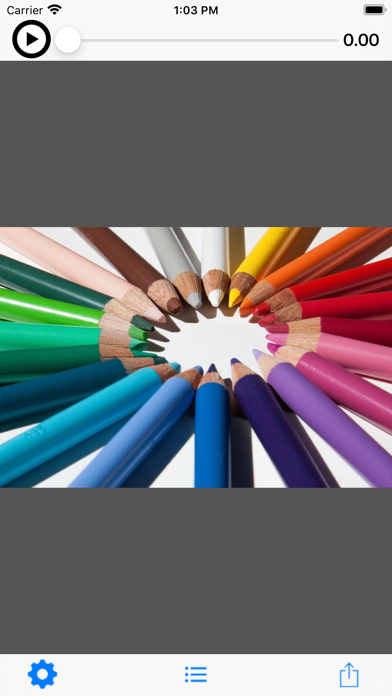
1. Press the play button at the top left of the top screen to play the tutorial video.

* Make videos from images.
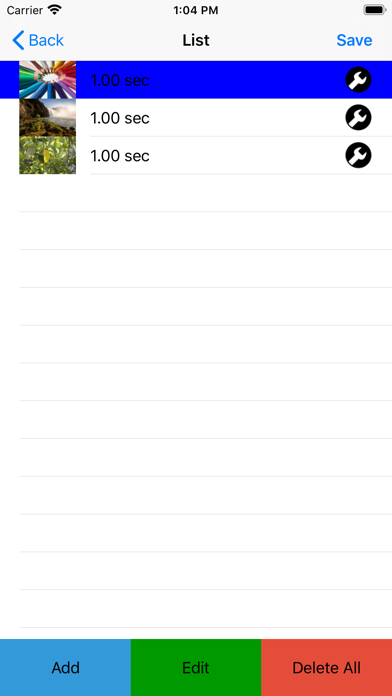
1. Press the icon circle button in the center of the tool bar at the bottom of the top screen to move to the image list screen.
2. Select an image.
-You can select the image you want to add to the video from the ADD button. (Multiple selections are possible).
If you want to add between lines, select the line you want to add first (the background color changes to blue) and then add it with the ADD button.
If you press the i button at the right end of the line, you can change the image and change the playback time.
-Press the EDIT button to change or delete the image playback order.
-Press the DEL button to delete all lines.
3. Once you have selected an image, press the Create Movie button on the top right to return to the top screen.
4. Press the play button on the top left of the top screen to play the created video.
5. From the arrow button on the right side of the toolbar, select “Save” to save the video.

* Set the movie playback time (initial value 1 second) for each image.
1. Press the gear button on the left of the tool bar at the bottom of the top screen to move to the setting screen.
2. After changing the playback time, confirm with the save button in the upper right.

En voir plus...

Quoi de neuf dans la dernière version ?

- iOS14 is now supported.
  • Screenshot #1 pour MyImageToVideo
  • Screenshot #2 pour MyImageToVideo
  • Screenshot #4 pour MyImageToVideo
  • Screenshot #5 pour MyImageToVideo

Note

(0 note)

Détails sur l'application

Version
6.0.0
Taille
9.6 Mo
Version minimum d'iOS
14.5
Dernière mise à jour
10/07/2021
Publié par
MekeFactory

Newsletter App Store

Recevez chaque jour les meilleures promos

Actualité Apple

Image L’iMac OLED éviterait les brûlures d’écran grâce à une technique
L’iMac OLED éviterait les brûlures d’écran grâce à une technique
Image iPhone 18 Pro : le coût de fabrication en hausse de 38 % pour Apple
iPhone 18 Pro : le coût de fabrication en hausse de 38 % pour Apple
Image Bad News Dads : James Marsden décroche une troisième série sur Apple TV
Bad News Dads : James Marsden décroche une troisième série sur Apple TV
Image Apple attaque Boomcloud 360 contre des accusations de violation de brevets
Apple attaque Boomcloud 360 contre des accusations de violation de brevets
iPhoneAddict Apps

Le catalogue iPhoneAddict pour suivre les nouveautés, mises à jour et baisses de prix de l’App Store.

Apps

Toutes les apps iOS iPhone iPad Universelles Mac Apple TV

iPhoneAddict

Actualité Apple Archives keynotes Contact À propos KultureGeek

Suivez-nous

©2009-2026 i2CMedia. Tous droits réservés.