PreviewAR - Film & TV Toolkit
iOS Universel / Photo et vidéo
Trusted by Frankenstein, Foundation, Wicked and many more, PreviewAR accelerates previsualization on your next show.
Made for independent studios and used by world-renowned production companies, PreviewAR is the easiest way to view your 3D characters and objects in the real world using technology you already have. Use it for accurate location scouts or to test animated pre-viz in pre-production, or on the day to check set extensions, animated characters and realistic scene previews you can share with clients, cast and crew.
PreviewAR supports most major 3D file formats (including OBJ, USDZ, USD, DAE and FBX) or drop in 2D image cards to block out set extensions and reference frames. Download now and see your animated, textured characters and objects live on set.
--------------------------------
"PreviewAR provides a wonderful shortcut to viewing a 3D asset and sharing that experience with others in the room, without need for a headset. Its application on a sound stage is quite amazing - it's allowed us to quickly see a potential set build without harming the budget."
Art Director, Painting Practice
--------------------------------
IMMERSIVE & ACCURATE
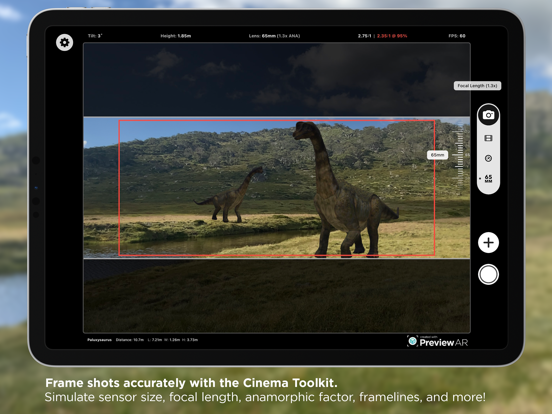
PreviewAR uses real-world scale to show your models as accurately as possible. With people and environment occlusion, your models are deeply incorporated into the scene, and the full-screen AR display means your set can come alive right before your eyes. Simulate a lens wider than your device's camera and your 3D scene now extends beyond the live feed for true ultra-wide framing.
CLEAN & INTUITIVE
The on-screen controls let you adjust every aspect of the scene without getting in the way. Change lighting angles, scale models, set a model's origin point for precise pivots, and fine-tune positions with the Adjustment Wheel. Live on-screen readouts show focal length, camera tilt, height, frame rate and aspect ratio as you move. The interface can be hidden entirely for a completely immersive experience by tapping any empty area of the scene.
SECURE & PRIVATE
There are no external servers or processing involved with PreviewAR, every model you import stays on your device and isn't uploaded or downloaded anywhere else. Perfect for NDA-restricted or sensitive assets that can't be uploaded to other cloud-based products.
PreviewAR offers a Pro subscription for advanced features tailor-made for those on-set, including:
- Camera & Lens Simulation: Choose from 500+ cinema camera formats with spherical & anamorphic lens options, or add your own custom setup.
- Image Anchors: Lock an entire scene to a real-world marker and reload it in exactly the same place, every time, ideal for resuming a setup on a stage or location. Capture a marker with your camera, or use the ready-to-print markers included.
- Multiple Models: Build a full scene from several textured, animated models at once.
- Collaborative Sessions: Multiple devices share one AR scene in real time. Give your Directors, DOPs and clients a device to view and frame the scene through while you make edits. Updated instantly across up to 4 devices, no internet connection required.
- Scene Saving & GPS Anchors: Save an entire scene and reload it in the same spot, or anchor it to a real-world GPS location and recall it on the day.
- Clean Plates & Camera Track: Capture ProRes clean plates and export scene + environment geometry and a camera track for later reference and pipeline integration.
- and many more!
Questions or suggestions? Feel free to contact me:
support@previewar.app
Quoi de neuf dans la dernière version ?
5.5.1 makes markers easier to create and squashes a batch of bugs:
• Capture a Marker with Your Camera (Pro): No printed marker handy? Open the Anchors page, frame any flat object such as a card, label or sticker, and PreviewAR measures its real-world size and adds it to your Anchors library, ready to lock a scene to.
• Tidier Settings: A refreshed Settings screen with quicker Close and Add buttons and a cleaner camera and import layout. Frame Rate and Ultra-Wide Angle now sit together in Recording Settings.
• USDZ model fixes when Y is Up would sometimes be ignored.
• Various other fixes, polish and performance improvements.
Questions or ideas? support@previewar.app