Spotmatic Magic
iOS Universel / Photo et vidéo
SpotmaticMagic is a complete computational photography studio for iPhone, iPad, and Mac. Work in one place across three tools — Adjust your tone and color with a live preview, apply a creative Filter like Watercolor or a classic film stock, or Transform a whole sequence with desktop-class algorithms like Focus Stacking, HDR Fusion, and Astrophotography Stacking. Bring in photos from any camera, including full-resolution RAW.
Adjust in Real Time
Fine-tune every image on a live canvas with an on-screen luminance histogram. Drag Exposure, Highlights, Shadows, Contrast, Black & White Point, Brilliance, Saturation, Vibrance, Warmth, and Tint — plus a true vignette. Every slider starts on a smart Auto value that corrects color casts without blowing out highlights; take manual control whenever you like, or tap Reset All to return to Auto. Nothing is written until you apply.
A Creative Filter Suite
Transform a single photo with eleven hand-built looks:
• Painterly — Watercolor (soft bleeds and pooled pigment), Oil Painting (thick impasto relief), Ink Painting (sumi-e ink wash), Painterly Media (pastel, gouache, and acrylic), and Impressionist brushwork.
• Graphic — Cartoon, Line Drawing (pen, pencil, and charcoal), and Photo Abstraction.
• Selective Focus — color splash, background blur, and spotlight effects driven by automatic subject detection.
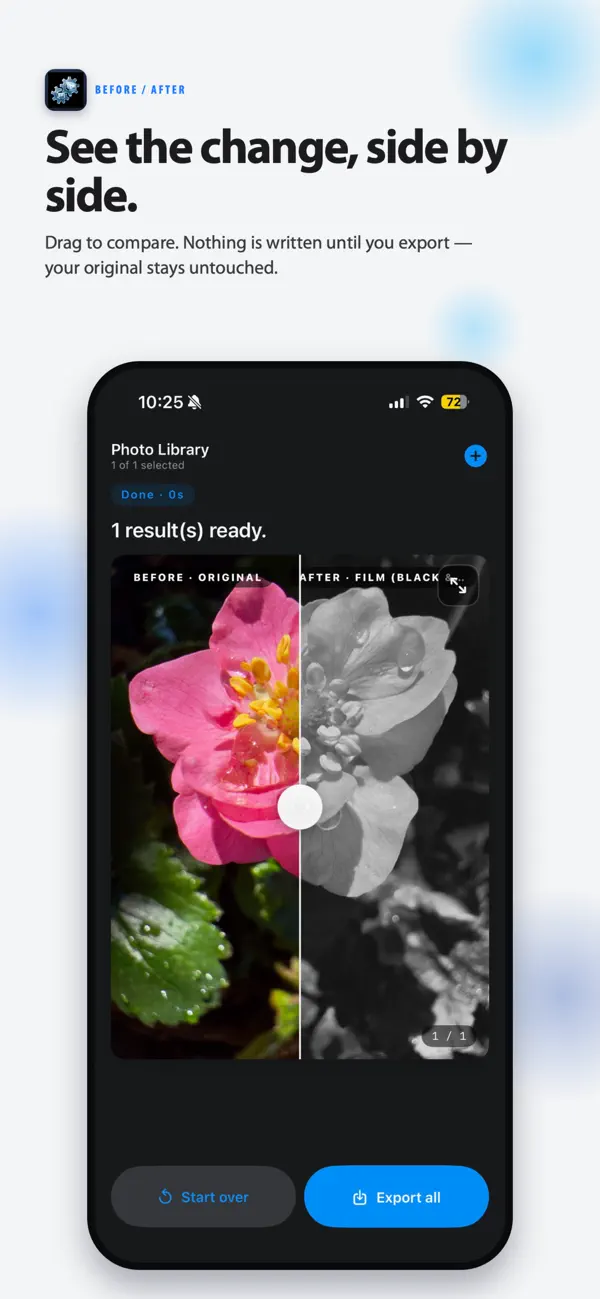
• Film — authentic color and black-and-white film-stock emulation, including Kodak Portra, Ektar, and Kodachrome; Fujifilm Velvia, Provia, and Astia; and Ilford and Fujifilm B&W stocks like Tri-X, HP5 Plus, T-Max, Delta, and Neopan Acros — each with real grain, sharpness, and halation.
Pro Stacking & Transform
Combine an image sequence with hardware-accelerated algorithms:
• Focus Stacking — merge images shot at different focus distances into a single edge-to-edge sharp photo, with optional per-pixel optical-flow refinement.
• HDR Fusion (Natural & Vibrant) — blend exposure brackets for the full dynamic range of a scene, in realistic or punchy styles.
• Astrophotography Stacking — reduce noise and reveal deep-sky detail, with full bias, dark, flat, and dark-flat calibration support.
• Motion Removal — erase passing tourists or cars from a burst of otherwise identical frames.
• Long Exposure & Motion Blur — simulate silky water and light trails without an ND filter.
• Image Alignment — scale-robust feature-based alignment built for handheld and macro sequences.
Any Camera, Any Format
Import from your Photo Library, or choose individual files or a whole folder. SpotmaticMagic reads full-resolution RAW from every major manufacturer — Canon, Nikon, Sony, Fujifilm, Olympus / OM System, Panasonic, and more, plus universal DNG — now with correct RAW decoding on iPhone and iPad. Export your finished image as HEIF, JPEG, PNG, or 16-bit TIFF.
Inspect Every Detail
Tap any result to open a fullscreen Zoom Inspector. Pan and zoom with a navigator minimap, and press and hold to compare your edit against the original.
Desktop-Class Performance on Device
SpotmaticMagic is built on a highly optimized Metal graphics pipeline, with operations like 8-DOF homography alignment and optical flow running locally. Everything happens on your device — no cloud uploads — maximizing your privacy and speed. The app fully supports Dark Mode and is localized for many languages, including Simplified and Traditional Chinese.
Who It's For
SpotmaticMagic is for macro and landscape shooters, astrophotographers, and any creative who wants real control over how their photos look — from a quick live adjustment to a painterly filter to a precision focus stack. It's the perfect companion for a dedicated camera, and a powerful way to elevate the photos you've already taken.
Quoi de neuf dans la dernière version ?
Display P3)
- Your edits now export in wide-gamut Display P3 — the vivid colors you see on screen are the colors
that get saved, instead of being flattened to a narrower range.
Your Photo's Details, Kept
- Exports now preserve your original photo's date, location (GPS), and IPTC info, and RAW/DNG files
import at full resolution with accurate color.
Choose Your Quality
- New export controls let you pick JPEG/HEIF quality and output resolution (Full, 4K, or 2K).
Built for Everyone
- Full VoiceOver support and Dynamic Type: the entire Studio scales with your text-size setting and
reads aloud, so it works the way you do.
Faster to Share
- Share results straight to the system share sheet, and drag-and-drop images in to get started.