Tinipiny Camera
iOS Universel / Photo et vidéo
Introducing Tinipiny Camera, the app that turns your photos into comics in an original and fun way. Take a picture, add speech bubbles and stickers, and share your creation in seconds.
CREATE IN SECONDS
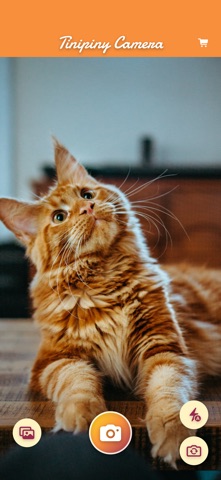
• Take a photo with the built-in camera or pick one from your gallery
• Add speech bubbles with your text: the size adjusts automatically
• Decorate with more than 80 stickers: hearts, stars, emoji and much more
• Move, rotate and resize everything with your fingers, exactly the way you want
A BUBBLE FOR EVERY STORY
• 16 balloon styles: speech bubbles, thought balloons, shouts and whispers
• 10 different fonts to give every phrase the right voice
• The text fits the bubble automatically – or fine-tune the size yourself
• Perfect for jokes, captions, dialogues and comic strips
SHARE THE FUN
• Share your creations with any app from the share sheet
• Save them to your gallery in high quality, in the Tinipiny Camera album
• What you see is exactly what you share: the exported photo matches the preview
MUCH MORE THAN A PHOTO EDITOR
Meme maker, comic creator and fun photo booth: add text to photos, create funny memes, photo captions, comic strips, greeting cards and social media posts with speech bubbles, thought balloons and emoji stickers. The fun photo editor for the whole family.
PERFECT FOR
• Making your friends laugh with a photo that speaks
• Birthday wishes and greeting cards with a personal touch
• Giving your pets a voice – what would your cat say?
• School projects, parties, trips and family moments
• Quick memes for your group chats and social networks
SIMPLE, FAST AND RESPECTFUL
• No account, no sign-up: open the app, snap, create and share
• Works offline: your photos stay on your device
• Free to use, with an option to remove ads forever
Questions, ideas or issues? Write to ios@giuseppetumino.com – we read and answer every message.
Quoi de neuf dans la dernière version ?
Saving to your gallery now works with “Add Photos Only” access too. If Photos access is turned off, the app takes you straight to Settings to turn it on. Minor fixes.