iPhoneAddict Apps
  • Actualités
  • Accueil Apps
  • iPhone
  • iPad
  • Universelles
  • Mac
  • Apple TV
KG KultureGeek
App
iPhone / iPad Télécharger iAddict v5 Mac Télécharger iAddict Mac
  • Actualités
  • Accueil Apps
  • iPhone
  • iPad
  • Universelles
  • Mac
  • Apple TV
  • Archives keynotes
  • Firmwares & iTunes
  • Contactez-nous
  • Comparateur de prix
  • KultureGeek
Accueil » Liste des Apps » Apps iPad » Photo et vidéo » VideoLUT - Color Grade Editor
2.76 iOS €Gratuit Enrique Garcia 4.7 6 Transform your videos and images into cinematic masterpieces with VideoLUT, the ultimate color-grading app! With over 2500 presets, you can easily import, edit, and apply LUTs to create stunning videos and photos. Plus, VideoLUT allows you to record...
VideoLUT - Color Grade Editor

VideoLUT - Color Grade Editor

iPad / Photo et vidéo

Gratuit au lieu de 3,99€
Obtenir sur l'App Store
Facebook X E-mail

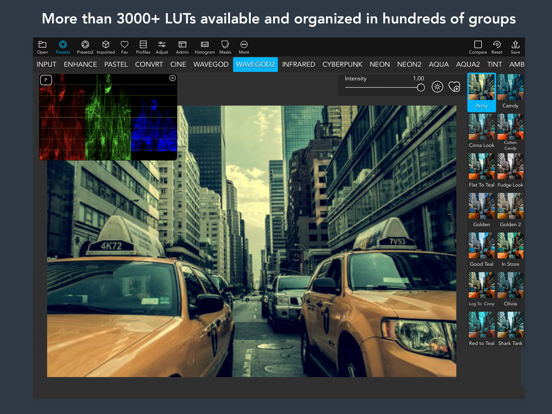
Transform your videos and images into cinematic masterpieces with VideoLUT, the ultimate color-grading app! With over 2500 presets, you can easily import, edit, and apply LUTs to create stunning videos and photos. Plus, VideoLUT allows you to record videos and take photos with your imported LUTs, giving you the ultimate creative control.

Whether you're a professional filmmaker or a casual iPhone photographer, VideoLUT is the perfect app for you. It comes with powerful editing tools that allow you to color grade your videos and images with ease. You can even create your own LUTs and share them with other users via QR codes or apps like Lumafusion.

VideoLUT supports a variety of LUT formats, including DaVinci Resolve 3D Cube LUT (.cube) and Autodesk 3D LUT (.3dl). You can import .cube, .3dl, and 512x512 .png LUT tables, and save or import cube files to iCloud, Dropbox, and other storage apps.

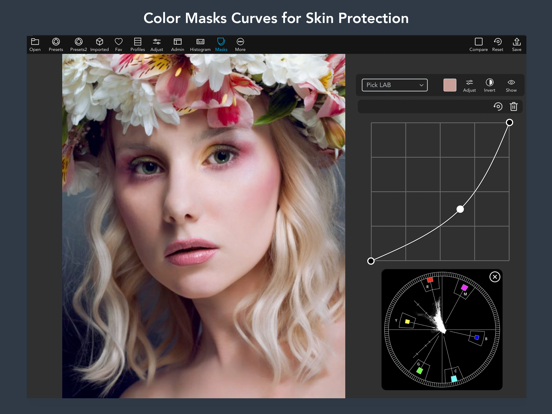
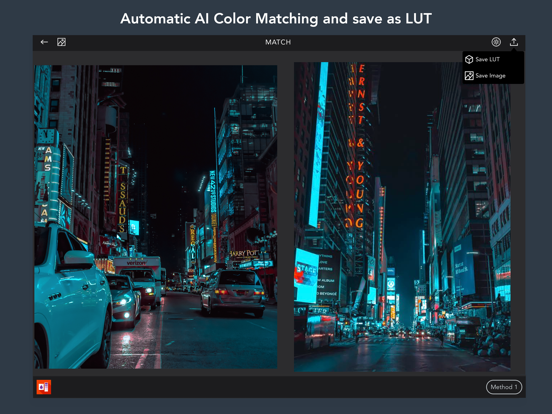
But that's not all – VideoLUT also lets you visualize LUTs in 3D, export them as LUT images (.png), and share them as .cube 16, 32, or 33 (DaVinci Resolve 3D Cube LUT) with other apps or your desktop. You can also match colors from images and build new LUTs from the result, and use RGB, HSL, CMYK, LAB, and Skin Masks and Curves for added control.

With VideoLUT's auto white balance, Mackbet table detection and correction, split toning, color wheels, and other adjust tools, you have everything you need to perfect your videos and images. Mix multiple LUTs to create new ones, convert Filmic Pro LUTS, and even preprocess RAW photos for added flexibility.

Download VideoLUT today and transform your videos and images into true works of art!

Terms of Use (EULA): https://www.apple.com/legal/internet-services/itunes/dev/stdeula/

En voir plus...

Quoi de neuf dans la dernière version ?

Fixes a problem with the Wheels controllers.
  • Screenshot #4 pour VideoLUT - Color Grade Editor
  • Screenshot #5 pour VideoLUT - Color Grade Editor
  • Screenshot #6 pour VideoLUT - Color Grade Editor

D'autres applications du développeur

iColorama SiColorama SiPhoneVideoLUTVideoLUTiPhoneiC Painter for iColoramaiC Painter for iColoramaiPadiCPainteriCPainteriPhoneKinoGlitch ProKinoGlitch ProiPad

Note

(6 notes)

Détails sur l'application

Version
2.76
Taille
273.5 Mo
Version minimum d'iOS
16.6
Dernière mise à jour
01/08/2026
Publié par
Enrique Garcia

Newsletter App Store

Recevez chaque jour les meilleures promos

Actualité Apple

Image iOS 27 bêta 5 : la liste des nouveautés
iOS 27 bêta 5 : la liste des nouveautés
Image iOS 27 affiche désormais 5G+ pour la 5G SA avec la bêta 5
iOS 27 affiche désormais 5G+ pour la 5G SA avec la bêta 5
Image iPhone 18 Pro Max : la batterie avec une plus grosse capacité se confirme
iPhone 18 Pro Max : la batterie avec une plus grosse capacité se confirme
Image Release candidate pour iOS 26.6.1, iOS 18.7.10 et macOS 26.6.2
Release candidate pour iOS 26.6.1, iOS 18.7.10 et macOS 26.6.2
iPhoneAddict Apps

Le catalogue iPhoneAddict pour suivre les nouveautés, mises à jour et baisses de prix de l’App Store.

Apps

Toutes les apps iOS iPhone iPad Universelles Mac Apple TV

iPhoneAddict

Actualité Apple Archives keynotes Contact À propos KultureGeek

Suivez-nous

©2009-2026 i2CMedia. Tous droits réservés.