iPhoneAddict Apps
  • Actualités
  • Accueil Apps
  • iPhone
  • iPad
  • Universelles
  • Mac
  • Apple TV
KG KultureGeek
App
iPhone / iPad Télécharger iAddict v5 Mac Télécharger iAddict Mac
  • Actualités
  • Accueil Apps
  • iPhone
  • iPad
  • Universelles
  • Mac
  • Apple TV
  • Archives keynotes
  • Firmwares & iTunes
  • Contactez-nous
  • Comparateur de prix
  • KultureGeek
Accueil » Liste des Apps » Apps Universelles » Productivité » Ctrl+C:Easily record your copy
1.26 iOS €Gratuit Chang Chin-Ming 5 1 Ctrl+C like a clipboard in widget and you can copy words automatically in it. It's a useful, simple and quick tool. Help you to copy and edit words. All you need to do is copy words and pull down Notification Center, then Ctrl+C in widget will record...
Ctrl+C:Easily record your copy

Ctrl+C:Easily record your copy

iOS Universel / Productivité

Gratuit
Obtenir sur l'App Store
Facebook X E-mail

Ctrl+C like a clipboard in widget and you can copy words automatically in it.
It's a useful, simple and quick tool. Help you to copy and edit words.
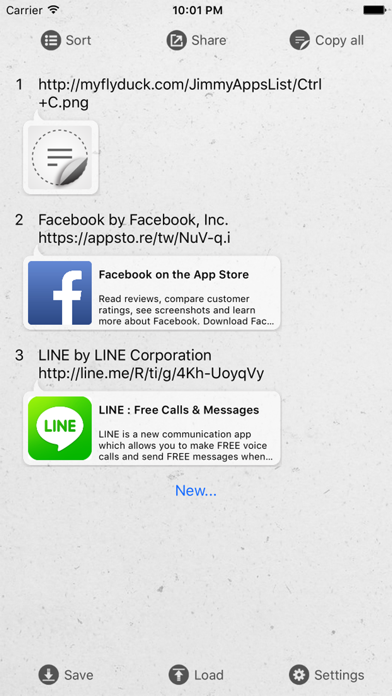
All you need to do is copy words and pull down Notification Center, then Ctrl+C in widget will record these contents automatically.

"Copy all" function can combine all contents to one content and copy it. You can paste it to every platforms you want to share.

- Requirement
◎ Support iOS 8 and above, iPhone 4S and newer devices.

- Features
◎ Support iPhone 6, iPhone 6 plus resolution.

◎ Support iOS 8 widget to record the text that you copied from other place
When you copied a text from other place and scroll down Notification Center, the text will be appeared in widget and you can press + button to record it.

◎ Keep and list multi texts
Can record up to 10 texts, and support text editing, sorting or deleted.

◎ A key to copy all the text merge
Just one button, combine all texts listed in app for easy sharing and pasting anywhere.

◎ Save and load archive
Support save the texts to archive, you can save 10 texts in one archive, and the number of archive is unlimited.

◎ Edit text through gestures
1. Single press: Copy text
2. Long press: Edit text
3. Left slide: Delete text

◎ New user interface and themes
Now,you can change other themes anytime.

- Future updates
◎ We will provide more and better customize features!

En voir plus...

Quoi de neuf dans la dernière version ?

Annual app maintenance.
  • Screenshot #1 pour Ctrl+C:Easily record your copy
  • Screenshot #2 pour Ctrl+C:Easily record your copy
  • Screenshot #3 pour Ctrl+C:Easily record your copy
  • Screenshot #4 pour Ctrl+C:Easily record your copy
  • Screenshot #5 pour Ctrl+C:Easily record your copy
  • Screenshot #6 pour Ctrl+C:Easily record your copy

D'autres applications du développeur

Bulls & Cows GoBulls & Cows GoiPhone學測指考考古題學測指考考古題iOS UniverselWhere's My Color?Where's My Color?iPad

Note

(1 notes)

Détails sur l'application

Version
1.26
Taille
6.3 Mo
Version minimum d'iOS
15.0
Dernière mise à jour
22/09/2025
Publié par
Chang Chin-Ming

Newsletter App Store

Recevez chaque jour les meilleures promos

Actualité Apple

Image Apple envoie des notifications aux utilisateurs visés par des logiciels espions
Apple envoie des notifications aux utilisateurs visés par des logiciels espions
Image Apple entraîne son propre modèle d’IA pour la Chine avec Alibaba
Apple entraîne son propre modèle d’IA pour la Chine avec Alibaba
Image Apple veut jusqu’à 15 % de commission pour les achats hors App Store
Apple veut jusqu’à 15 % de commission pour les achats hors App Store
Image Apple considère les iPhone X et MacBook Pro 2018 comme obsolètes
Apple considère les iPhone X et MacBook Pro 2018 comme obsolètes
iPhoneAddict Apps

Le catalogue iPhoneAddict pour suivre les nouveautés, mises à jour et baisses de prix de l’App Store.

Apps

Toutes les apps iOS iPhone iPad Universelles Mac Apple TV

iPhoneAddict

Actualité Apple Archives keynotes Contact À propos KultureGeek

Suivez-nous

©2009-2026 i2CMedia. Tous droits réservés.