iCertifi
iOS Universel / Productivité
Create professional BS 7671 electrical certificates on your iPhone or iPad — on site, offline, in minutes. iCertifi is the UK's most comprehensive electrical certification app, trusted by
thousands of electricians.
CERTIFICATE TYPES:
• Electrical Installation Certificate (EIC)
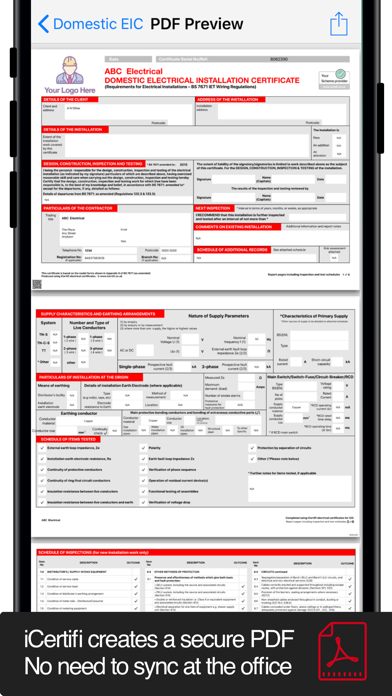
• Domestic EIC
• Electrical Installation Condition Report (EICR)
• Minor Works Certificate
• 3 Circuit Minor Works
• EV Charger Certificate (Full EIC)
• Solar PV Certificate (8-part, BS EN 62446-1)
• Electrical Danger Notice
• Earthing & Bonding Certificate
• Electrical Isolation Certificate
• Landlord's Interim Check
• Ventilation Certificate
• Risk Assessment
• Visual Inspection
• EV Charging Risk Assessment
All certificates fully comply with BS 7671:2018 18th Edition + Amendment 2.
AI-POWERED FEATURES:
• BoardVision AI — photograph a distribution board and auto-populate every circuit, device type, and rating. Supports MCB, RCBO, and AFDD identification
• MFT Scanner — photograph your multifunction tester display and readings are extracted automatically. Supports Megger, Fluke, Kewtech, Metrel, and more
• Circuit Schedule Scanner — scan a paper schedule and import all circuits instantly
• Spark AI Assistant — ask BS 7671 questions while you work
CIRCUIT DESIGNER:
Built-in BS 7671:2018+A2 cable sizing calculator with a guided 5-step wizard:
• Current-carrying capacity with full derating factors (Ca, Cg, Ci, Cc)
• Voltage drop calculations (3% lighting, 5% power)
• Earth fault loop impedance (Zs) validation
• Protective device selection
• 20+ circuit types including EV chargers, solar PV, ring finals, three-phase
• TT system support with 50V/IΔn formula
• Exportable PDF calculation sheet
PROFESSIONAL PDF OUTPUT:
• 10+ EICR presentation templates (Grid, Minimal, Blocks, Classical, and more)
• Custom company branding — your logo, colours, and trading name on every certificate
• Photo-rich observation reports with captions
• Email PDFs directly to clients from the app
QUALIFYING SUPERVISOR (QS) REMOTE SIGNING:
• Send certificates to your QS for review and approval
• Digital signatures applied remotely via iCloud
• Real-time push notifications when approved
• No more chasing paper signatures
OBSERVATIONS & PHOTOS:
• Full observation system with C1, C2, C3, and FI codes
• Attach multiple photos per observation with captions
• Photo gallery embedded in final PDF report
WORKS OFFLINE:
• Create and complete certificates without mobile signal
• All BS 7671 reference tables stored locally
• Syncs automatically when back online
BACKUP & SYNC:
• iCloud sync across iPhone, iPad, and iPad on Mac
• One-tap backup and restore
• Never lose a certificate again
SAVE TIME WITH TEMPLATES:
• Pre-fill distribution board layouts
• Reusable circuit templates
• Clone previous certificates
• Alternative contractor profile for multiple trading names
BUILT FOR UK ELECTRICIANS:
iCertifi is designed exclusively for qualified UK electricians. Every certificate, calculation, and reference is based on BS 7671:2018 (18th Edition Wiring Regulations) with Amendment 2.
Join thousands of electricians who have made iCertifi their go-to certification tool.
No additional device licences needed. Use on all your iOS devices under one subscription.
iCertifi is free to use in trial mode.
To send, save, print, or export certificates, a subscription is required.
Subscriptions auto-renew unless cancelled in your iTunes Account settings.
Other Paid Upgrades Include:
• Built-in backup and restore
• BS7671 AI Assistant
• Zs Calculator
• Top up AI credits as needed (10, 50, or 250 packs)
Quoi de neuf dans la dernière version ?
- Fixes Remarks not showing on final PDF on EICR
- Other fixes
Previous update:
BS 7671:2018+A4:2026 (Amendment 4) Support
* Full Amendment 4 certificate updates.
* New EICR inspection schedules, observations layout, PNB earthing option and additional A4 fields.
* Circuit Designer updated for Amendment 4 requirements.
Issued PDF Archive
* Exported PDFs are now stored as the issued version.
* Revise certificates with a full revision history or issue a replacement certificate.
* Archive control available in Settings.
3-Phase Board Scanner
* Scan TP&N boards with automatic L1/L2/L3 phase detection.
* New full-screen review before import.
* Phase information prints on certificates and exports.
NEW: iCertifi & Mint Books Integration
* Every completed certificate automatically creates a draft invoice in Mint Books.
* Fully integrated bookkeeping, invoicing, quotations and Making Tax Digital compliance.
Also in this update
* Option to open new certificates directly on the Distribution Board page.
* New “NOT SAVED” warning to prevent data loss.
* Printing improvements, bug fixes and performance enhancements.
Important: Please update iCertifi on all your devices. Backups created with this version cannot be restored on older versions of the app.