LisTask
iPhone / Productivité
LisTask is a To-Do List or Checklist Productivity App that is quick, simple, and straightforward.
If you're looking for something user-friendly to manage your To-Do or Checklist items, LisTask is the app for you...
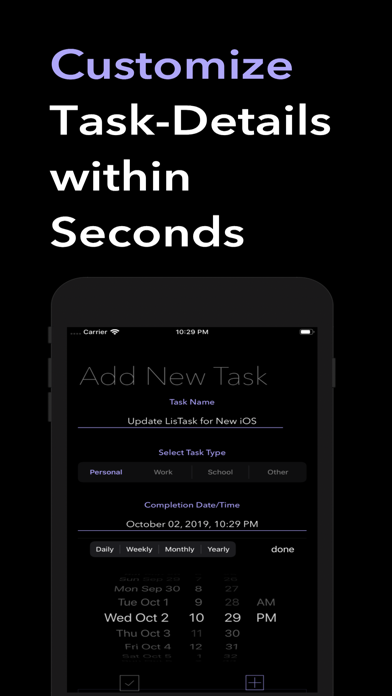
1. Add new task details. (If using as item checklist, leave type and date/time details blank)
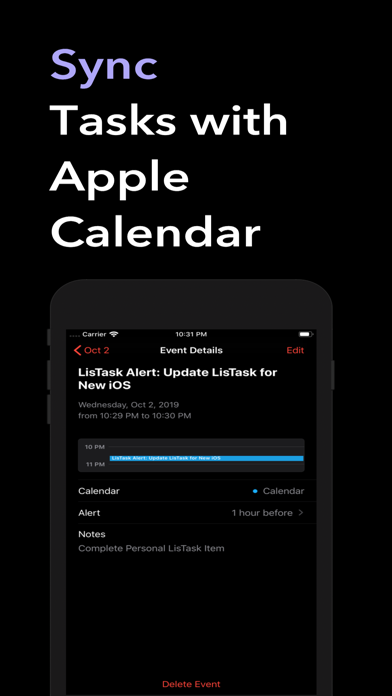
(Sync Task With Device Calendar - Completion Date/Time Required to create Calendar alert) - Recurrence (Repeating Tasks Added to Calendar) is Optional.
Note: Calendar alerts are automatically set to trigger 1 hour before the set completion date/time. LisTask push notifications will appear at the completion date/time.
2. Complete your task by tapping on it to add a check mark that will also allow you to remove if desired.
3. Did the time change for a task or did you make a minor mistake when entering it? Edit by Swiping Right on a task item, in style of course!
Need to reset and start over in the middle of Adding a Task? Use the Clear "Fields" button.
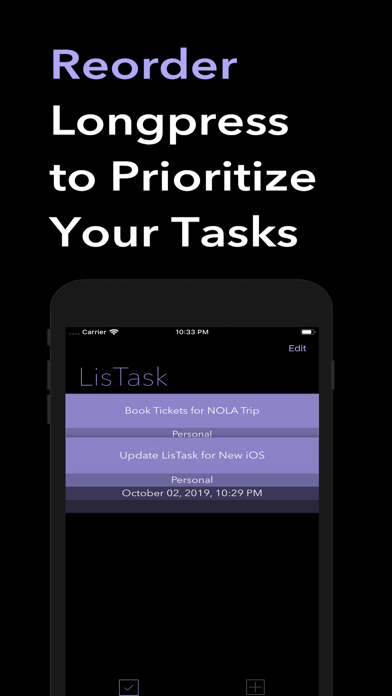
4. Need to Reorder? Just tap and hold a task to move it. You can also click the Edit button to Reorder your tasks just the way you like it.
4. After task completion, tap to add checkmark.
5. Swipe left or tap to delete.
Voila! That's It!
Follow @LisTaskApp on Twitter
Quoi de neuf dans la dernière version ?
Hello LisTaskers, it’s been awhile but you are gonna love the new rebrand and polishing 4.0 update for iOS 13!
Let’s get rolling on the new look and facelift. iOS 13 and 2019 have been all about Dark Mode this and Dark Mode that, which has provided an opportunity to improve the overall app design.
As you already know, the app was heading towards a more “dark mode” friendly app color scheme, but in addition to that, LisTask is now sporting a new color and I think you will love it. Not only is it more polished, but it also improves the overall experience when using the app.
The ability to hide or show the clear fields button has been removed. Even though I know you love magic, I wanted to perform a few tricks and elevate your experience since I obviously love magic too! The app will observe your current situation and react accordingly #smartphone.
Next, there is a new feature when you add a checkmark to complete a task. Tap on it and decide if you want to remove it or keep it as a checklist item. No need to have completed tasks hanging around but I still want the decision to be in your hands.
Many bugs have been fixed and several improvements have been made but I’ve already said too much. I don’t want to give all of the surprises away so let’s call it a wrap on this update.
It is the same LisTask you love but way better.
Thanks for all the support. Enjoy! Keep LisTasking and spreading the word.
If you have any specific feature requests or feedback, please reach out on Twitter @LisTask. While you’re at it, be sure to tap that follow button.
Till next time, LisTask out...