Lognote
iOS Universel / Productivité
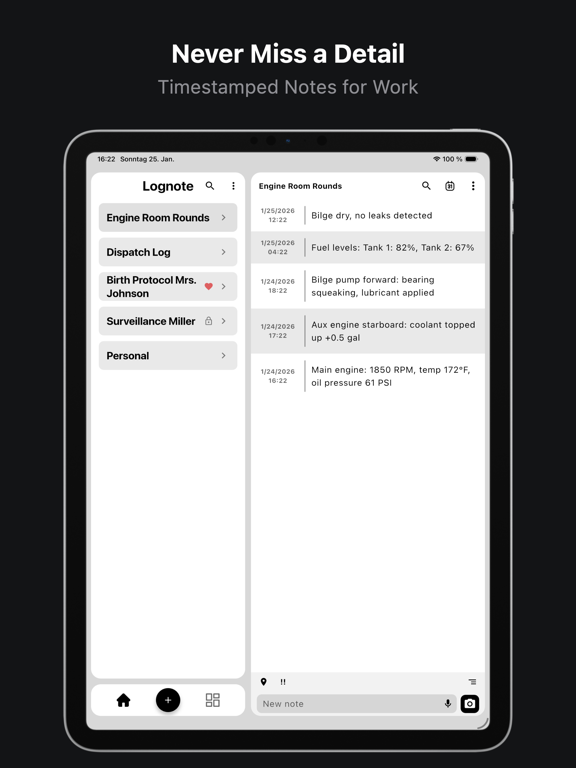
Lognote – Fast, Accurate, Timestamped Notes
Need to record information exactly when it happens?
Lognote makes it effortless to create precise, timestamped notes - instantly. Perfect for work logs, meetings, projects, health tracking, and any time-critical documentation. Stay organized, capture everything, and find it again in seconds.
Works on iPhone, iPad, and Mac.
◆ CORE FEATURES
• Automatic timestamps on every note — always know exactly when it happened
• Organize notes into custom groups for work, health, projects, and more
• Global search across all notes and groups — find anything instantly
• Quick Notes — pre-set phrases for faster, consistent one-tap entries
• Mark notes and groups as favorites for instant access
• Swipe actions for quick editing, duplicating, and deleting
• Multi-select for bulk operations — move, delete, or export in one step
• Duration display between notes — see time gaps at a glance
• Bold text formatting and automatic URL detection
• Configurable date formats, 12/24h time, and optional seconds display
• Second timezone display — perfect for international teams
• Dark Mode & Light Mode with system-adaptive option
◆ EXPORT & BACKUP
• Export notes as PDF, Plain Text, CSV, or JSON
• Export with images as ZIP archive
• Trashcan — soft-delete with restore and automatic 30-day cleanup
• Auto Backup — daily automatic backups with smart rotation keeping the 4 most recent
• Audit Log — complete activity tracking with detailed history for all notes, groups, and changes
◆ GO PREMIUM - UNLOCK THE FULL EXPERIENCE
• Cloud Sync - sync your notes across all your devices in real-time, offline first - your notes always work without internet
• Voice-to-Text - create notes hands-free using speech recognition
• Geofencing - automatic notes triggered by entering or leaving locations
• Calendar View - visual monthly overview of all your notes
• Photo Attachments - take photos or attach from gallery directly to notes
• Save Location & Address - capture GPS coordinates and street address with every note
• Lock Groups - protect sensitive notes with Face ID or biometric security
• Note Priorities - organize with Low, Medium, and High priority levels
• Archive Groups - declutter your workspace without losing data
• Custom Accent Colors - personalize the app to match your style
• Export Date Filter - export only the timeframe you need
• Extended Audit Log - advanced search and filter for your complete activity history
◆ PERFECT FOR
• Work shift logging & time tracking
• Meeting notes & standup documentation
• Health & symptom journaling
• Field notes & site visit records
• Baby feeding & sleep logs
• Project documentation & event tracking
◆ PRIVACY & OFFLINE FIRST
Lognote is fully functional offline - no account required. Your notes are stored locally on your device first. Cloud Sync (Premium) adds seamless real-time synchronization across all your Apple devices.
Questions or feedback? Contact us anytime: support@lognoteapp.com
***Lognote Pro***
A subscription renews automatically unless canceled at least 24 hours before the end of the current period via your iTunes account.
For more details, please refer to our Terms of Use and Privacy Policy.
• Terms of Use: https://www.apple.com/legal/internet-services/itunes/dev/stdeula/
• Privacy Policy: https://lognoteapp.com/legal/privacy-policy
• Website: https://lognoteapp.com
Quoi de neuf dans la dernière version ?
Lots of little things you can actually see this time. If there's a feature you're still missing, feel free to contact me
• Note layouts: Choose between classic rows, note bubbles and a journal view, and day headers now stay pinned while you scroll through a group
• Visual settings: Layout, theme, date and time options are picked from a preview grid instead of a dropdown, so you see the result before you choose it
• Apple Watch transfers: Long recordings keep running when you drop your wrist, and a new queue shows you exactly which recordings are still on their way to your iPhone
• macOS feature parity: Filters, group sorting, multi-select, reactions and context menus are now available on the Mac as well
• More statistics: See your total number of groups and the average time between two entries
• iPad & Mac polish: A collapsible groups list, and long notes no longer cover up the context menu preview
• Upgrade fix: Fixed a startup crash that could hit anyone upgrading from the previous Lognote generation