iPhoneAddict Apps
  • Actualités
  • Accueil Apps
  • iPhone
  • iPad
  • Universelles
  • Mac
  • Apple TV
KG KultureGeek
App
iPhone / iPad Télécharger iAddict v5 Mac Télécharger iAddict Mac
  • Actualités
  • Accueil Apps
  • iPhone
  • iPad
  • Universelles
  • Mac
  • Apple TV
  • Archives keynotes
  • Firmwares & iTunes
  • Contactez-nous
  • Comparateur de prix
  • KultureGeek
Accueil » Liste des Apps » Apps iPhone » Productivité » Tasks - Designed to make you productive
L'application n'est plus disponible sur l'App Store français
1.0 iOS €Gratuit Tarento Technologies 4.8 9 Tasks is designed to make you more productive by better managing your time. This is based on the technique followed by the legendary General and former president of the the United States Dwight D. Eisenhower. This method was made popular by Stephen...
Tasks - Designed to make you productive

Tasks - Designed to make you productive

iPhone / Productivité

Gratuit
Obtenir sur l'App Store
Facebook X E-mail

Tasks is designed to make you more productive by better managing your time. This is based on the technique followed by the legendary General and former president of the the United States Dwight D. Eisenhower. This method was made popular by Stephen Covey in his popular title “The 7 Habits of Highly Effective People”.

Usage:
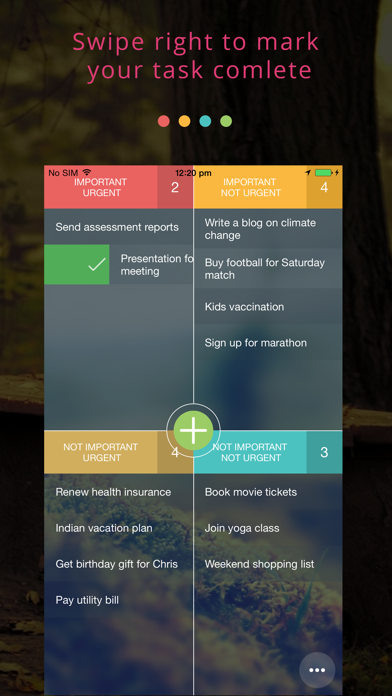
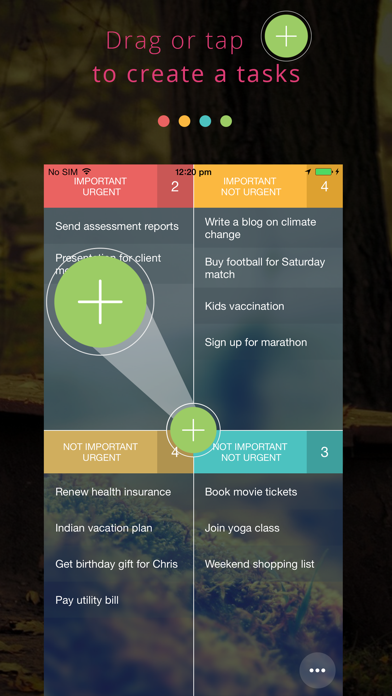
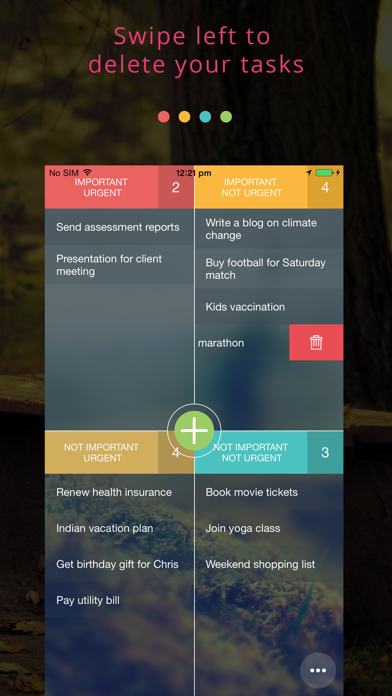
Just drag the ‘+’ icon to any quadrant to create a new tasks. Simple. You can move the existing tasks to other quadrants by dragging the task across. Once you are done with a task swipe right to mark it complete. If you want to delete a task just swipe left. Want to be notified on due dates? select the ‘bell’ icon and set a due date. When a task is due in the next 24 hours it shows a red marker on the task. If the marker is yellow it means that the card is due in the 48 hours. If the due date is beyond 48 hours the marker will be green in color. If you see a blue marker it means there is not due date for that task.

How to use tasks effectively
Eisenhower’s strategy for taking action and organizing your tasks is simple. Using the decision matrix below, you will separate your actions based on four possibilities.

- Urgent and important (tasks you will do immediately).
- Important, but not urgent (tasks you will schedule to do later).
- Urgent, but not important (tasks you will delegate to someone else).
- Neither urgent nor important (tasks that you will eliminate).

The great thing about tasks app is that it can be used for broad productivity plans (“What should i plan for the coming week?”) and for managing checklists related to certain tasks (ex: Grocery shopping list).

En voir plus...

Quoi de neuf dans la dernière version ?

This app has been updated by Apple to display the Apple Watch app icon.
  • Screenshot #1 pour Tasks - Designed to make you productive
  • Screenshot #2 pour Tasks - Designed to make you productive
  • Screenshot #3 pour Tasks - Designed to make you productive

Note

(9 notes)

Détails sur l'application

Version
1.0
Taille
31.3 Mo
Version minimum d'iOS
8.0
Dernière mise à jour
13/11/2016
Publié par
Tarento Technologies

Newsletter App Store

Recevez chaque jour les meilleures promos

Actualité Apple

Image Apple considère les iPhone X et MacBook Pro 2018 comme obsolètes
Apple considère les iPhone X et MacBook Pro 2018 comme obsolètes
Image Apple ouvre son Advanced Manufacturing Center à Houston
Apple ouvre son Advanced Manufacturing Center à Houston
Image Les Apple Watch continuent de largement dominer les ventes de montres connectées
Les Apple Watch continuent de largement dominer les ventes de montres connectées
Image App Store : Apple laisse passer des fraudes pour les applications
App Store : Apple laisse passer des fraudes pour les applications
iPhoneAddict Apps

Le catalogue iPhoneAddict pour suivre les nouveautés, mises à jour et baisses de prix de l’App Store.

Apps

Toutes les apps iOS iPhone iPad Universelles Mac Apple TV

iPhoneAddict

Actualité Apple Archives keynotes Contact À propos KultureGeek

Suivez-nous

©2009-2026 i2CMedia. Tous droits réservés.