Flag Football Playmaker X
iOS Universel / Sports
Flag Football Playmaker X is a playbook design, collaboration and printing app. We've built on the foundation of our coach-favorite Playmaker app and added cloud backup, multi-device syncing, advanced diagramming, animation, deeper printing options and more.
DESIGN & ORGANIZE PLAYS
• Intuitive touch controls make it easy to set formations & draw plays.
• Name plays & assign them to categories for instant access to the right play for any situation.
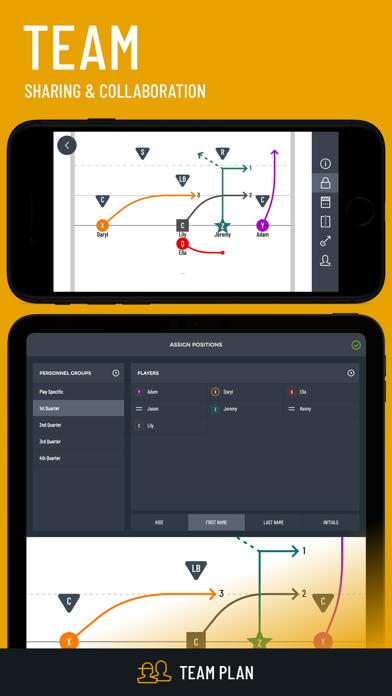
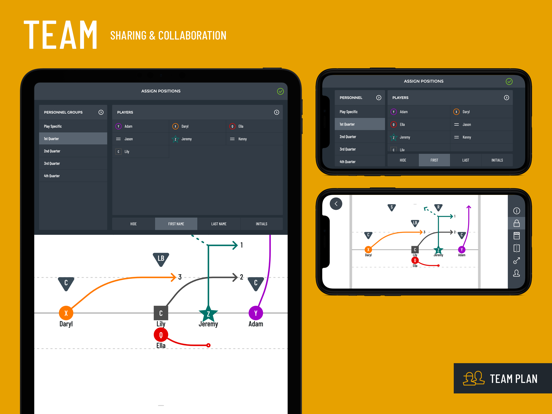
• Collapsable roster panel lists all team members with drag and drop position assignment.
ANIMATE YOUR PLAYBOOK
• One tap to animate any play.
• Fine tune animation speed for precise route timing.
• Show football movement with the animated football annotation.
MAKE INSTANT ADJUSTMENTS
• Make changes to existing plays on the fly.
• Flip any play instantly.
• Draw up a new play in seconds to take advantage of schematic opportunities as they emerge.
• Switch between offensive & defensive playbooks with one touch.
MAXIMIZE PLAYER COMPREHENSION
• Assign names to positions to save time in the huddle & keep players focused on their responsibilities.
• Customizable colors & labels clearly distinguish positions.
• Optional field lines for precise alignments and route depths.
• High definition graphics make play diagrams easy to see under any lighting conditions.
MORE
• Playbook settings for 4, 5, 6, 7, 8 & 9 player per side leagues.
• Customize your dashboard with your own team logo and color.
• Identify an intended receiver, choose smooth or straight lines, show zigzag lines for pre-snap motion, show dotted lines for pitch & pass and draw zone defense responsibilities.
• Add text annotations to provide on-play notes.
• Add option routes for more advanced offensive diagrams.
• Add a ball icon to show handoffs and ball movement.
• Choose between three end caps for your routes: arrow, T (for blocks) and dot.
• Choose between dark & light backgrounds for optimal visibility under any lighting conditions.
• Set up custom Personnel Groups. Great for play-specific position assignments, depth charts and mass substitutions.
• Design unlimited offensive & defensive plays. Have your full playbook at your fingertips & add new plays whenever inspiration strikes.
OPTIONS FOR EVERY COACH
After your free trial, you can choose between a range of app options to suit your team’s needs.
PAPERLESS
• App access for you
• + Cloud backup & sync on multiple devices
PRINT
• App access for you
• Cloud backup & sync on multiple devices
• + Print wristbands, playbooks, call sheets & more
TEAM
• App access for you
• Cloud backup & sync on multiple devices
• Print wristbands, playbooks, call sheets & more
• + App access for your whole team
Quoi de neuf dans la dernière version ?
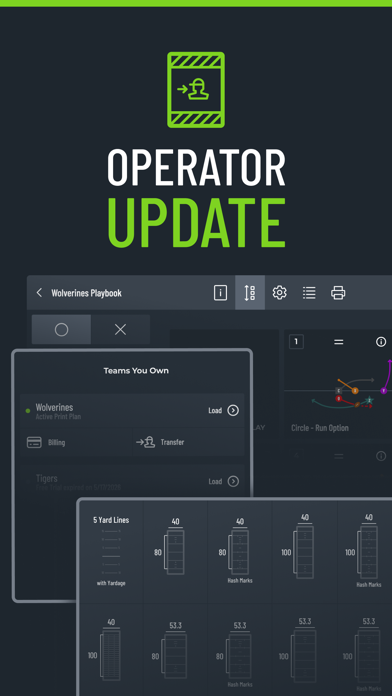
As a coach, you know that what people see on game day represents just a small fraction of the personal investment you make in your team, club or program. The behind-the-scenes work isn't flashy, but it's essential to operating a team. The Operator Update has something for all our coaches, whether you're the leader of a multi-team club or high school program, a play caller designing and organizing playbooks, or a solo volunteer using Playmaker in the huddle.
Multi-Team Management
• Central location for viewing status of all teams, managing subscriptions and transferring team ownership.
• Delete old, unused teams that you created.
• Remove yourself from teams you were invited to join but no longer need.
• Easier to create multiple teams - no more "log out and back in" workaround.
• When you log back into the app at the end of offseason or on a new device, you'll see a full list of your teams to make it clearer which team you want to load before renewing.
• Clearer highlight in the main menu to show which team you currently have loaded.
Playbooks
• When using the app out in the field, it was too easy to accidentally reorder plays in the gallery. This caused problems when the app was out of order with player wristbands. Sorting is now locked by default and can be unlocked temporarily when you actually want to rearrange plays.
• Category edit button was too hard to discover. Moved it to the sidebar footer and added a label.
• Playbook imports and transfers now include any opponent icons/routes added on the original diagrams.
Play Diagram Fields
• 7v7 playbooks: with the girls high school game growing and evolving, we've added all of the standardized field options prescribed in the recent national rules update. In addition to our previous field options, now you can choose from 40x80, 40x100, 53.3x80 and 53.3x100 high school flag football-specific fields with and without hashmarks.
• All playbooks: new background option with 5 yard lines that include yardage depth indicators (5, 10, 15, 20, etc.) displayed on the left and right.
Fundamentals
• Improved clarity on the minimal required info when adding a team member to the roster.
• Corrected a sizing error with the 3.75" wristband width option.
• Refined some icons and other visual elements.
• Resolved an issue with iOS safe areas taking up too much space on some devices.
• Other bug fixes & performance improvements.