Thermo Watch
iPhone / Style de vie
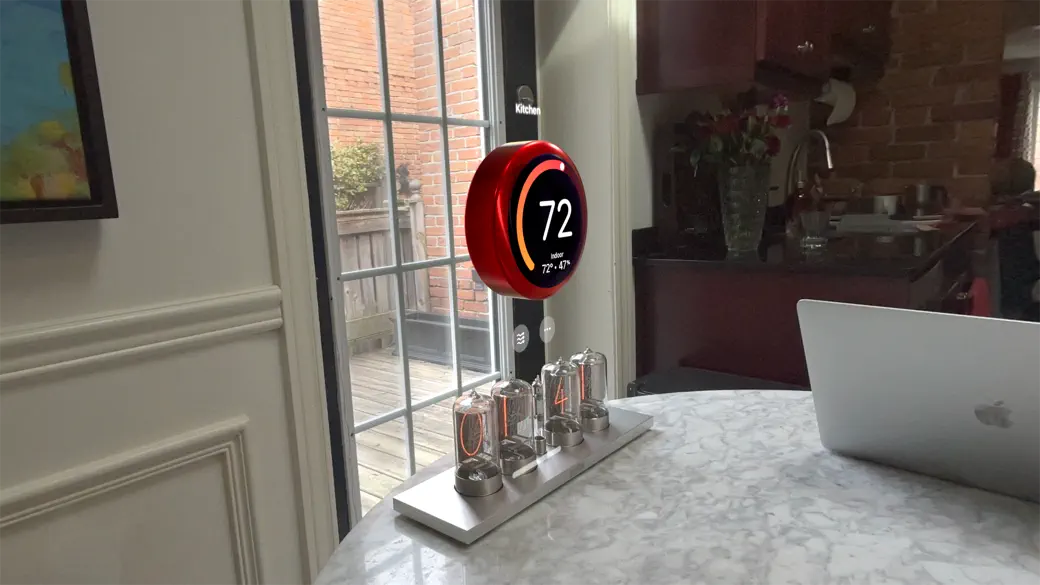
Thermo Watch brings the satisfying, tactile feel of a high-end thermostat into your visionOS workspace.
* Tactile Precision: Grab and spin a virtual dial as if it were right in front of you.
* Look & Drag: Too far to reach? Just look at a thermostat and drag up or down to dial in the perfect temperature. Whether you’re touching the device or using a gesture from the couch, the physics are tuned to feel exactly right.
* Material Matters: Make it yours. Choose from realistic finishes like brushed steel, polished silver, onyx black, or warm natural woods to match your room’s decor.
* Wall-Mounted: Use the visionOS surface snapping to make it sit flush against your physical walls.
Thermo Watch for Vision Pro plays nice with all Apple Home-compatible thermostats, including the latest Nest and all Ecobee models.
To add Nest thermostats to Apple Home, a Matter hub like Apple TV is needed. If you need hub-less support for Nest thermostats, you can use the iOS version of Thermo Watch app on your Vision Pro.
Full support for multi-device setups, all heating/cooling modes, and temperature increments of 0.5° for Celsius users.
If you have an idea to make this app even better, send it to marconelly@gmail.com
Thermo Watch does not collect any of your data, thermostat settings, or any app activity.
Quoi de neuf dans la dernière version ?
- Fixed an issue where the app would not show a warning message when no thermostats are found for some users. Thanks to Justin for reporting this!