A2DPblocker - Bluetooth Mono
iPhone / Utilitaires
WHAT IS IT?
------------------------------------------//
A2DPblocker is an audio player that blocks the Advanced Audio Distribution Profile (A2DP) (i.e. Bluetooth Stereo Profile) from connecting on a Bluetooth enabled iOS device without completely disabling the Bluetooth hardware. This enables the iOS device to continue to perform other Bluetooth functions like default audio output from another audio app (dictation, audio books, podcasts, GPS, music streaming, etc.) to a Hands-Free Profile (HFP) enabled Bluetooth car kit, headset, etc. as well as make phone calls over Bluetooth, and wirelessly control the iPod with a paired AVRCP enabled Bluetooth accessory.
A2DP was introduced in iOS 3.0 and this app simply blocks A2DP from connecting and maintains the default audio output device when it's running in the foreground (including when the screen is locked on iOS 3.1 or later devices) or background (requires iOS 4.0 or later).
You can finally disable A2DP once and for all with this app and stop manually changing the default audio output device each time your car kit, headset, or whatever A2DP enabled Bluetooth accessory you have connects to your iOS device.
FEATURES
------------------------------------------//
- blocks A2DP.
- defaults audio output from another audio app to a HFP enabled Bluetooth car kit, headset, etc.
- maintains the default audio output device.
- built-in iPod controls.
- audio Playback Queue (requires iOS 4.0 or later).
- suppresses audio notification alerts (only on pre-iOS 7.0 or earlier devices).
HOW TO USE
------------------------------------------//
1.) Pair your Bluetooth enabled iOS device with your Bluetooth car kit, headset, etc.
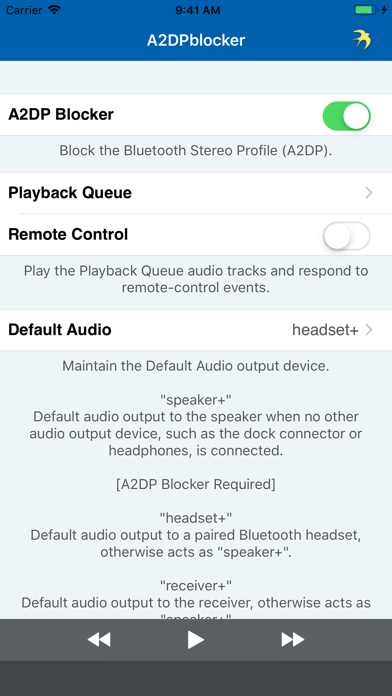
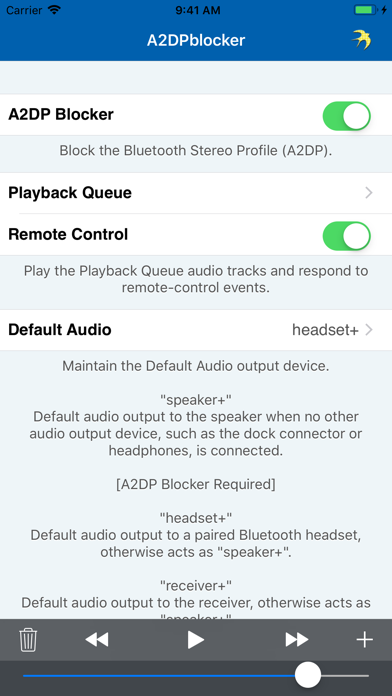
2.) Launch A2DPblocker and ensure “A2DP Blocker" switch is ON.
3.) Add a downloaded non-DRM (i.e. not copy-protected) audio track from your music library to the Playback Queue on iOS 4.0 or later and adjust the independent volume slider to guarantee A2DP is blocked.
4.) Ensure “Remote Control" switch is OFF.
5.) Set Default Audio to “speaker+” / “receiver” / “speaker” to block A2DP or “headset+” to default audio output via HFP.
6.) Play Playback Queue.
7.) Launch and configure your other audio app or begin playing the iPod with the built-in iPod controls or an attached accessory.
Now your Bluetooth enabled iOS device should block the A2DP connection from occurring or audio should now be streaming via the HFP connection as long as A2DPblocker is active. Successive launches of A2DPblocker doesn't require reconfiguration and it will not interfere with the phone call function or transport controls (AVRCP).
NOTICE
------------------------------------------//
HFP enabled Bluetooth car kits, headsets, etc. that only support the phone call function may configure A2DPblocker to utilize the same connection to playback audio (see HOW TO USE). However, the audio quality of the HFP standard is designed to be low bitrate, mono, and frequency limited to voice ranges, which is why music streaming may sound a bit lacking, but streaming dictation, audio books, podcasts, GPS, etc. for example would sound normal.
REQUIREMENTS
------------------------------------------//
- requires iOS 7.0 or later.
- Bluetooth.
- microphone or other audio input.
- works best with the audio Playback Queue active.
CONTACT INFO
------------------------------------------//
Please contact me with your questions and/or comments. If you just love A2DPblocker then please leave a review!
- twitter.com/gnavicks
- dkanem.selfip.com
Quoi de neuf dans la dernière version ?
A2DPblocker v1.7.2 is ready!
- built with iOS 11 :)
- iOS versions earlier than iOS 7.0 are no longer supported.
- added 5.8-inch and 6.5-inch super retina display support.
- added 6.1-inch liquid retina display support.
- fixed crash when using remote-control on iOS 11.3 or later.
- updated About screen.
Your 5 star reviews keep the updates coming!
Please contact me with your questions and/or comments. If you just love A2DPblocker then please leave a review!
- twitter.com/gnavicks
- dkanem.selfip.com