iPhoneAddict Apps
  • Accueil Apps
  • iPhone
  • iPad
  • Universelles
  • Mac
  • Apple TV
KG KultureGeek
App
iPhone / iPad Télécharger iAddict v5 Mac Télécharger iAddict Mac
  • Accueil Apps
  • iPhone
  • iPad
  • Universelles
  • Mac
  • Apple TV
  • Actualité Apple
  • Archives keynotes
  • Firmwares & iTunes
  • Contactez-nous
  • Comparateur de prix
  • KultureGeek
Accueil » Liste des Apps » Apps Universelles » Utilitaires » Handwriting Keyboard
2.5.2 iOS €3,99€ Catalystwo 5 1 Quick and easy to turn your handwriting into inputted text in any app. Works with any app, such as Safari, Mail, Notes, etc. MyScript® engine converts your handwriting to typed text in any app. Works offline. No need to be online to use or...
Handwriting Keyboard

Handwriting Keyboard

iOS Universel / Utilitaires

3,99€ au lieu de 4,99€
Acheter sur l'App Store

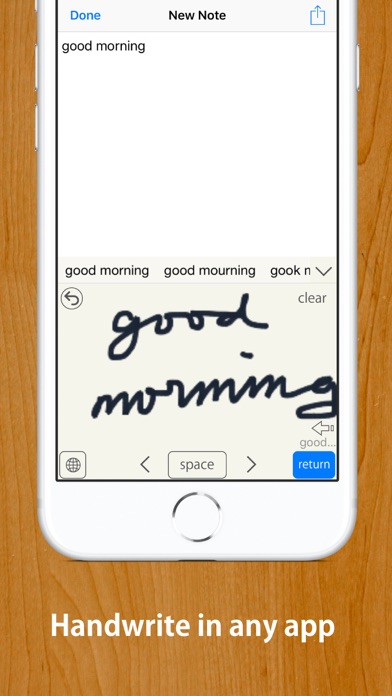
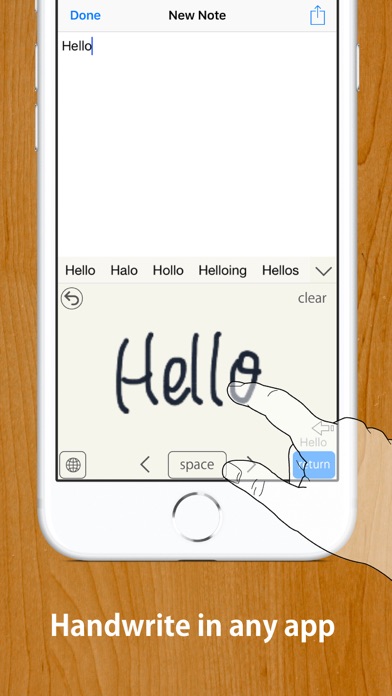
Quick and easy to turn your handwriting into inputted text in any app.
Works with any app, such as Safari, Mail, Notes, etc.

MyScript® engine converts your handwriting to typed text in any app.

Works offline. No need to be online to use or activate online.

Compatible with Apple Pencil if your device supports it.


【HOW TO USE】

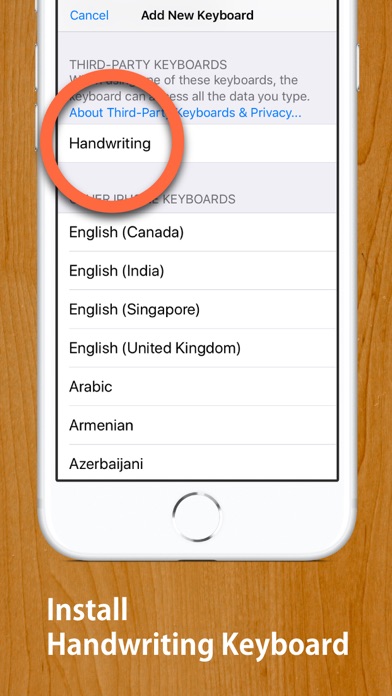
STEP 1: Install this Handwriting Keyboard (U.S. English or Japanese, or both) from "Keyboard" section in "Settings" app.

Open Settings App ▶ Handwriting(This app's settings section) ▶ Keyboards ▶ Turn "English (US)" on.
…or
Open Settings App ▶ General ▶ Keyboard ▶ Keyboards ▶ Add New Keyboards... ▶ Choose "Handwriting" ▶ Turn "English (US)" on.


STEP 2: When inputting, such as when writing a mail message, long-press "Globe Button" on the keyboard to switch to this Handwriting Keyboard. 
(Tap "Globe Button" to switch to a next keyboard, long-press "Globe Button" to show keyboard list.)


* When inputting password, the iOS keyboard automatically switches to default keyboard.


【Note】
• For some apps that have original inputting area, such as "Slack", disable inline inputting.
• If you have enabled "Scribble", the button to activate a keyboard has a bug. Please tap "3 times" to activate this keyboard from Scribble.


Functionalities: [Tap gear button on the keyboard to customise]
• Auto enter after customsed delay
• Choose input area size from three sizes
• Choose enter button location from three options
• 2 finger scroll or 2 finger cursor move gesture
• Supports Apple Pencil with finger touch rejection
• Option to disable inline inputting
• Choose three line widths, four background color
• Supports Text Replacement
• Supports iOS13's dark mode and floating keyboard

Supported Languages: 
• English (U.S.)
• Japanese (including hiragana to kanji conversion)

This app does not recognize other languages than U.S. English and Japanese. This app does not recognise UK English. Diese App erkennt kein Deutsch. Esta aplicación no reconoce español. Este aplicativo não reconhece português. Denna app känner inte igen svenska. Cette application ne reconnaît pas le français. 이 응용 프로그램은 한글을 인식하지 않습니다.


MyScript® is a trademark of MyScript

En voir plus...

Quoi de neuf dans la dernière version ?

Maintenance update
  • Screenshot #1 pour Handwriting Keyboard
  • Screenshot #2 pour Handwriting Keyboard
  • Screenshot #3 pour Handwriting Keyboard
  • Screenshot #4 pour Handwriting Keyboard
  • Screenshot #5 pour Handwriting Keyboard
  • Screenshot #6 pour Handwriting Keyboard

D'autres applications du développeur

PocketWatch - 3D Clock
/ iPhone
PictureWall
PictureWall
/ iPhone
クイック メモ ウィジェット
クイック メモ ウィジェット
/ iOS Universel
AirKey
AirKey
/ iOS Universel
筆談パット
筆談パット
/ iOS Universel
Tab Notes  Lite
Tab Notes Lite
/ macOS
Voir toutes les apps

Note

(1 notes)

Détails sur l'application

Version
2.5.2
Taille
68.6 Mo
Version minimum d'iOS
13.6
Dernière mise à jour
13/11/2022
Publié par
Catalystwo

Newsletter App Store

Recevez chaque jour les meilleures promos

Actualité Apple

Image Tim Cook partage un message pour ses derniers résultats financiers d’Apple
Tim Cook partage un message pour ses derniers résultats financiers d’Apple
Image Davantage de fournisseurs de RAM = baisse de prix chez Apple ? Pas forcément, dit Tim Cook
Davantage de fournisseurs de RAM = baisse de prix chez Apple ? Pas forcément, dit Tim Cook
Image Siri AI en Europe : Apple travaille avec la Commision, dit Tim Cook
Siri AI en Europe : Apple travaille avec la Commision, dit Tim Cook
Image Apple justifie sa hausse de prix pour les Mac, iPad et le reste
Apple justifie sa hausse de prix pour les Mac, iPad et le reste
iPhoneAddict Apps

Le catalogue iPhoneAddict pour suivre les nouveautés, mises à jour et baisses de prix de l’App Store.

Apps

Toutes les apps iOS iPhone iPad Universelles Mac Apple TV

iPhoneAddict

Actualité Apple Archives keynotes Contact À propos KultureGeek

Suivez-nous

©2009-2026 i2CMedia. Tous droits réservés.