Eclipse QRA
iOS Universel / Utilitaires
The Eclipse Quick Reference App (QRA) is an interactive version of the Eclipse Quick Reference Handbook.
Checklist:
Effortlessly scroll through the Eclipse checklist iPad style and mark each action as complete with a single touch. Quickly scroll to any section of the checklist (Startup, Taxi, Takeoff, Climb, Cruise, Approach, Landing, Shutdown) using dedicated buttons. Never lose your place in the checklist as the app remembers your position even when exited.
W&B:
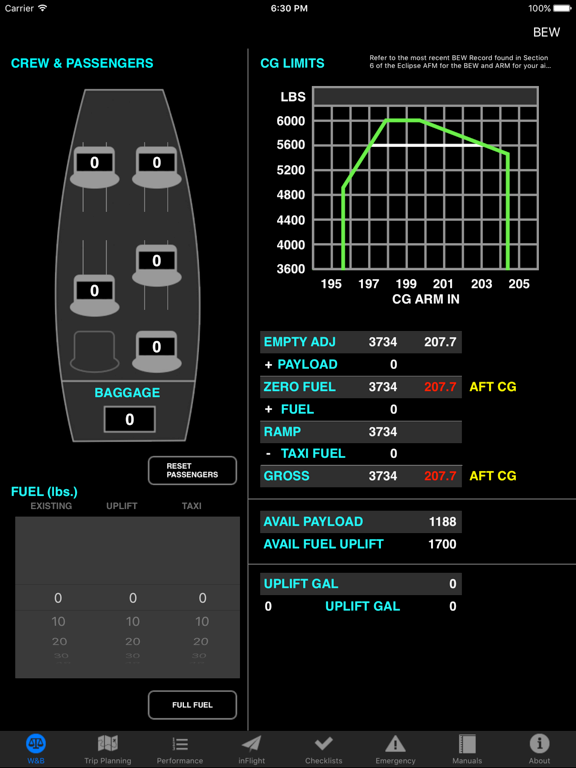
Quickly configure your jet’s seat layout by dragging seats along their tracks and enter the passenger weights with a flick of your finger. Specify your existing fuel load and how much fuel to add, and the app calculates the uplift in gallons automatically. A real time CG graph shows your CG envelope.
Fuel Planning:
Enter distance to destination, planned descent type (normal, idle, early), MCT or LRC power, cruise altitude, winds and ISA temperature, and the app returns fuel to destination, time en route, fuel remaining at destination, and nautical mile range at destination.
Performance Lookup (Takeoff, Cruise, Landing):
Takeoff: Enter field OAT, Elevation, and Takeoff Weight, and the app computes runway requirements, climb weight limitations (climb / tire speed), v50 climb data, and vSpeeds. Optionally enter wind and runway slope to fine-tune the results further.
Takeoff Minimums: Enter the ft/nm-altitude requirements from a departure procedure, and the app will show you the required gradient and the Eclipse’s Vy performance in both normal and engine out configurations at that altitude.
Climb & Cruise: Enter OAT, altitude, and weight and the app computes the Fuel Flow, KTAS, nm/100 lbs. for both MCT, LRC, and S/E LRC. No need to calculate the LRC FF manually. Trilinear interpolation yields numbers within 2-3 knots and 2-5 lbs/hr accuracy. Climb to altitude and Vy climb at altitude are also displayed.
Descent & Landing: Enter field OAT, elevation, and takeoff weight, and the app computes runway requirements, vSpeeds, and balked landing performance. Optionally enter wind and runway slope to fine-tune the results further.
Emergency Procedures:
Quickly find any CAS Message or Unannounciated Procedure in the color coded, searchable list. Touching a message shows a full page action page (scrollable) from the QRH.
DSU Upload:
Upload aircraft DSU Data (Diagnostic Storage Unit) to FlightData.com for processing, storage, and sharing with maintenance centers.
Manuals:
Qualified pilots can view the AFM and other documents through the Eclipse QRA application.
Quoi de neuf dans la dernière version ?
Fixed minor bugs with PDF viewer on iPhone