• KultureGeek
  • Comparateur de prix
       
iPhoneAddict
 iAddictv5Notre Application iPhone/iPad
  • Accueil Apps
  • Actualité Apple
  • Keynote Apple
  • Firmwares & iTunes
  • Contactez-nous
Accueil » Liste des Apps » Apps Universelles » Utilitaires » LocFaker - Change Current Location on the Map
L'application n'est plus disponible sur l'App Store français
1.8 iOS €0,99€ 健 李 1 5 It can mask your real current location by searching for a specific location or simply by LONG PRESS anywhere on the map. After selecting the exact location (long press), you can share a screenshot of your fake location to trick your friends. The...
LocFaker - Change Current Location on the Map

LocFaker - Change Current Location on the Map

iOS Universel / Utilitaires

0,99€ au lieu de 1,19€
Acheter sur l'App Store

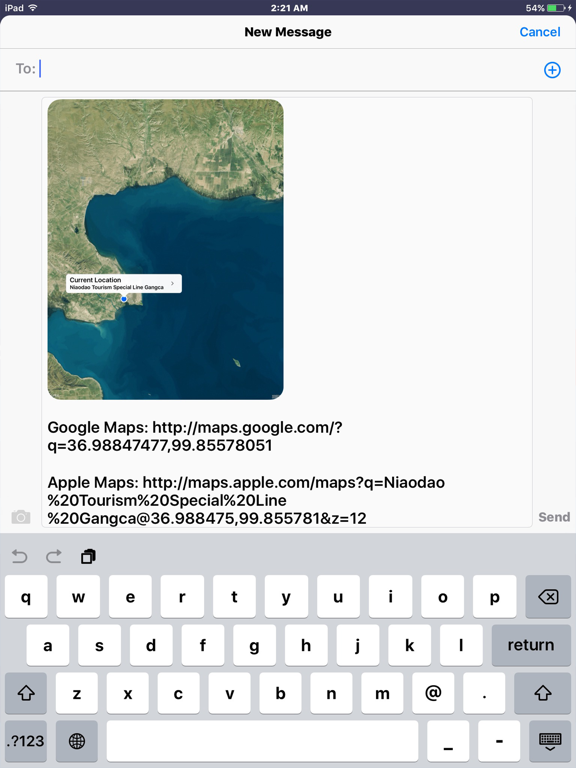
It can mask your real current location by searching for a specific location or simply by LONG PRESS anywhere on the map.

After selecting the exact location (long press), you can share a screenshot of your fake location to trick your friends.

The App can NOT display or change the user's real current location, the location on the map view is a fake one, just for fun.

Declaration: The App has nothing to do with Pokemon GO, and can't change the real user's current location to anywhere else, just get a fake location on the map.

* Feature
- Long Tap on the Map to Set Fake Location
- Tap on the Blue Dot and ">" button
- Search Location
- Show Location Coordinate (Latitude, Longitude)
- Show Location Address : Street number and name
- History Location List
- Map : General / Satellite / Hybrid
- Location History List

* Send Data
- Location Address
- Location Card (VCard)
- Map linked URL (Google Maps, Apple Maps)
- PNG image (Screenshot)
- TXT, CVS, KML files

* Share Fake Location
- Send to Twitter
- Send to Facebook
- Send to E-Mail
- Send to Text Message(SMS)
- Send to iMessage
- Save to Photos

En voir plus...

Quoi de neuf dans la dernière version ?

Bugs fixs, the address will be more correct in China mainland.
Uniformed the sharing operation style.
New screenshot is added.

  • Screenshot #1 pour LocFaker - Change Current Location on the Map
  • Screenshot #2 pour LocFaker - Change Current Location on the Map
  • Screenshot #3 pour LocFaker - Change Current Location on the Map
  • Screenshot #4 pour LocFaker - Change Current Location on the Map
  • Screenshot #5 pour LocFaker - Change Current Location on the Map
  • Screenshot #6 pour LocFaker - Change Current Location on the Map

Note

(5 notes)

Détails sur l'application

Version
1.8
Taille
3.2 Mo
Version minimum d'iOS
8.0
Dernière mise à jour
03/03/2017
Publié par
健 李

Newsletter App Store

Recevez chaque jour les meilleures promos

Actualité Apple

Image Test TerraMaster D1 SSD Pro : notre avis sur ce boîtier SSD NVMe Thunderbolt 5/USB4 80 Gbit/s
Test TerraMaster D1 SSD Pro : notre avis sur ce boîtier SSD NVMe Thunderbolt 5/USB4 80 Gbit/s
Image iPhone 17 : une nouvelle pub d’Apple vante les selfies de groupe
iPhone 17 : une nouvelle pub d’Apple vante les selfies de groupe
Image Apple célèbre Safari qui a fait un bond pour la compatibilité Web entre navigateurs
Apple célèbre Safari qui a fait un bond pour la compatibilité Web entre navigateurs
Image Apple va autoriser les chabots IA vocaux sur CarPlay, en plus de Siri
Apple va autoriser les chabots IA vocaux sur CarPlay, en plus de Siri
Partenaires : Actualité iPhone - Culture Geek
©2009-2026 i2CMedia | A propos |