MIHTool Basic - Web Debugger
iOS Universel / Utilitaires
**Warning**: MIHTool is for professional developers, newbies won't get it. There's no "FRIENDLY" guides, so see the docs and videos on the website then ask yourself if it's the right tool for you before you click the install button!
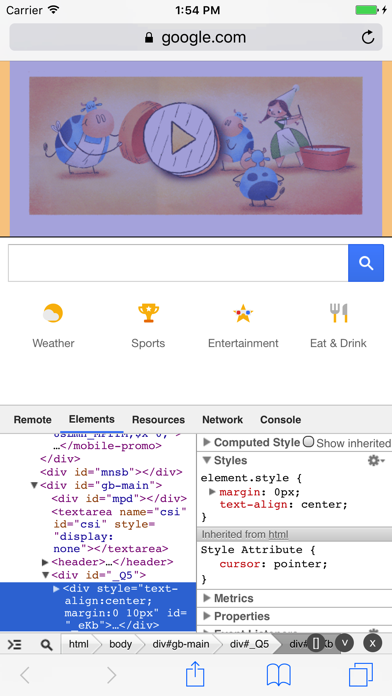
MIHTool helps Front-End Engineers to debug and optimize their webpages on iPad and iPhone.
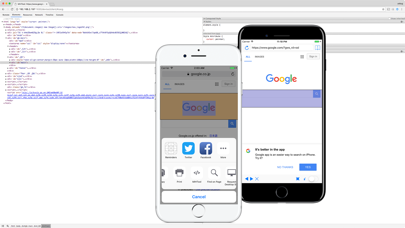
**new** : Action Extension for Safari, brings remote Web Inspector to debug your webpages in Safari. A Inline Web Inspector that is a real Chrome like DevTool (Includes Elements,Resources,Network,Timeline,Console panel.) for iOS Safari. To open MIHTool Action Extension, just click the Share Button of Safari and select MIHTool, for the first time, you might have to enable it in the more list.
What font-end masters say about MIHTool:
MIHTool is a brilliant tool that helps you debug websites on iOS. -- @pbakaus (Google).
MIHTool will change your life: A complete inline Web Inspector on iOS with performance profiling. -- @addyosmani (Google).
MIHTool: a smart & powerful debug tool for iOS WebView. -- @paul_irish (Google).
MIHTool: a good tool for debugging websites on iPad and iPhone. -- @smashingmag (Smashing Magazine).
For iPad
1.Action Extension for Safari, brings remote Web Inspector to debug your webpages in Safari. A Inline Web Inspector that is a real Chrome like DevTool for iPad Safari.
2.Inline Web inspector (like Chrome DevTool or FireBug): With Elements,Resources, Network, Timeline, Console panel.
3.Web inspector remote(weinre): remote to debug and optimize your mobile webpages on your computer(window, mac, linux with chrome).
4.Online Web Inspector.
5.HTML editor: view webpage source code with syntax highlighting and formatting;editing source code or creare a new webpage and preview the result.
6.Remote control (With HTTP Server): Remote to, Load URL in MIHTool|Safari; Inject Javascript in current webpage; Clear website data; Get HAR data; Get source code; Get screenshots...
7.Show WebKit Debug Borders (Compositing Render Layers).
8.Show Webkit Repaint Counter (Paint Rects).
9.Emulate iPhone.
10.User agent switcher.
11.More developer bookmarklets: Firebug, YSlow, PageSpeed, GTmetrix...
12.Evaluating JavaScript in the address bar.
13.Full screen mode (Shake Device To Toggle Full Screen Mode).
14.Disable cache.
15.Clear history, clear cache, clear cookies, clear local storage.
16.Keep awake (Default is ON).
17.HAR Viewer.
18.Performance API.
19.Polyfill Manager (simulate APIs for javaScript to Objective-C communication)
20.NPM Modules (To require() any module on npm in web inspector console with browserify)
For iPhone
1.Action Extension for Safari, brings remote Web Inspector to debug your webpages in Safari. A Inline Web Inspector that is a real Chrome like DevTool for iPhone Safari.
2.Web inspector remote(weinre): remote to debug and optimize your mobile webpages on your computer(window, mac, linux with chrome).
3.Online Web Inspector.
4.Remote control (With HTTP Server): Remote to, Load URL in MIHTool|Safari|Chrome; Inject Javascript in current webpage; Clear website data; Get HAR data; Get source code; Get screenshots...
5.Show WebKit Debug Borders (Compositing Render Layers).
6.Show Webkit Repaint Counter (Paint Rects).
7.Evaluating JavaScript in the address bar.
8.Disable cache *when the switch button is ON*.
9.Full screen mode (Shake Device To Toggle Full Screen Mode).
10.Keep awake (Default is ON).
11.Performance API.
12.Polyfill Manager (simulate APIs for javaScript to Objective-C communication)
13.NPM Modules (To require() any module on npm in web inspector console with browserify)
---------------------
官网有详细的中文文档。
Quoi de neuf dans la dernière version ?
This app has been updated by Apple to display the Apple Watch app icon.
For iPad
1.*Fix, Address bar update when user input.
For iPhone
1.+Add, Update for iPhone X