OSpectrometer
iOS Universel / Utilitaires
Optical spectroscopy in the visible light spectrum is a commonly used tool in different fields such as health, manufacturing, art, and forensic research.
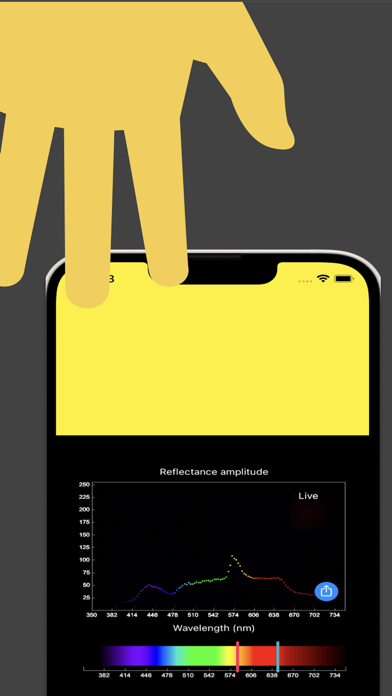
OSpectrometer implements basic spectrometer functions using the built-in camera and screen without requiring external devices or programs.
- Visible light spectrum is transformed and mapped to a function that generates RGB (Red Green Blue) color values
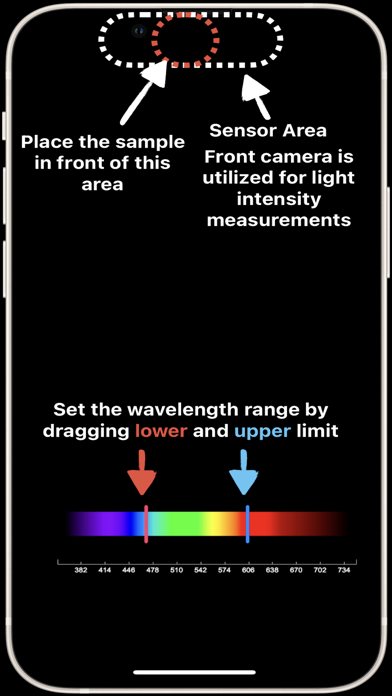
- A specific light wavelength can be selected and used to illuminate a desired target (i.e., close to the screen)
- The whole spectrum or a specific part of the spectrum can be selected and scanned
- Front camera is used to sense the reflection from the target object
- Consistent and repeatable reflection/absorption amplitude with respect to the color spectrum
- The result can be saved and shared
- Works offline, no need to connect to any network or internet
Privacy-policy: https://software.nanorescenter.com/osprectrometer-privacy-policy
Terms of use: https://www.apple.com/legal/internet-services/itunes/dev/stdeula/
Quoi de neuf dans la dernière version ?
Spectrum Calibration
Improve measurement accuracy with the new calibration feature. Place any white reflective surface in front of the camera, tap "Calibrate," and run a single reference scan. All future scans are automatically normalized against this baseline, removing brightness variations caused by the light source across different wavelengths. This results in cleaner, more consistent spectrum readings where intensity differences reflect actual material properties rather than LED output characteristics.
• One-tap calibration with on-screen guidance
• Calibration persists between sessions
• Recalibrate or clear anytime
• Visual indicator shows calibration status