RCL Control
iPad / Utilitaires
RCL Control is the second instalment of RCL’s long established lighting control system. A new wireless architecture is combined with an intuitive and easy-to-use graphic interface, larger project capacity, dynamic Light Plan navigation and fine control over pan, tilt and intensity. The system is capable of global control over hundreds of luminaires. It is compatible with RCL’s DRX luminaire series, including Variable Pinspot and Tuneable White technology providing greater levels of light manipulation with additional control over beam width and colour temperature.
Easy Setup:
• RCL Control now allows users to create their own digital schematic (Light Plan) of their lighting installation with greater ease.
• The wireless system connects via a central RCL Mediator and Wi-Fi router. A single RCL Mediator is capable of controlling up to 100 luminaires, 1000 scenes and 1000 groups – all of which can be stored and backed up for use on multiple iPads simultaneously.
• Multiple RCL Mediators can be used in one project, delivering a system capable of hundreds of lights.
• RCL Control is compatible with existing DALI systems.
Light Plan:
• A Light Plan is a digital representation of a room that enables the positioning and light manipulation functionality of RCL’s motorised lighting technology.
• Room schematics can be imported via a wide range of sources including Files, Messages, iCloud and Photo Library. This enables users to instantly capture a room’s layout using the iPad camera.
• A dynamic control interface enables the user to simultaneously adjust luminaires and navigate the Light Plan, delivering a fast and efficient user workflow. Users can adjust pan, tilt and dim level in fine increments, enabling maximum control of luminaires installed in high ceilings.
• Light Plan content dynamically scales when zooming to perfectly accommodate large project sizes.
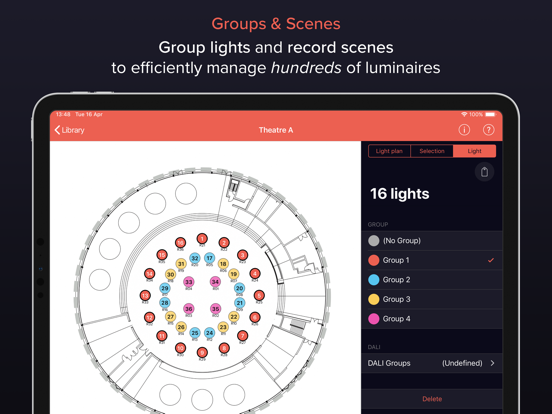
• Multiple luminaires can be organised into Groups, making short work of orchestrating large-scale projects.
Library:
• The hub of RCL Control where Light Plans are created and stored.
• Here, the app is divided into two categories; User Mode - for general user functions, and Admin Mode - for the creation and editing of Light Plans. This allows the commissioner of the app to tailor unique end user content as well as prohibit the deletion of any core information.
Movement:
• The movement control graphic interface has now been condensed, making it quicker and easier to control single or multiple luminaires, cutting setup times to boost productivity for the high-end venues that demand it.
• It’s now possible to adjust the positioning of individual or multiple luminaires by Joystick (coarse) or Dial (fine) control methods.
• On-screen positioning feedback helps find the perfect angle for whatever the application.
• All compatible luminaires are equipped with several automated functions including: Identify, Calibrate and Home Position.
Dimming:
• Dim level can now be adjusted incrementally with fine dim. Simply dragging vertically from the horizontal dim slider achieves increments of 0.1% intensity.
• Dim levels can now be adjusted for a multiple selection of luminaires regardless of their Group allocation. Multiple luminaires can then be dimmed relative to their individual dim levels.
• The Library can also be used to dim a Group of luminaires in any given Light Plan via the Quick Control function. This makes adjusting dim levels and executing Scenes quicker than ever before.
Scenes:
• Scenes are a set of saved motorised pan and tilt angles as well as light settings including beam angle, dim level and colour temperature that are able to be stored and recalled in seconds.
• Scenes allow lighting schemes to be quickly recorded and recalled from within the app reducing set-up time and cost dramatically.
• Users will be able to activate scenes from within the Light Plan as well as from the Library – delivering a faster option for when time is limited.
Quoi de neuf dans la dernière version ?
We've increased the number of network controllable (DMX) scene slots