iPhoneAddict Apps
  • Actualités
  • Accueil Apps
  • iPhone
  • iPad
  • Universelles
  • Mac
  • Apple TV
KG KultureGeek
App
iPhone / iPad Télécharger iAddict v5 Mac Télécharger iAddict Mac
  • Actualités
  • Accueil Apps
  • iPhone
  • iPad
  • Universelles
  • Mac
  • Apple TV
  • Archives keynotes
  • Firmwares & iTunes
  • Contactez-nous
  • Comparateur de prix
  • KultureGeek
Accueil » Liste des Apps » Apps Universelles » Utilitaires » RICOH AR
2.4.5 iOS €Gratuit Ricoh Co., Ltd. 0 0 RICOH AR is a Augumented Reality(AR) appliction to experience RICOH products. By this app various printers and Multi-Functions can be shown in 360 degrees anytime, anywhere. Features: ・This application can be downloaded free, and easy to use....
RICOH AR

RICOH AR

iOS Universel / Utilitaires

Gratuit
Obtenir sur l'App Store
Facebook X E-mail

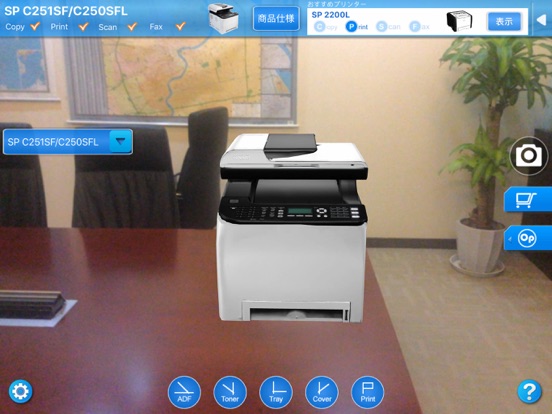
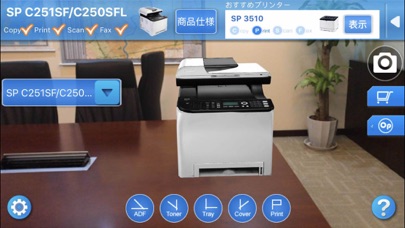
RICOH AR is a Augumented Reality(AR) appliction to experience RICOH products. By this app various printers and Multi-Functions can be shown in 360 degrees anytime, anywhere.

Features:
・This application can be downloaded free, and easy to use.
・Before buy the printer, you can see the real set up effect by this application.
・The operation is very simple, start this application and put the AR marker at the place you want to set up printer. You will see the 3d effect by smart device's camera immediately.
・By this application the printer's option device, cover and ADF open/close effect can be shown. Not only size of printer, but also the space for setting up printer can be confirmed.
・By "Space Measure Tool", you can input any size of the space where you want to set up printer, and compare it with the real printer.
・By click [Photo] button, you can save the AR image to album.

Use notes:
・The smart device should with camera.
・Please click [Get AR Marker] button in Help screen, then the AR Marker will be saved to your phone/pad. File name: RICOH_Marker_EN.pdf
・Please print the marker with actual paper size.
・For good simulations, please make sure the pattern size of marker is 17.0cm (for A4 size)/ 26.0cm (for A3 size).
・AR marker should be neither bent nor crumpled.
・Please capture the marker in a bright room.
・After Printer is displayed on the screen, please watch it in 1 meter (for A4 size)/ 2 meter (for A3 size). Otherwise, the marker detect capability will be reduced.

En voir plus...

Quoi de neuf dans la dernière version ?

・Added privacy statement for China.
  • Screenshot #4 pour RICOH AR

D'autres applications du développeur

RICOH TAMAGO InOut ToolRICOH TAMAGO InOut TooliPadRICOH Device Manager NXRICOH Device Manager NXiOS UniverselRICOH Smart Device ConnectorRICOH Smart Device ConnectoriOS UniverselRICOH IWB ClientRICOH IWB ClientiPadTHETA+THETA+iPhoneRICOH THETARICOH THETAiOS UniverselVoir toutes les apps

Note

(0 note)

Détails sur l'application

Version
2.4.5
Taille
98.8 Mo
Version minimum d'iOS
8.0
Dernière mise à jour
21/06/2021
Publié par
Ricoh Co., Ltd.

Newsletter App Store

Recevez chaque jour les meilleures promos

Actualité Apple

Image Apple bat un record de dépenses en R&D avec 10,2 milliards d’euros dépensés au T3 2026
Apple bat un record de dépenses en R&D avec 10,2 milliards d’euros dépensés au T3 2026
Image iPhone 18 Pro : une hausse de prix de 300 $ est évoquée
iPhone 18 Pro : une hausse de prix de 300 $ est évoquée
Image Apple Car Key bientôt compatible avec les VE Haval du constructeur chinois GWM
Apple Car Key bientôt compatible avec les VE Haval du constructeur chinois GWM
Image Apple franchit 1,5 milliard d’abonnements avec ses services
Apple franchit 1,5 milliard d’abonnements avec ses services
iPhoneAddict Apps

Le catalogue iPhoneAddict pour suivre les nouveautés, mises à jour et baisses de prix de l’App Store.

Apps

Toutes les apps iOS iPhone iPad Universelles Mac Apple TV

iPhoneAddict

Actualité Apple Archives keynotes Contact À propos KultureGeek

Suivez-nous

©2009-2026 i2CMedia. Tous droits réservés.