iPhoneAddict Apps
  • Actualités
  • Accueil Apps
  • iPhone
  • iPad
  • Universelles
  • Mac
  • Apple TV
KG KultureGeek
App
iPhone / iPad Télécharger iAddict v5 Mac Télécharger iAddict Mac
  • Actualités
  • Accueil Apps
  • iPhone
  • iPad
  • Universelles
  • Mac
  • Apple TV
  • Archives keynotes
  • Firmwares & iTunes
  • Contactez-nous
  • Comparateur de prix
  • KultureGeek
Accueil » Liste des Apps » Apps Universelles » Utilitaires » RMU2 Config
1.0.13 iOS €Gratuit Mobiltex Data 0 0 *** Requires a corTalk® RBT1 or RMU123PGM and RMU2 to use. *** Contact us at 'sales.rmu2@mobiltex.com' to purchase. This app is for configuring the corTalk® RMU2 (Remote Monitoring Unit 2) with a Bluetooth configuration interface. Both the RBT1 or...
RMU2 Config

RMU2 Config

iOS Universel / Utilitaires

Gratuit
Obtenir sur l'App Store
Facebook X E-mail

*** Requires a corTalk® RBT1 or RMU123PGM and RMU2 to use. ***
Contact us at 'sales.rmu2@mobiltex.com' to purchase.

This app is for configuring the corTalk® RMU2 (Remote Monitoring Unit 2) with a Bluetooth configuration interface. Both the RBT1 or RMU123PGM are compatible. They both function as a complete RMU2 programming interface but only requires the Bluetooth connection of your phone to use.

The RMU2 is used to monitor a cathodic protection rectifier with accurate measurement of a wide variety of signals. This app allows access to diagnostic information on the RMU2 and setting up the configuration to meet the customer's needs.

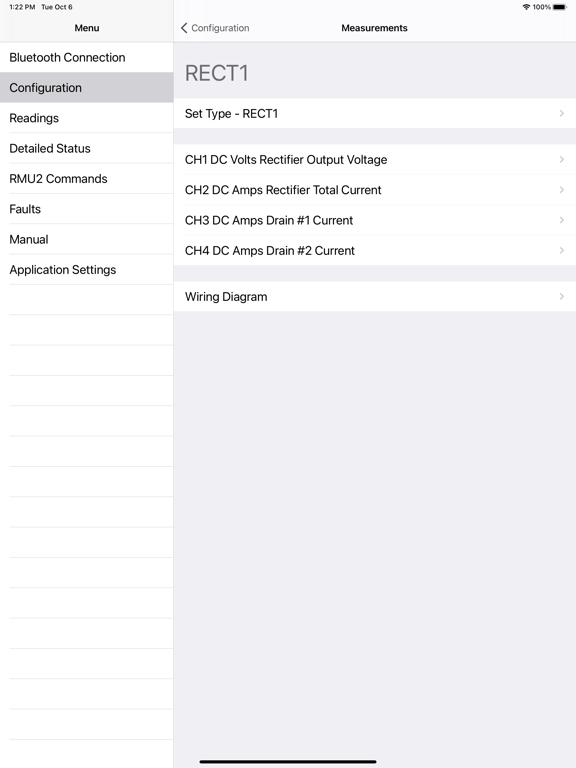
The app allows full configuration of the RMU2 including
- slot measurement types
- limits
- slot scaling and offset
- location

Other features include the
- viewing of readings and their limits
- detailed status screen for troubleshooting
- integrated manual
- wiring diagrams for each measurement type

The RBT1 and RMU123PGM is always in a Bluetooth pairing mode and requires a pairing code entered on the app. The pairing code (default=123456) can be found and changed with the app. Once paired, the iOS device can reconnect without needing to re-enter the code. The RBT1 pairing code can be reset by tapping the RBT1 5 times in 10 seconds with a user-supplied magnet.

En voir plus...

Quoi de neuf dans la dernière version ?

Updated firmware:
- RBT1 v1.09
- RMU123PGM v1.12
- RMU2 v28
- Manual v123
New programmer firmware releases

  • Screenshot #1 pour RMU2 Config
  • Screenshot #2 pour RMU2 Config
  • Screenshot #3 pour RMU2 Config
  • Screenshot #4 pour RMU2 Config
  • Screenshot #5 pour RMU2 Config
  • Screenshot #6 pour RMU2 Config

D'autres applications du développeur

uGI1 ConfiguGI1 ConfigiOS UniverselRMU3 ConfigRMU3 ConfigiOS UniverselRMU1 ConfigRMU1 ConfigiOS UniverselRMU1ER ConfigRMU1ER ConfigiOS UniverselLTE SwapLTE SwapiOS Universel

Note

(0 note)

Détails sur l'application

Version
1.0.13
Taille
36.5 Mo
Version minimum d'iOS
12.0
Dernière mise à jour
24/09/2021
Publié par
Mobiltex Data

Newsletter App Store

Recevez chaque jour les meilleures promos

Actualité Apple

Image Apple met à jour le firmware de son adaptateur multiport AV numérique USB‑C
Apple met à jour le firmware de son adaptateur multiport AV numérique USB‑C
Image Une pub d’Apple avec un enfant et un iPhone crée une polémique en Italie
Une pub d’Apple avec un enfant et un iPhone crée une polémique en Italie
Image Apple prépare un système de reprise pour 90 jours avec l’app Cartes
Apple prépare un système de reprise pour 90 jours avec l’app Cartes
Image Apple recrute son nouveau responsable des affaires gouvernementales
Apple recrute son nouveau responsable des affaires gouvernementales
iPhoneAddict Apps

Le catalogue iPhoneAddict pour suivre les nouveautés, mises à jour et baisses de prix de l’App Store.

Apps

Toutes les apps iOS iPhone iPad Universelles Mac Apple TV

iPhoneAddict

Actualité Apple Archives keynotes Contact À propos KultureGeek

Suivez-nous

©2009-2026 i2CMedia. Tous droits réservés.