SYNCalc
iPhone / Utilitaires
To set up your SynCalc Calculator, please follow these steps:
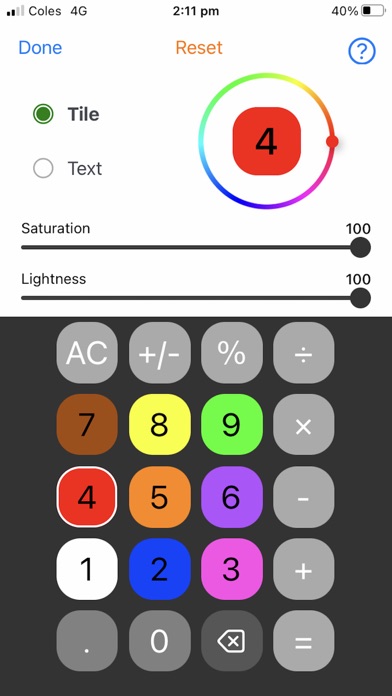
Step 1: Choose either the "tile" or "text" option. Select "tile" if you want to choose the background color, or "text" if you want to select the numbers or symbols that appear on the calculator.
Step 2: Choose a calculator button. Once you do this, you will notice that the button you selected appears in the center of the color wheel.
Step 3: Move the small dot on the outside of the circle to select the color you want for the tile or text.
Step 4: Adjust the saturation and lightness to achieve the desired color shade. Saturation refers to the intensity of the color, while lightness ranges from black (0) to white (100). Experiment with these settings until you find the color you want.
Step 5: Choose another button if you want to change its tile or text. Your previous choice will be saved until you press "Done" to save all your choices.
Step 6: Press "Done."
Step 7: Enjoy using your own SynCalc Calculator!
Here are some important notes to keep in mind when using the SynCalc Calculator:
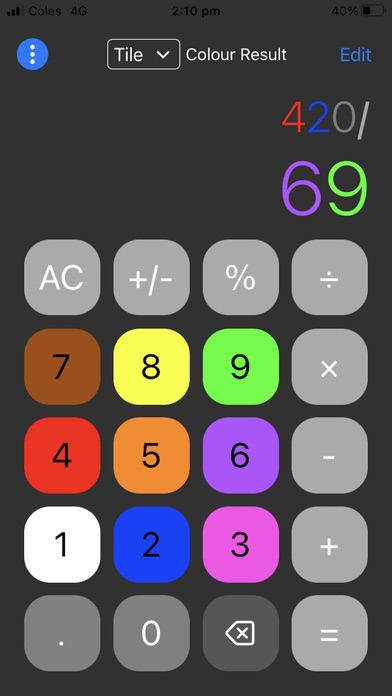
To save your choices at any point while in edit mode, simply press "Done." If you want to update or change your choices while using the calculator, press "Edit."
If you ever want to reset your choices back to the default settings, just press the word "Reset" at the top of the screen.
When using the SynCalc app, you can choose whether your answers appear in your chosen text color or in the default app color (white) by using the color result button at the top of the screen. You can change this setting at any time.
Quoi de neuf dans la dernière version ?
Supports iOS 17