Tide Now USA Southeast
iOS Universel / Utilitaires
Tide Now USA Southeast is a tide calculator for the states of North and South Carolina, Georgia, Florida, Alabama, Mississippi, Louisiana and Texas.
The app is free, there are no ads, and it cannot access phone features. The app USES NO PERMISSIONS at all.
The app is completely OFF-LINE. It performs its function purely by calculations and has built in tide data. It never uses the internet.
Predictions are quick and the app is simple to use and understand. Gestures are supported for looking at the next and prior day tides.
Tabs and Gestures
The app uses a familiar tab bar approach. The icons along the bottom allow you to choose what you want to do. The active tab is marked by a blue tint.
THE TIDE REPORT TAB
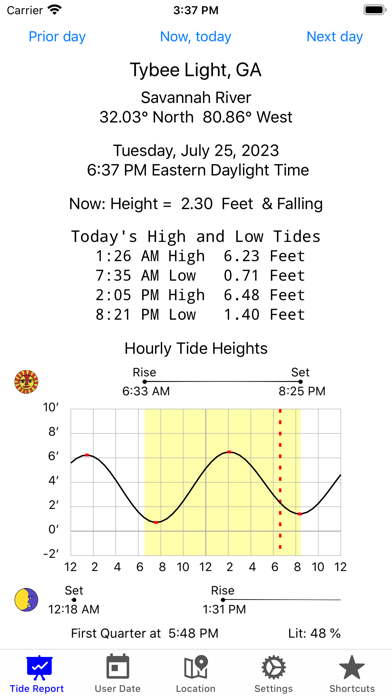
The left most tab is "Tide Report". It can be presented in either "Bright" or "Dark". Both are shown above.
The tide report includes the location (station name). It also includes the region and state of the location.
The report shows for which date, time, and time zone the tides were calculated for. It includes a shapshot of the current tide status (rising or falling, how fast, and the present tide height). Then the day's tide table is printed.
Below the tide table is the tide graph for the day. Along the top of the graph is shown sunrise and sunset time, also including arrows indicating these times on the 24 hour time line of the graph. You can have a highlighted portion on the graph lighting up those hours the sun is up. On the bright graph, this is shown in yellow. On the dark graph this is shown in grey.
The tide heights are shown on the left side of the graph, and the times along the bottom. You can have the times
shown in AM/PM or military time. The red dashed line marks the present time. The red dots on the graph are the high and low tides.
GESTURES for Tide Report Tab
There are three gestures available when the Tide Report tab is selected.
-----SWIPE LEFT (NEXT DAY) Gesture. Shows tomorrows ( or next day's tide ).
-----SWIPE RIGHT (PRIOR DAY) Gesture. Shows yesterday's (or previous day's tide).
-----LONG TOUCH Gesture. This refreshes the tide display to the present date and time. If you have changed the date, this will restore the date to the present date. If the app has been sitting idle for some time, you might want to press the refresh to update the current tide status and time mark on the graph. These change throughout the day.
THE LOCATION TAB
The Location Tab allows you to specify which location you want the tides for. There are three scrolling wheels, top to bottom. The top one chooses a state. When you have chosen a state the next scroll wheel will show you the regions within that state. When you have selected a region the next scroll wheel allows you to choose your desired tide station. When all the state, region, and stations highlighted choices are what you want, then just choose the Tide Report tab and you will get a tide report for that location.
THE USER DATE TAB
The User Date tab allows you to enter a date, if you are considering days other than today such as planning a clamming trip. Normally you can leave this alone otherwise.
THE SETTINGS TAB
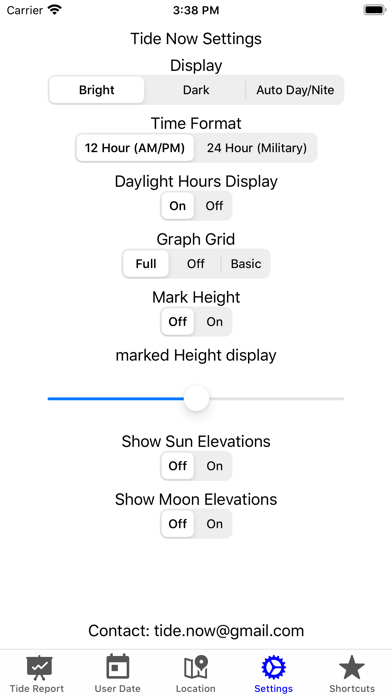
The Settings tab lets you choose how the Display looks- Bright, Dark, or Auto Day/Nite. It lets you choose a time format - AM/PM or military. It lets you turn on or off a highlighted Daylight Hours Display - an area on the tide graph. Finally, it allows you to turn on or off the Graph Grid. These settings are to allow you to control how detailed of a graph you want to see.
THE SHORTCUTS TAB
The Shortcuts tab lets you save six different tide stations for immediate access. If you long-press one of the six buttons, the current station will be saved. If you short-press one of the buttons where you already saved a station, the Tide Report tab will be immediately shown with that station's tide.
Quoi de neuf dans la dernière version ?
Updated Station Selection
Added view on map button
Added support for iPhone 14 series