Time Flies - Butler Watch Co.
iPhone / Utilitaires
Multi Time Zone - Travel - Weather - Airport - GMT - UTC - Zulu Time World Time at user selected World Airport locations. All U.S. public and private airports included. View time and weather at your travel destination, or current location. Includes aviation weather METAR and TAF.
Set your GMT wrist watch to the correct time zone and date. Save your favorites. Use the Chronograph J80 watch to time your barbecue or beer brew.
Check current time and weather at travel destinations by using the airport search feature. Destinations are saved for quick reference and re-selection. Favorites may be saved to a list.
Update a GMT wrist watch to the correct time and date, from anywhere in the world. GMT and date is always available and displayed on the GMT Dual Time screen page.
Check weather at any airport, including aviation weather (Metar and TAF).
GMT DUAL TIME PAGE:
1. Device time - analog
2. GMT - analog and digital
3. User selected time - digital
4. Weather icon - press for weather
GMT time and date displayed digitally in upper right corner and by analog GMT hand in the display.
User selected airport time is displayed in the lower right digital window.
User selected airport live weather icon is shown next to the lower right digital time.
User may select the weather page by pressing the lower left weather icon.
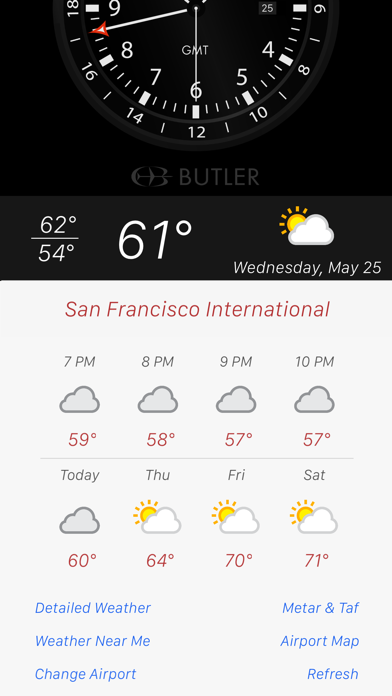
WEATHER PAGE:
The weather page shows the current and forecast weather at the user selected airport and includes a map. This page offers additional options.
1. Detailed Weather.
2. Weather Near Me (user location)
3. Change Airport Location
4. Metar &TAF
5. Scroll hourly and Days forecast
6. View Map
1. Select aviation weather for the current airport by pressing the "METAR/TAF" button.
2. Select between world airports by selecting the "Change Airport" button.
3. Scroll through the hourly forecast for the current day by touch manipulation.
5. View the map of the selected airport. After manipulating the map, touch the “person” icon to move the map to the user’s device location. In addition, touch the airplane symbol icon and return to the selected airport on the map.
METAR & TAF PAGE:
Select the METAR & TAF button and the selected airport's Metar & TAF current result displays. The airport LAT/LONG and Eelevation are also displayed.
CHANGE AIRPORT PAGE:
Search for airport by airport name, IATA 3 letter airport code, and ICAO 4 letter airport code. Searches are saved to the page and user can reselect airports already used.
Airports can be saved as "Favorites."
SETTINGS:
1. Screen Always On: When selected on, the pages will display and not blank according to the normal device settings.
2. Hide Status Bar: When selected on, device’s status bar will disappear from the top of the app display.
4. Use 24 Hour Format; When selected on, digital time display on the main page will display in 24 hour format.
5. Launch on GMT: App starts on GMT
6. Select units: Metric vs. Imperial
Time/Weather Subscription:
-All subscriptions come with free trial.
-Subscription length periods 1month $0.99, 3 month $1.99, 6 month $2.99, 1year $3.99, Life of App $4.99 (USD)
- Payment will be charged to iTunes Account at confirmation of purchase.
- Subscription automatically renews unless auto-renew is turned off at least 24-hours before the end of the current period.
- Account will be charged for renewal within 24-hours prior to the end of the current period, and renewal cost is commensurate with your original subscription.
- Subscriptions may be managed by the user and auto-renewal may be turned off by going to the user's Account Settings after purchase.
- No cancellation of the current subscription is allowed during active subscription period.
- Any unused portion of a free trial period, if offered, will be forfeited when the user purchases a subscription to that publication.
Privacy-http://www.butlerwatch.com/privacy.html
Terms of use-http://www.butlerwatch.com/terms_use.html
Quoi de neuf dans la dernière version ?
-Fixes an issue where METAR and TAF would not display.
-Other minor changes