• KultureGeek
  • Comparateur de prix
       
iPhoneAddict
 iAddictv5Notre Application iPhone/iPad
  • Accueil Apps
  • Actualité Apple
  • Keynote Apple
  • Firmwares & iTunes
  • Contactez-nous
Accueil » Liste des Apps » Apps Universelles » Utilitaires » TipType
L'application n'est plus disponible sur l'App Store français
1.3 iOS €Gratuit Daniel Goldberg 0 0 Welcome to TipType, a new keyboard for Iphone and Ipad. Writing is more accurate in TipType because the keys are huge. The secret? Don't press, slide. Each of the 9 writing keys can produce up to 5 characters, depending on the movement of the...
TipType

TipType

iOS Universel / Utilitaires

Gratuit
Obtenir sur l'App Store

Welcome to TipType, a new keyboard for Iphone and Ipad.

Writing is more accurate in TipType because the keys are huge.

The secret? Don't press, slide.

Each of the 9 writing keys can produce up to 5 characters, depending on the movement of the finger on top of it.

Slide each key left, up, right or down in the direction of the character you want to type.

For a space, just press on any of the 9 writing keys, avoiding your finger's trip to the space bar. Tip for faster typing: tap close to where you finish each word.

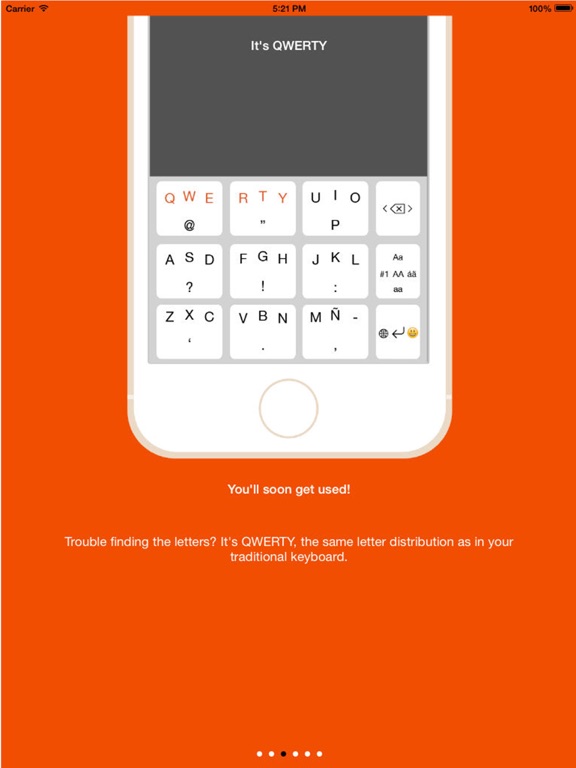
Letter distribution is the same as in your traditional QWERTY keyboard. You'll take a little while to adjust, but in 2 weeks you'll be writing faster with less mistakes.

ARE YOU FASTER THAN TIPTYPE WITH ANOTHER KEYBOARD? WIN USD 500 IF YOU BEAT TIPTYPE!! https://www.youtube.com/watch?v=3WisA7o2Mgk

The three keys on the far right column are Function Keys. They also work by sliding or pressing.

The DEL key deletes when pressing, but moves the cursor (like the arrows in a computer keyboard) when sliding in each direction.

The Alternate Keyboards key is used to write characters that are not in the main keyboard. Slide left (towards "#1") for numbers and additional symbols, upwards ("Aa") for a capitalized initial, right ("áã") for international characters, downwards ("aa") to go back to the small letter keyboard and press ("AA") to turn on CAPS.

The Enter key produces Enter when pressing. When sliding right you get an emoticon keyboard!

En voir plus...

Quoi de neuf dans la dernière version ?

This app has been updated by Apple to display the Apple Watch app icon.

Fix minor bugs for iOS 10

  • Screenshot #1 pour TipType
  • Screenshot #2 pour TipType
  • Screenshot #3 pour TipType
  • Screenshot #4 pour TipType
  • Screenshot #5 pour TipType
  • Screenshot #6 pour TipType

Note

(0 note)

Détails sur l'application

Version
1.3
Taille
18.2 Mo
Version minimum d'iOS
8.0
Dernière mise à jour
27/10/2016
Publié par
Daniel Goldberg

Newsletter App Store

Recevez chaque jour les meilleures promos

Actualité Apple

Image Apple augmente les prix d’Apple Music et d’Apple One
Apple augmente les prix d’Apple Music et d’Apple One
Image Apple négocie avec les États-Unis (DOJ) pour régler la plainte antitrust
Apple négocie avec les États-Unis (DOJ) pour régler la plainte antitrust
Image The Dynasty: UConn Huskies (Apple TV) : premier trailer pour le docu sur les basketteuses du Connecticut
The Dynasty: UConn Huskies (Apple TV) : premier trailer pour le docu sur les basketteuses du Connecticut
Image La fidélité à l’iPhone progresse pour atteindre 87 %
La fidélité à l’iPhone progresse pour atteindre 87 %
Partenaires : Actualité iPhone - Culture Geek
©2009-2026 i2CMedia | A propos |