• KultureGeek
  • Comparateur de prix
       
iPhoneAddict
 iAddictv5Notre Application iPhone/iPad
  • Accueil Apps
  • Actualité Apple
  • Keynote Apple
  • Firmwares & iTunes
  • Contactez-nous
Accueil » Liste des Apps » Apps Mac » Photo et vidéo » Compress Any Video
5.0 macOS €2,99€ Anand 0 0 Compress Any Video is the easiest and most accurate video compressor for Mac — no codec knowledge required. Forget bitrate calculations, quality settings, and encoder presets. Just drag in your video, choose how small you want it, and compress....
Compress Any Video

Compress Any Video

macOS / Photo et vidéo

2,99€ au lieu de 3,49€
Acheter sur l'App Store

Compress Any Video is the easiest and most accurate video compressor for Mac — no codec knowledge required.

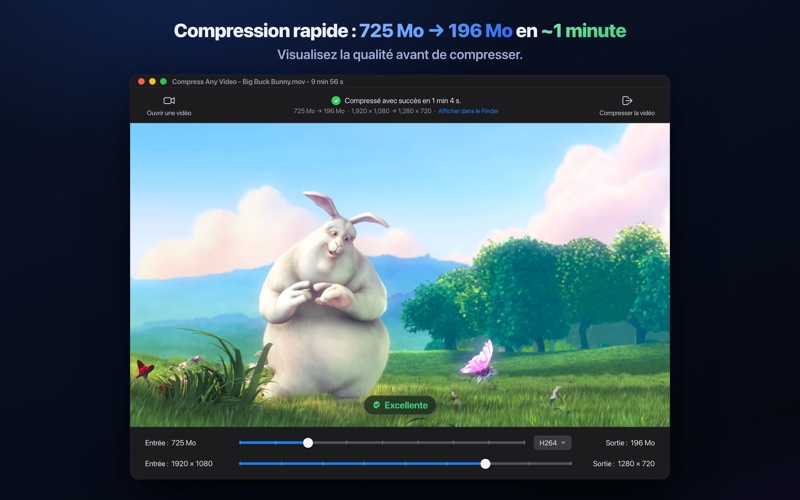
Forget bitrate calculations, quality settings, and encoder presets. Just drag in your video, choose how small you want it, and compress. The app automatically finds the best settings for you.

HOW IT WORKS

1. Drag and drop any video into the app
2. Choose your target file size using the size slider. Optionally adjust the output resolution
4. Click Compress — your smaller video is ready

No complicated settings. No trial and error. No repeated exports. Just reliable compression that works the first time.

WHY IT STANDS OUT

Most video compressors expect you to understand H.264 vs H.265, bitrate modes, CRF values, and encoder presets. Compress Any Video removes all of that complexity.

Simply choose your desired file size and the app intelligently handles everything else automatically.

KEY FEATURES

• Exact Target File Size
Set the precise output size you need for email attachments, messaging apps, upload limits, and client requirements.

• Independent Resolution Control
Resize video dimensions separately from file size. Downscale 4K to 1080p or combine both controls for maximum compression.

• Supports Virtually Any Video Format
Works with MP4, MOV, AVI, MKV, WebM, M4V, MPG, DV, FLV, TS, MTS, M2TS, OGG, WMV, and many more.

• High Quality MP4 Output
Creates widely compatible H.264/AAC MP4 videos at the best quality possible for your chosen size.

• Accurate Compression
Advanced compression logic keeps the final file size extremely close to your target.

• Fast Performance
Optimized for speed and significantly faster than many traditional Mac video compression tools.

• Reduce Videos Up to 10× Smaller
Dramatically shrink file sizes while maintaining excellent visual quality.

• Built-In Video Resizer
Use the resolution slider independently to resize videos without additional compression.

• Simple Format Conversion
Leave both sliders at maximum to instantly convert videos to MP4 without resizing or compression.

• Privacy First
Everything runs entirely on your Mac. No accounts, no subscriptions, no cloud uploads. Your videos never leave your device.


PERFECT FOR

• Email attachments for Gmail, Outlook, and iCloud Mail
• Messaging apps like WhatsApp, Telegram, and iMessage
• Social media uploads for Instagram, TikTok, and YouTube
• File sharing through Dropbox, Google Drive, and WeTransfer
• Saving storage space on your Mac or external drives
• Delivering videos with strict file size requirements


SUPPORTED FORMATS

MP4, MOV, M4V, MPG, MKV, AVI, DV, FLV, TS, MTS, M2TS, OGG, WEBM, WMV, and many more

En voir plus...

Quoi de neuf dans la dernière version ?

● Completely redesigned from the ground up.
● Upgraded with our fastest compression engine yet.
● Enhanced performance and improved overall stability.

  • Screenshot #1 pour Compress Any Video
  • Screenshot #2 pour Compress Any Video
  • Screenshot #3 pour Compress Any Video

D'autres applications du développeur

HLS Video Creator
HLS Video Creator
/ macOS
MoviePal
MoviePal
/ macOS
Subtitle Extractor
Subtitle Extractor
/ macOS
Crop Any Video
Crop Any Video
/ macOS
Resize Any Video
Resize Any Video
/ macOS
Movie Subtitler
Movie Subtitler
/ macOS
Voir toutes les apps

Note

(0 note)

Détails sur l'application

Version
5.0
Taille
59.1 Mo
Version minimum de macOS
12.0
Dernière mise à jour
15/05/2026
Publié par
Anand

Newsletter App Store

Recevez chaque jour les meilleures promos

Actualité Apple

Image iOS 27 : notifications depuis la gauche et édition de photos en langage naturel
iOS 27 : notifications depuis la gauche et édition de photos en langage naturel
Image L’iPhone Ultra pliable en noir est incertain pour l’instant
L’iPhone Ultra pliable en noir est incertain pour l’instant
Image iOS 27 change le geste pour le centre de notifications sur iPhone
iOS 27 change le geste pour le centre de notifications sur iPhone
Image iOS 27 : le nouveau Siri IA serait en bêta avec une liste d’attente
iOS 27 : le nouveau Siri IA serait en bêta avec une liste d’attente
Partenaires : Actualité iPhone - Culture Geek
©2009-2026 i2CMedia | A propos |