• KultureGeek
  • Comparateur de prix
       
iPhoneAddict
 iAddictv5Notre Application iPhone/iPad
  • Accueil Apps
  • Actualité Apple
  • Keynote Apple
  • Firmwares & iTunes
  • Contactez-nous
Accueil » Liste des Apps » Apps Mac » Photo et vidéo » Subtitle Extractor
7.1 macOS €Gratuit Anand 0 0 Extract subtitles from any video and save them as clean .srt files. 1. Drag & Drop any Video. 2. Select Subtitles 3. Extract. That's it! Most tools only handle subtitles that are already text. Subtitle Extractor handles all three kinds — including...
Subtitle Extractor

Subtitle Extractor

macOS / Photo et vidéo

Gratuit au lieu de 17,99€
Obtenir sur l'App Store

Extract subtitles from any video and save them as clean .srt files.
1. Drag & Drop any Video. 2. Select Subtitles 3. Extract. That's it!

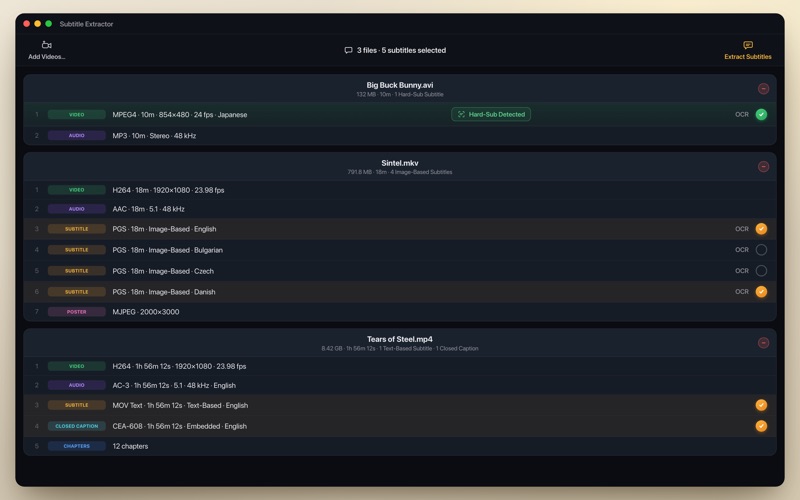
Most tools only handle subtitles that are already text. Subtitle Extractor handles all three kinds — including the hard ones most apps can't touch:

● Text-Based — SRT, ASS/SSA, WebVTT, MOV Text, EBU STL, DVB Teletext, Closed Captions and more. Copied out instantly, with no quality loss.
● Image-Based — PGS (Blu-ray) and VobSub (DVD) bitmap subtitles turned into clean, editable text with OCR.
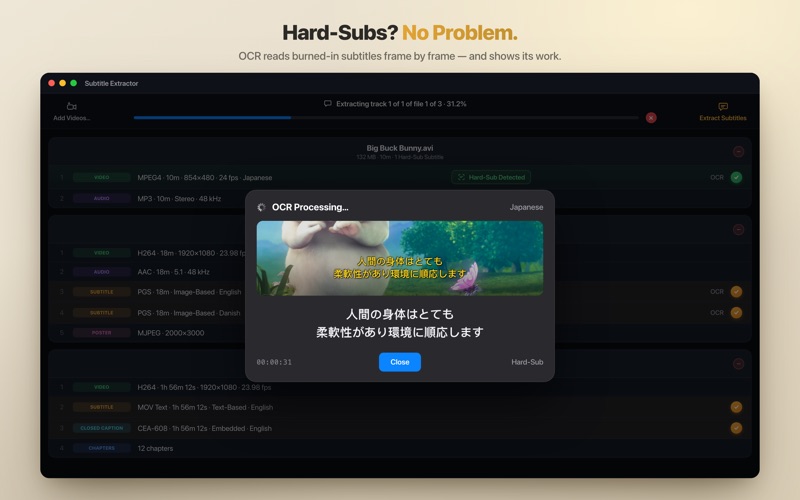
● Burned-In — text baked right into the video picture, read frame-by-frame with Apple Vision and Tesseract OCR. Something most subtitle tools simply cannot do.

Everything runs on your Mac. No uploads, no servers, no account — your videos never leave your computer.

Key Features
• Extract every subtitle track as its own .srt file
• Pick just the language you need when a video has several
• Doubles as a subtitle converter — .sup → .srt, .ass → .srt, VobSub → .srt and more
• On-device OCR in 40+ languages with Apple Vision and Tesseract
• Works with virtually any video — MKV, MP4, MOV, AVI, M2TS, TS, MTS, WebM, WMV, FLV and more
• One-time purchase. No subscription, ever.

Supported Subtitle Formats
Text: SRT · ASS · SSA · WebVTT · MOV Text · EBU STL · Spruce STL · DVB Teletext · CEA-608 / CEA-708 CC
Image: PGS (Blu-ray) · VobSub (DVD) · DVB Subtitle · XSUB
Burned-in: any video with hardcoded text on the picture

OCR Languages
English, Spanish, French, German, Portuguese, Italian, Dutch, Danish, Swedish, Norwegian, Finnish, Russian, Ukrainian, Polish, Czech, Slovak, Hungarian, Romanian, Bulgarian, Greek, Turkish, Arabic, Hebrew, Hindi, Bengali, Tamil, Thai, Vietnamese, Indonesian, Malay, Filipino, Japanese, Chinese, Korean, Catalan, Serbian, Slovenian, Latvian, Lithuanian, Estonian, Persian — and more.

Free to Try
Download free and extract the first 5 subtitles of any track — enough to check the quality on your own files first. Unlock the full version with a one-time purchase, and every extraction runs start to finish. No subscription.

Already purchased Subtitle Extractor before version 7.0? You have full access automatically — no action needed.

Good to Know
• OCR accuracy depends on subtitle font size, contrast, and video quality
• Blu-ray and DVD discs must be ripped to a video file first, with separate software
• Encrypted or DRM-protected files cannot be extracted
• Burned-in extraction works best on a clean, high-quality video source

Terms of Use: https://flashanand.github.io/SubtitleExtractorSamples/terms.html
Privacy Policy: https://flashanand.github.io/SubtitleExtractorSamples/privacy.html

En voir plus...

Quoi de neuf dans la dernière version ?

As of version 7.0, Subtitle Extractor is free to download — extract the first 5 subtitles from any video, then unlock full, unlimited extraction with a one-time in-app purchase.

If you purchased Subtitle Extractor before version 7.0, you automatically have full access — no action needed.

  • Screenshot #1 pour Subtitle Extractor
  • Screenshot #2 pour Subtitle Extractor
  • Screenshot #3 pour Subtitle Extractor

D'autres applications du développeur

HLS Video Creator
HLS Video Creator
/ macOS
MoviePal
MoviePal
/ macOS
Crop Any Video
Crop Any Video
/ macOS
Resize Any Video
Resize Any Video
/ macOS
Movie Subtitler
Movie Subtitler
/ macOS
Join Any Video
Join Any Video
/ macOS
Voir toutes les apps

Note

(0 note)

Détails sur l'application

Version
7.1
Taille
334.1 Mo
Version minimum de macOS
13.0
Dernière mise à jour
14/06/2026
Publié par
Anand

Newsletter App Store

Recevez chaque jour les meilleures promos

Actualité Apple

Image John Ternus, futur patron d’Apple, veut redonner au design une place importante
John Ternus, futur patron d’Apple, veut redonner au design une place importante
Image Apple va lancer plus de 20 produits en 2026 et 2027, voici la liste
Apple va lancer plus de 20 produits en 2026 et 2027, voici la liste
Image Apple ferme trois Apple Store, avec des employés pris au piège
Apple ferme trois Apple Store, avec des employés pris au piège
Image La hausse de prix annoncée par Apple serait imminente
La hausse de prix annoncée par Apple serait imminente
Partenaires : Actualité iPhone - Culture Geek
©2009-2026 i2CMedia | A propos |