iPhoneAddict Apps
  • Actualités
  • Accueil Apps
  • iPhone
  • iPad
  • Universelles
  • Mac
  • Apple TV
KG KultureGeek
App
iPhone / iPad Télécharger iAddict v5 Mac Télécharger iAddict Mac
  • Actualités
  • Accueil Apps
  • iPhone
  • iPad
  • Universelles
  • Mac
  • Apple TV
  • Archives keynotes
  • Firmwares & iTunes
  • Contactez-nous
  • Comparateur de prix
  • KultureGeek
Accueil » Liste des Apps » Apps Mac » Productivité » Windows Grid
L'application n'est plus disponible sur l'App Store français
1.6.0 macOS €1,99€ Denk Alexandru 0 0 Move and resize windows with ease. With Windows Grid you can organise your workspace the way you want it. Put windows side by side, tile, stack, compare and multitask. Select from predefined layouts, use keyboard shortcuts or transform windows by...
Windows Grid

Windows Grid

macOS / Productivité

1,99€ au lieu de 2,49€
Acheter sur l'App Store
Facebook X E-mail

Move and resize windows with ease.

With Windows Grid you can organise your workspace the way you want it. Put windows side by side, tile, stack, compare and multitask. Select from predefined layouts, use keyboard shortcuts or transform windows by dragging them to one of the screen's edges.

Note: By default, Windows Grid supports your favourite productivity apps only, but with a helper that you can download for free (from: http://alexdenk.eu/windowsgrid) you can transform any window from any app.
Supported out of the box:
• Browsers: Safari and Chrome
• iWork: Pages, Numbers, Keynote, Notes, TextEdit
• Microsoft Office: Word, Excel, PowerPoint, Outlook
If you download a free helper, Windows Grid can transform any window from any app (from: http://alexdenk.eu/windowsgrid)

HOW TO USE IT
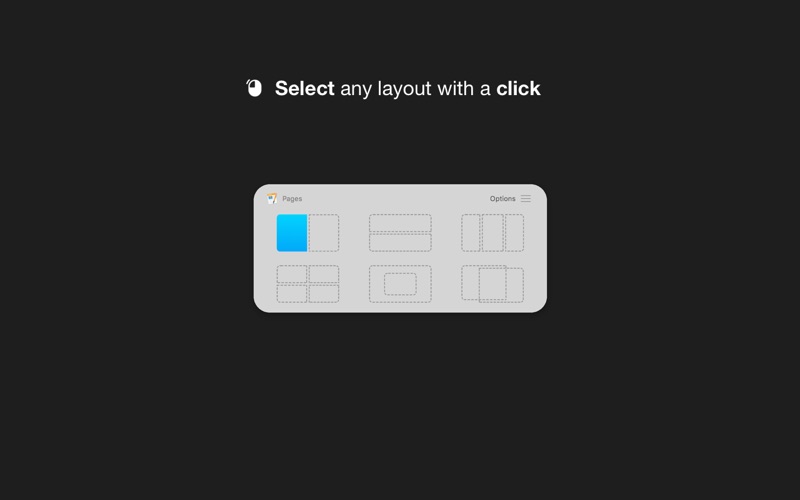
• Use a keyboard shortcut or press the menubar icon to show the possible layouts on your screen or in the Touch Bar. Clicking on any option will move and resize your front window
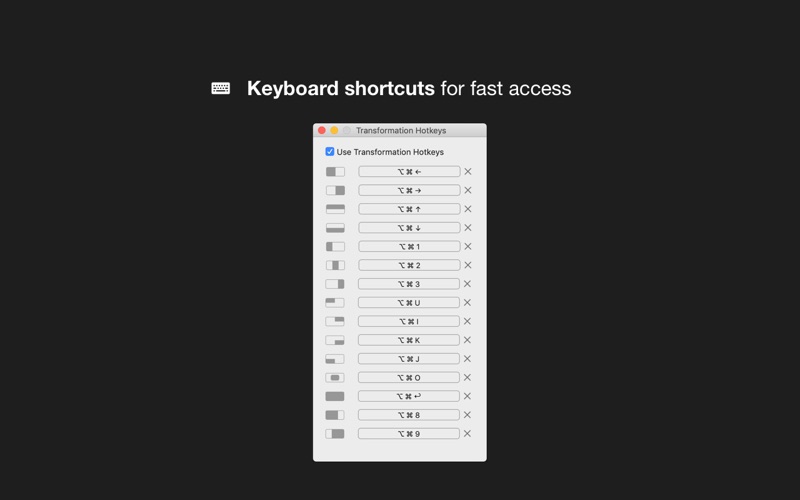
• You can also transform windows with a keyboard shortcut directly
• Or you can drag any window to one of the screen's edges to resize and snap it fast

FEATURES
• Make multitasking easier and faster
• Show all the possible layouts with a keyboard shortcut (Alt + Enter by default and customisable) or by clicking the menubar icon
• Transform windows with keyboard shortcuts
• Full Touch Bar support
• Drag windows to any screen edge or corner and snap it half screen
• Put windows side by side, tile, stack, move and resize
• Easy to use and access, quick and elegant, no complicated options

SUPPORT
We read your support emails every day, day by day.
Write with confidence any question, feedback or complaint and you will receive an answer in a very short period of time.

En voir plus...

Quoi de neuf dans la dernière version ?

• Drag to corners (place windows in the corner of the screen)
• Dark mode full support
• Bug fixes

  • Screenshot #1 pour Windows Grid
  • Screenshot #2 pour Windows Grid
  • Screenshot #3 pour Windows Grid

D'autres applications du développeur

BlogTouch pour Blogspot BlogBlogTouch pour Blogspot BlogiOS UniverselBlogTouch for Wordpress.comBlogTouch for Wordpress.comiOS UniverselZip Doctor: Réparer ArchivesZip Doctor: Réparer ArchivesmacOSAppLocker • Passcode lock appsAppLocker • Passcode lock appsiOS UniverselFocus - Highlight front windowFocus - Highlight front windowmacOSNightTone - Filtre Anti-BleuNightTone - Filtre Anti-BleumacOSVoir toutes les apps

Note

(0 note)

Détails sur l'application

Version
1.6.0
Taille
8.8 Mo
Version minimum de macOS
10.11
Dernière mise à jour
21/09/2019
Publié par
Denk Alexandru

Newsletter App Store

Recevez chaque jour les meilleures promos

Actualité Apple

Image Release candidate pour iOS 26.6.1, iOS 18.7.10 et macOS 26.6.2
Release candidate pour iOS 26.6.1, iOS 18.7.10 et macOS 26.6.2
Image Bêta 5 pour iOS 27, macOS 27 Golden State, watchOS 27, tvOS 27 et visionOS 27
Bêta 5 pour iOS 27, macOS 27 Golden State, watchOS 27, tvOS 27 et visionOS 27
Image Le nouveau coloris de l’iPhone 18 Pro se précise
Le nouveau coloris de l’iPhone 18 Pro se précise
Image Apple révèle comment Siri peut se connecter à l’IA Qwen en Chine
Apple révèle comment Siri peut se connecter à l’IA Qwen en Chine
iPhoneAddict Apps

Le catalogue iPhoneAddict pour suivre les nouveautés, mises à jour et baisses de prix de l’App Store.

Apps

Toutes les apps iOS iPhone iPad Universelles Mac Apple TV

iPhoneAddict

Actualité Apple Archives keynotes Contact À propos KultureGeek

Suivez-nous

©2009-2026 i2CMedia. Tous droits réservés.