Folder Sync - File Backup
macOS / Utilitaires
Welcome to Folder Sync - File Backup, the simple and reliable way to sync folders and back up files on your Mac. With automatic sync and flexible one-way or two-way folder sync modes, keep your data always updated without manual effort.
Whether you need folder sync, file backup, or folder mirror functionality, Folder Sync - File Backup makes synchronization fast, secure, and efficient across local folders and external drives.
KEY FEATURES
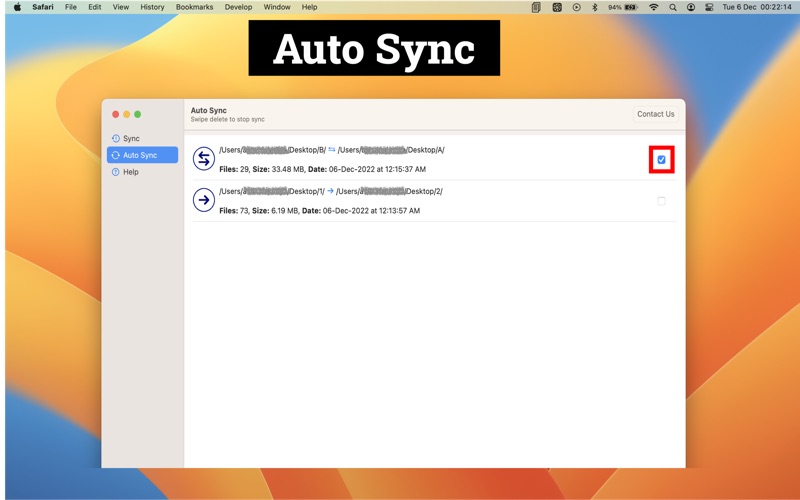
• Auto sync folders with real-time updates
• Two-way sync (bidirectional folder sync)
• One-way sync (A → B or B → A)
• Folder mirror to keep files identical
• Sync folders including all sub-folders and files
• Compare folders with file count and size
• Incremental sync (copies only new or changed files)
• Faster synchronization of large folders
• Supports local folders and external drives (USB, HDD, SSD)
• Low memory usage with fast scanning performance
• Progress indicator for compare and sync operations
• Clean, modern, and easy-to-use interface
HOW IT WORKS
• Select source and destination folders
• Choose sync mode: one-way or two-way
• Start manual sync or enable auto sync
• Keep your folders always synchronized
WHY CHOOSE FOLDER SYNC
• Sync folders in just a few clicks
• Reliable folder mirror and backup solution
• Designed for simple and efficient workflows
• Optimized for large data (GB / TB files)
• Smooth and consistent performance
PERFECT FOR
• Folder sync between locations
• File backup to external drives
• Mirror folders and keep data consistent
• Sync large data sets automatically
OPTIMIZED FOR macOS
• Native macOS experience
• Optimized for Apple Silicon (M1, M2, M3)
• Fast, stable, and efficient performance
PRIVACY & SECURITY
• No data collection
• No cloud upload
• All files stay on your device
• Safe and private folder synchronization
AUTO-RENEW SUBSCRIPTION TERMS
• Subscription auto-renews unless canceled, charged via your Apple ID
• Pricing may vary based on your region
• No commitment; cancel anytime
• Payment will be charged to your iTunes Account at confirmation of purchase
• Subscription durations: 1 month and 1 year
• Renewal is charged within 24 hours prior to the end of the current period
• Manage or cancel via Account Settings on the App Store
• Unused portion of a free trial (if offered) will be forfeited when a subscription is purchased
POLICY & TERMS
• Privacy Policy: https://envisiontechnolabs.com/privacy-policy
• Terms of Service: https://www.envisiontechnolabs.com/terms
SUPPORT
We’re continuously improving Folder Sync - File Backup to provide a faster, more reliable, and secure way to sync your files and folders.
If you have any questions or suggestions, contact us at: support@envisiontechnolabs.com
Quoi de neuf dans la dernière version ?
We’ve made updates to improve your app experience:
• Improved two-way sync performance and reliability
• Faster synchronization for large folders and files
• Enhanced support for external drives
• UI improvements for a smoother macOS experience
• Bug fixes and overall stability improvements
Thank you for using Folder Sync - File Backup! Your feedback helps us keep improving the app.