• KultureGeek
  • Comparateur de prix
       
iPhoneAddict
 iAddictv5Notre Application iPhone/iPad
  • Accueil Apps
  • Actualité Apple
  • Keynote Apple
  • Firmwares & iTunes
  • Contactez-nous
Accueil » Liste des Apps » Apps Universelles » Voyages » MapRuler for paper map
2.12 iOS €Gratuit mitsunori oishi 0 0 Mapruler is application to measure the distance of a map in the trip magazines. ※ Attention: I cannot guarantee the accuracy of the scales. ■ How to use: ・ You set a scale and put iPhone on a map.(Step1) ・ When you drag a scale, a light...
MapRuler for paper map

MapRuler for paper map

iOS Universel / Voyages

Gratuit
Obtenir sur l'App Store

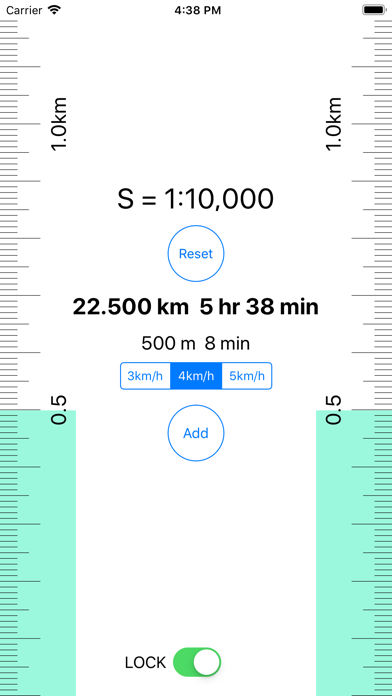
Mapruler is application to measure the distance of a map in the trip magazines.
※ Attention: I cannot guarantee the accuracy of the scales.

■ How to use:
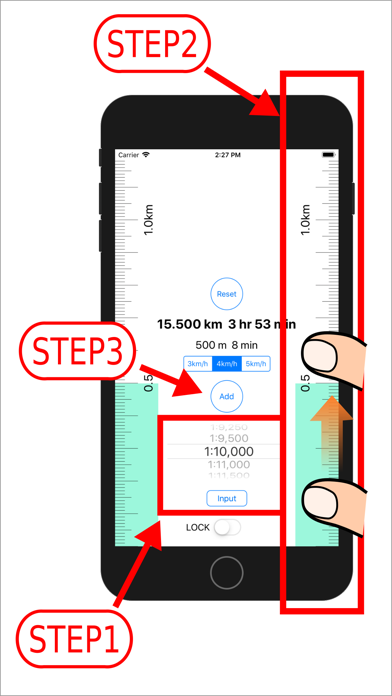
・ You set a scale and put iPhone on a map.(Step1)
・ When you drag a scale, a light blue indicator will be displayed.
・ You drag it to the position that you want to measure.(Step2)
・ The measured value are displayed with the "distance" "travel time".
※ When the time required is within one minute, it is displayed with one minute.
・ You can choose speed among 3km/h, 4km/h, 5km/h.
・ The measured value are added when you tap the button "add".
The result is displayed by a total value.(Step3)
・ When you tap a "reset" button, measured value, an indicator are reset.
・ You can lock a reduced scale with a switch.
Sorry, an advertisement is displayed during unlocking.
・ When you finish application, a total value, measurements, the indicator are reset.

■ Reduced scale setting method
・ The choice of the reduced scale with the picker.
  Please choose the reduced scale that you want to set among a picker.

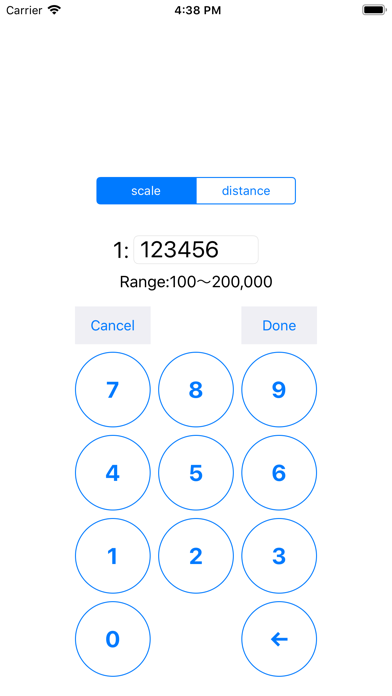
・ Input of the reduced scale denominator
 You tap an "input" button. and you tap “scale" button.
 You input a reduced scale denominator, and you tap "Done" button.
 A scale is displayed in a locked state.

・ Input of the distance
 You tap an "input" button. and you tap “distance" button.
 You input distance (m) for 1cm in the map, and you tap "Done" button.
 A scale is displayed in a locked state.

■ Specification of Mapruler
- reduced scale setting range
1:100〜1:200,000
- Maximum total value
999km
- Indication of the distance
under 100m unit of distance:m(one decimal places)
over 100m〜under 1000m unit of distance:m
over 1000m unit of distance:km(three decimal places)

En voir plus...

Quoi de neuf dans la dernière version ?

Update for iPhone17e ,iPad Air 11-inch(M4),iPad Air 13-inch(M4).
  • Screenshot #1 pour MapRuler for paper map
  • Screenshot #2 pour MapRuler for paper map
  • Screenshot #3 pour MapRuler for paper map
  • Screenshot #4 pour MapRuler for paper map
  • Screenshot #5 pour MapRuler for paper map
  • Screenshot #6 pour MapRuler for paper map

D'autres applications du développeur

語呂合わせ電卓
語呂合わせ電卓
/ iPhone
Ruler - Scale Ruler
Ruler - Scale Ruler
/ iOS Universel
Bolt Length - (Nominal Length)
/ iOS Universel
Camera - Take photos in 3steps
/ iPhone
Ring Sizer for Japan
/ iOS Universel
SNS Profile Image maker
/ iOS Universel
Voir toutes les apps

Note

(0 note)

Détails sur l'application

Version
2.12
Taille
4 Mo
Version minimum d'iOS
15.0
Dernière mise à jour
17/03/2026
Publié par
mitsunori oishi

Newsletter App Store

Recevez chaque jour les meilleures promos

Actualité Apple

Image L’iPad 12 avec la puce A18 et Apple Intelligence est toujours prévu pour 2026
L’iPad 12 avec la puce A18 et Apple Intelligence est toujours prévu pour 2026
Image Les nouveaux HomePod mini et Apple TV 4K sont prêts, mais Siri IA bloque tout
Les nouveaux HomePod mini et Apple TV 4K sont prêts, mais Siri IA bloque tout
Image Apple voulait racheter Halide pour améliorer la partie photo de l’iPhone 18 Pro
Apple voulait racheter Halide pour améliorer la partie photo de l’iPhone 18 Pro
Image WhatsApp pour iPhone prépare la traduction automatique des discussions
WhatsApp pour iPhone prépare la traduction automatique des discussions
Partenaires : Actualité iPhone - Culture Geek
©2009-2026 i2CMedia | A propos |