Birdathon
iOS Universel / Education
Birdathon is an observation-centric tool for creating birding checklists. It helps you organize your checklists and share them with others. Use Birdathon in the field to quickly record whether and where a bird is seen or heard and the number observed. The time and location of each observation is automatically recorded. You can adjust the location, time entries and the count of birds observed at any time to ensure your records are accurate. You can add breeding codes to your observations.
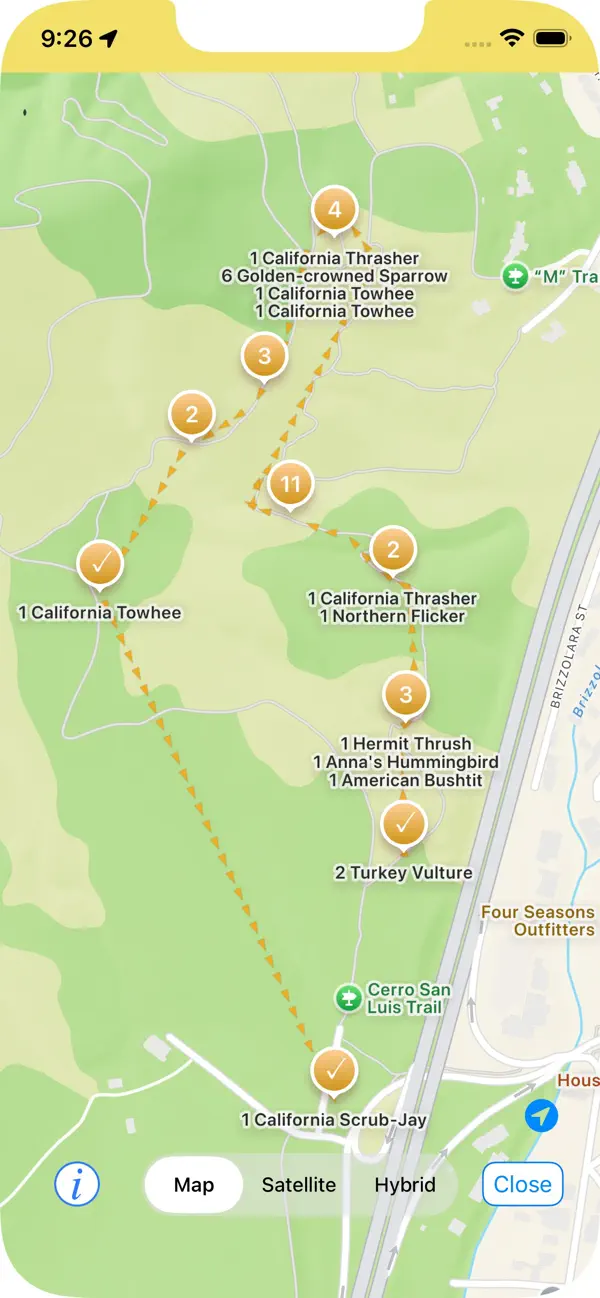
Checklist maps display the locations of your observations. You can overlay county boundaries for every US state. You can add a range circle such as a 5MR (5-mile Radius) to your maps. You can import and overlay custom kml/kmz files onto your maps.
An Overview feature lets you see your combined observations for any time period, and displays a map showing any boundaries you have selected, so you can utilize the map feature even when you are not actively checklisting. You can export Overview data into a csv text file or create a new checklist template from the Overview.
Your checklists can be viewed in taxonomic order, alphabetically, by rarity or as a timeline of species. You can enrich your checklist with field notes and add observations such as mammals, butterflies, wildflowers, etc., to make it a more complete record of your experience. You can organize your checklists into categories such as Day List, Year List, County List, Life List, etc., and assign color themes to your lists.
Bird species may be added and deleted from your lists at any time. You can create new checklist templates from your previous lists or import templates created by others. You can change which template is being used. You can import text files into Birdathon, making them into templates or new checklists.
Different export options for your checklists allow you to import into eBird or another copy of Birdathon.
The bird species source data and other resources used in this app come from the following sources:
AviList, a unified global checklist of birds, is the core data set used for Birdathon. https://www.avilist.org. Some data has been integrated from the following sources: The eBird/Clements checklist of birds of the world (https://www.birds.cornell.edu/clementschecklist/download/), the American Ornithological Society's (AOS) Checklist of North and Middle American Birds (https://checklist.americanornithology.org), and the American Birding Association's (ABA) checklist of North American Birds (https://www.aba.org/listing-taxonomy/)
Alpha codes come from The Institute for Bird Populations’ Standardized 4- and 6-letter Bird Species Codes. https://www.birdpop.org/pages/birdSpeciesCodes.php.
County boundary data is from the United States Geological Survey (USGS) TIGER/Line 2019 Shapefiles found on the United States Census Bureau's website at https://www.census.gov/geographies/mapping-files/time-series/geo/tiger-line-file.2019.html. Boundaries should be used as general guidelines and not be considered precise. Note especially where county boundaries follow creeks, rivers, ridge lines and other natural features, and so are of much finer resolution than can be shown on Birdathon’s maps.
California breeding bird atlas blocks come from the California Bird Atlas, https://www.californiabirdatlas.org. California Bird Atlas logo and breeding code descriptions used with permission.
Quoi de neuf dans la dernière version ?
General changes:
- Tapping on maps now prioritizes pins over the underlying county boundaries and custom overlays
- The duration of a checklist is now consistent wherever it appears (in the statistics at the bottom of a list, in the eBird report, and in the email report). Duration is the difference between the time the checklist was created (which you can adjust) and the time of the last observation or comment made in the checklist
- When making an eBird report, if your list is marked as Incidental it will automatically check "No" for "Is this a complete checklist?" Basically just a slightly smoother workflow
- On iPads, the Breeding Code view now fills the screen rather than being relegated to one-third of the screen
- When tapping a Breeding Code the list automatically scrolls so that the code selected is still visible
- The Checklist Statistics view (shown when tapping on the bottom middle button in a checklist) has been cleaned up
- Birdathon has been migrated to a scene-based architecture to ensure compatibility with future versions of iOS
California Bird Atlas (CBA) Tools updates:
- You can now create and name pins on the Atlas Blocks Map. This can be handy for personally marking interesting locations (e.g. nests) you might want to check up on, or marking blocks you plan to bird, etc. Pins are persistent, editable, movable, and deletable. You can copy the latitude & longitude from a pin. You can get Map directions from a pin
- The About tab has been significantly refined. There are new and updated links, videos, custom icons, and pointers to new tools including Blockboard and Code Check
- “Always Show Current Location” is now on by default for the Atlas Blocks Map
- For new installations, the county for displaying Atlas Blocks is now selected automatically based on your current location. If it can't figure out your location (or you don't give it permission), then it defaults to Santa Clara County