• KultureGeek
  • Comparateur de prix
       
iPhoneAddict
 iAddictv5Notre Application iPhone/iPad
  • Accueil Apps
  • Actualité Apple
  • Keynote Apple
  • Firmwares & iTunes
  • Contactez-nous
Accueil » Liste des Apps » Apps Mac » Economie et entreprise » Converter For MS Excel File
4.1 macOS €19,99€ Jyotsana Singh 0 0 Excel Converter – Convert Excel Files with Ease Excel Converter is a powerful and easy-to-use application that allows you to convert Microsoft Excel files into multiple formats such as HTML, CSV, JPEG, TXT, and RTF—all without requiring...
Converter For MS Excel File

Converter For MS Excel File

macOS / Economie et entreprise

19,99€ au lieu de 21,99€
Acheter sur l'App Store

Excel Converter – Convert Excel Files with Ease

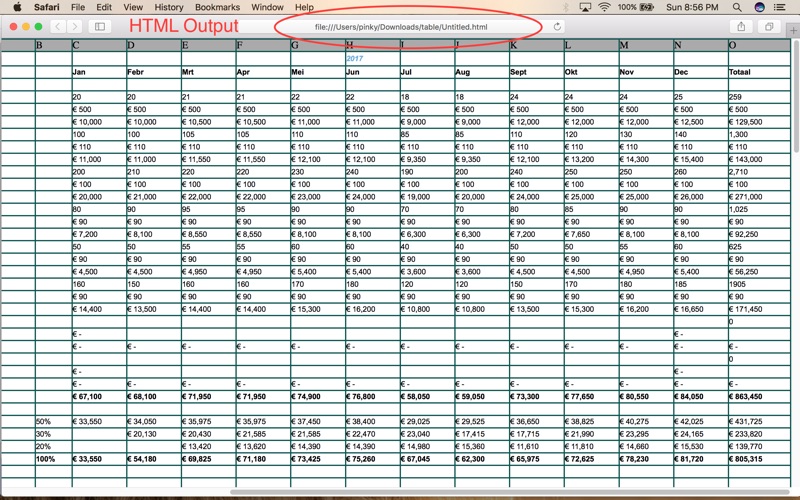
Excel Converter is a powerful and easy-to-use application that allows you to convert Microsoft Excel files into multiple formats such as HTML, CSV, JPEG, TXT, and RTF—all without requiring Microsoft Excel to be installed on your system.

The application supports both single and bulk file conversion. Simply select a file or an entire folder, and the app will automatically convert all Excel files into your chosen output format.

Key Features
A) Convert Excel Files Easily
Convert Excel files (.xls, .xlsx) to HTML, CSV, JPEG, TXT, or RTF formats with high accuracy and speed.

B) Preserve Formatting
The application maintains original formatting, including fonts, font sizes, colors, text styles, cell background colors, and layout.

C) WYSIWYG Output
Ensures “What You See Is What You Get” results, preserving the original appearance of spreadsheets in the exported files.

D) Bulk Conversion Support
Convert multiple Excel files at once by selecting a folder, saving time and effort.

E) Editable Before Conversion
View and edit Excel content before conversion, including adjusting column widths and cell data.

F) No Microsoft Excel Required
Open, view, edit, and convert Excel files without needing Microsoft Excel installed on your system.
1- Supports Excel formats: XLS, XLSX
2- Converts to HTML, CSV, TXT, RTF, and image formats
3- Maintains table structure and formatting
4- Simple, clean, and user-friendly interface

Support
If you have questions, feedback, or need assistance, please contact us at: support@RamaSoftwares.com

Sales
For licensing or purchase inquiries, contact: sales@RamaSoftwares.com

En voir plus...

Quoi de neuf dans la dernière version ?

- Resolved issues related to converting Excel files into multiple formats.
- Improved overall application stability and performance.
- Added support for the latest Tahoe OS version.

  • Screenshot #1 pour Converter For MS Excel File
  • Screenshot #2 pour Converter For MS Excel File
  • Screenshot #3 pour Converter For MS Excel File

D'autres applications du développeur

PDF Password Manager
/ macOS
All In One PDF Converter
/ macOS
XLSX Reader
XLSX Reader
/ macOS
PDF Creator for MS Excel File
/ macOS
Chart Extractor Tool
/ macOS
MailSender
MailSender
/ macOS

Note

(0 note)

Détails sur l'application

Version
4.1
Taille
1.8 Mo
Version minimum de macOS
10.13
Dernière mise à jour
31/12/2025
Publié par
Jyotsana Singh

Newsletter App Store

Recevez chaque jour les meilleures promos

Actualité Apple

Image HomeKit : Apple rappelle aux utilisateurs la fin prochaine de l’ancienne architecture
HomeKit : Apple rappelle aux utilisateurs la fin prochaine de l’ancienne architecture
Image Deepfakes sexuels : des sénateurs US demandent à Apple de retirer Grok et X de l’App Store
Deepfakes sexuels : des sénateurs US demandent à Apple de retirer Grok et X de l’App Store
Image SimpleStealth, le premier logiciel malveillant sur Mac créé par intelligence artificielle
SimpleStealth, le premier logiciel malveillant sur Mac créé par intelligence artificielle
Image L’iPhone Air 2 aurait un écran plus fin et plus lumineux avec une techno de l’iPhone Fold
L’iPhone Air 2 aurait un écran plus fin et plus lumineux avec une techno de l’iPhone Fold
Partenaires : Actualité iPhone - Culture Geek
©2009-2026 i2CMedia | A propos |