Easy-Cat
macOS / Utilitaires
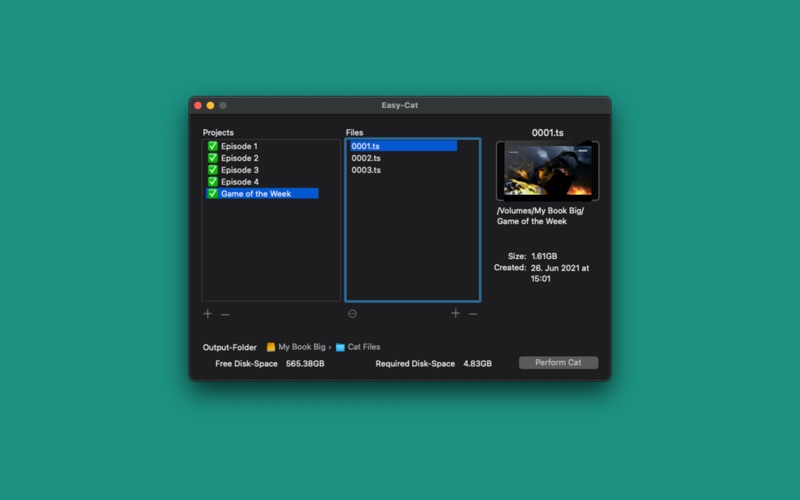
Easy-Cat is a GUI for the terminal tool "cat" that can be used to concatenate several files into a single file. In addition, Easy-Cat has the capability of batch processing, so that everything can be prepared and the concatenation can take place in the background.
## Why is Easy-Cat helpful?
Working with the Terminal-tool cat is not very comfortable. The to be concatenated files must be laboriously specified and you have to wait for completion of the concatenation before you can devote to the next concatenation. Easy-Cat spares you from this tedious work by predefining multiple concatenations and by easily putting together the to be concatenated files using drag'n drop. When the actual concatenation has been started, you can sit back and Easy-Cat will do all the work for you.
## What data can be chained?
The cat Tool can be used for concatenating plain data such as plain text-files, uncoded music- and movie-files (for example, Wave, MPEG).
## A short introduction to Easy-Cat
As the name implies the use of Easy-Cat is very simple. The user interface consists of the following interactive elements: two tables, one output directory-selection and a start-button.
- Left table
In the left table are applied the output files. For the file to be created, an individual name can be specified. In addition, a small icon next to the name is displayed. If there are problems with the currently selected project, a detailed error message below this table is displayed.
- The right table
In the right table the to be concatenated files can be added. There is an automatic check, which checks whether the added files all have the same file-extension. There is also a warning if a file has been added twice. Files can be added via the add-button or drag'n drop.
- Output directory path selection
To choose an output directory, you just click on the path bar. The last selected directory is automatically preset the next time Easy-Cat is opened.
- Start button
When ready you just have to press the Start button. However, the start-button will be deactivated, when something's not correct, please take a look at the left table and look for error-symbols.
Quoi de neuf dans la dernière version ?
## Changes:
- Easy-Cat now requires at least macOS 10.13
## Improvements:
- Various internal improvements and adjustments to enhance compatibility with newer macOS versions
- several smaller adjustments to the user interface