Insomniacs
macOS / Utilitaires
Insomniacs keeps your Mac awake — beautifully.
Need your Mac to stay awake for a download, a presentation, a long render, or just to stop the screen dimming mid-read? Insomniacs lives in your menu bar and keeps your Mac awake for exactly as long as you want — then quietly gets out of the way.
Version 2.0 is a complete redesign, built natively for macOS.
A countdown ring you can just grab
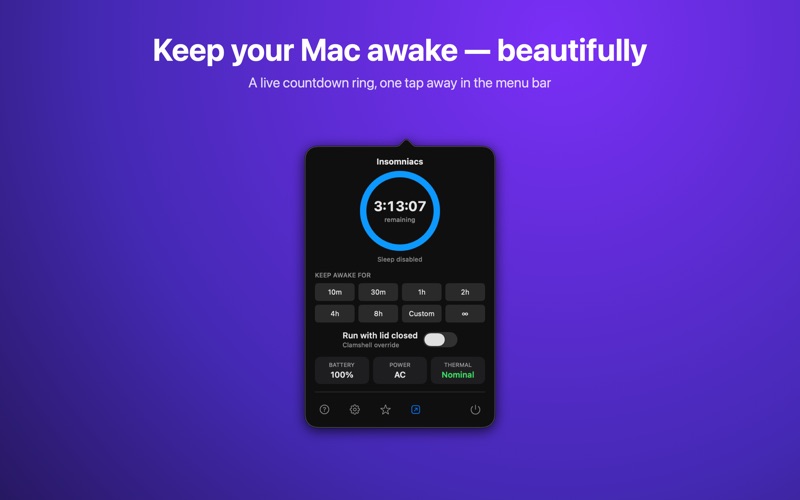
Click the menu bar icon and a live ring shows the time remaining. Drag the ring to dial in any duration, or tap a preset — 10 minutes to 8 hours, a custom time, or ∞ to stay awake until you stop. Tap the centre to let your Mac sleep again.
Keep working with the lid closed
Choose sleep-prevention only, or keep your Mac awake with the lid shut for downloads and remote work. Insomniacs shows a one-time ventilation reminder — keep your Mac cool.
Automate it — Shortcuts, Siri & Spotlight
Insomniacs adds native actions to the Shortcuts app — Keep Awake, Keep Awake Indefinitely, and Turn Off — so you can build automations, ask Siri ("Keep Insomniacs awake"), or trigger it from Spotlight.
Control it from anywhere
Set global keyboard shortcuts to start a timer, peek at the time remaining, or allow sleep instantly — fully customisable, and they work from any app.
Know your Mac at a glance
The popover shows battery level, power source, and thermal state, so you can keep an eye on things while your Mac stays awake. Optional notifications warn you 5 minutes and 1 minute before a timed session ends.
Native, private, and out of your way
Insomniacs is a lightweight, sandboxed menu bar app. No background daemons, no account, no tracking — it does one thing well and respects your Mac.
Keep your Mac awake, your way.
Quoi de neuf dans la dernière version ?
Insomniacs 2.0 is a complete redesign, rebuilt natively for macOS.
• A live countdown ring in a refreshed menu-bar popover — drag it to set any duration
• Keep-awake with the lid closed, with a one-time ventilation reminder
• Custom global keyboard shortcuts — start, peek, or turn off from any app
• Shortcuts, Siri & Spotlight automation — Keep Awake, Keep Awake Indefinitely, and Turn Off actions
• Battery, power source, and thermal status right in the popover
• Optional 5-minute and 1-minute warnings before a timed session ends