iGeoTrans X
iOS Universel / Navigation
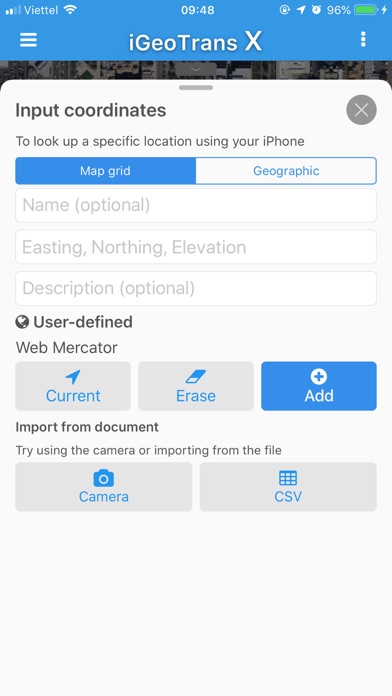
iGeoTrans X is a professional coordinate conversion, mapping, and field survey app for users working with coordinates, boundaries, and spatial data across different countries and regions.
The app is not limited to Vietnam. With support for more than 200 coordinate systems, iGeoTrans X can convert between local coordinate systems, national coordinate systems, projected coordinates, WGS-84, and GPS. It is suitable for both domestic and international projects.
iGeoTrans X is especially useful when you need to bring projected coordinates from documents, drawings, permits, area boundaries, engineering routes, land-use boundaries, or technical datasets onto a map, then use GPS to check locations, navigate in the field, stake out points, survey, compare boundaries, or support real estate asset appraisal.
In addition to built-in coordinate systems, the app also supports custom coordinate systems, helping users work with local maps, old survey data, internal datasets, and project-specific reference systems.
SUITABLE FOR
• Survey engineers and GIS specialists
• Construction contractors and infrastructure teams
• Mining, geological exploration, and mineral survey projects
• Environmental, forestry, and natural resource management work
• Land management, real estate, planning, and appraisal workflows
• Bank staff, asset appraisers, and collateral appraisal teams
• Boundary staking, site checking, and field operations
COORDINATE CONVERSION
• Convert between more than 200 coordinate systems, including VN-2000, WGS-84, UTM, Gauss-Krüger, and many others
• Convert local or projected coordinates to WGS-84/GPS for map display
• Convert GPS/WGS-84 positions to local or project coordinate systems
• Full support for VN-2000 3° and 6° projection zones for all provinces and cities in Vietnam
• Define custom coordinate systems based on project requirements
• Batch-convert multiple points
• View results instantly while entering data
• Work with points, lines, polygons, and spatial data
FIELD SURVEY & PROJECT MANAGEMENT
• Create and manage unlimited survey projects
• Add GPS points, lines, and polygons directly on the map
• Record GPS tracks with elevation data
• Manage boundaries, routes, survey areas, and field objects
• Check licensed boundaries, project boundaries, land-use boundaries, survey zones, and working areas
• Support staking out points, checking locations, and comparing coordinates in the field
• Support field checks for real estate locations, collateral assets, access roads, land parcel boundaries, and surrounding areas
MAP OVERLAYS
• Load offline maps: MBTiles and OGC-compliant GeoPackage (.gpkg)
• Add vector overlays: KML, KMZ, GeoJSON and GeoServer / WMS
• Display user-imported data layers on the map
• Combine GPS with map overlays to compare real-world positions with imported data
• Use planning layers, thematic maps, project boundaries, survey areas, and offline base maps
• Overzoom map tiles beyond the original maximum zoom level
• Import from iCloud Drive, Files app, and AirDrop
• Adjust the opacity of each map layer
GPS & LOCATION
• Display GPS coordinates in any supported coordinate system
• Track your current location on the map and overlays
• Support compass bearing and elevation
• Record GPS tracks during fieldwork, including background recording
EXPORT & SHARE
• Export data to KML, GeoJSON, CSV, and Excel
• Share via AirDrop, Email, and Files
• Use exported data with GIS, mapping, and data processing software
iGeoTrans X Pro is a one-time purchase with lifetime use. Core features do not require a subscription.
Privacy Policy:
https://igeotrans.rbc.vn/en/privacy.html
Terms of Use:
https://igeotrans.rbc.vn/en/terms.html
Terms of Use (EULA):
https://www.apple.com/legal/internet-services/itunes/dev/stdeula/
Support:
+84 98 344 8779
https://igeotrans.rbc.vn
https://www.facebook.com/iGeoTrans/
Quoi de neuf dans la dernière version ?
• Fixed KML import: files using StyleMap now display correct colors and line styles
• Fixed banner ad overlapping tracking controls during GPS recording