AutoDrive — Mileage Tracker
iPhone / Finance
AutoDrive turns every trip you take into a clean, audit-ready mileage log — automatically.
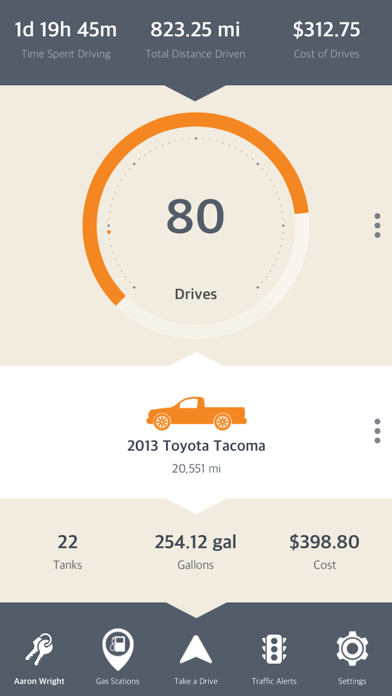
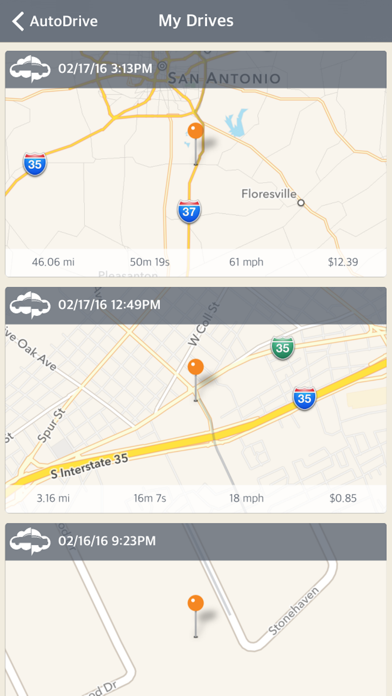
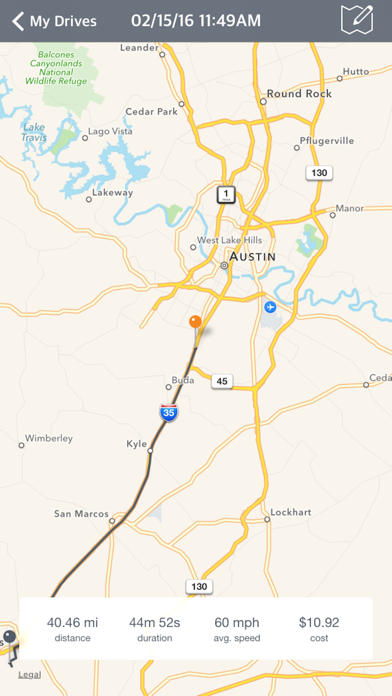
Drop the paper notebook. AutoDrive detects when you start driving, logs the distance, route, duration, and fuel or charging costs, and files every drive under the right vehicle and driver. Everything syncs across the mobile app, the AutoDrive Online Mac app, and Online website so your records are with you wherever you land.
WHAT YOU GET
• Automatic drive tracking — AutoDrive wakes up when it detects you're in a vehicle, records the trip from start to stop, and pauses when you're done.
• IRS-ready reports — every generated mileage log stamps a taxpayer header with your business name, tax ID, occupation, and address, matching IRS Pub. 463 / Form 2106 / Schedule C substantiation requirements. Generate a PDF in seconds when you need it.
• Fuel logs — track fill-ups, gallons, cost per gallon, and MPG over time. Supports unleaded, premium, diesel, and more.
• EV charging logs — record kWh, cost, and charging network for every session. Mixed fleets get the Fuel and Charging surfaces side-by-side; single-fuel users see only what applies.
• Vehicle manager — store every car you drive, with VIN decode, nickname, mileage, fuel type, and type-specific icons. Assign a primary driver to each.
• Driver profiles — keep a roster of drivers (family, employees, contractors) with optional taxpayer details for IRS-compliance reports.
• Account Groups — share vehicles, drivers, and reports with your household or fleet. One admin, many members, one combined mileage record.
• Report Builder — drag-and-drop report sections with ready-made templates for Drive Summary, Monthly Mileage, Fuel Summary, Charging Summary, and three IRS-compliance layouts (Mileage Log, Business Mileage, Vehicle Expenses). Save your own layouts for reuse.
• Data import — bring drivers, vehicles, drives, fuel logs, and charging logs in from CSV or TXT if you're switching from another tracker.
• Search everything — jump to any drive, vehicle, driver, or log in two keystrokes from the top bar.
• Cross-platform sync — your data moves with you across devices. Sign in on a new phone or browser and everything's there.
AUTOCARE — YOUR FULL-SERVICE AUTO MAINTENANCE MANAGER
Keep your vehicles healthy in one place: log service visits, set maintenance reminders, check open NHTSA safety recalls and mark them repaired, jot down observations about your car, and save your trusted shops & vendors. Free on your first vehicle.
DRIVING INSIGHTS
Every drive now earns a Drive Score. AutoDrive detects harsh braking, hard acceleration, and sharp cornering and pins each event right on your route map — so you can see exactly where it happened.
HOW AUTOMATIC DETECTION WORKS
AutoDrive uses your device's motion sensors and location services to detect when you start driving. Background location access is required — Apple requires apps that track trips while the app is closed to request "Always" permission. We never sell your location data. See the full privacy policy inside the app or at theautodriveapp.com/privacy.
PERFECT FOR
• Rideshare and delivery drivers who need a mileage log at tax time.
• Small business owners claiming vehicle expenses on Schedule C.
• Employees submitting mileage reimbursements under Form 2106 rules.
• Families tracking multiple vehicles across multiple drivers.
• EV owners who want charging costs in the same log as trips.
SUBSCRIPTIONS
- Read our Terms of Service https://theautodriveapp.com/terms
- Our Privacy Policy https://theautodriveapp.com/privacy
- Our Refund Policy https://theautodriveapp.com/refund
END-USER LICENSE AGREEMENT
- Standard EULA https://www.apple.com/legal/internet-services/itunes/dev/stdeula/
CONTINUED USE OF GPS RUNNING IN THE BACKGROUND CAN DRAMATICALLY DECREASE BATTERY LIFE.
Questions, feedback, or tax-season panic? Open a ticket in the app or email support@theautodriveapp.com.
Quoi de neuf dans la dernière version ?
THE ALL-NEW AUTODRIVE HUB
Your redesigned home screen puts every feature on a single, customizable grid.
INTRODUCING AUTOCARE
Keep your vehicles healthy in one place: log service visits, set maintenance reminders, check open NHTSA safety recalls, and much more.
DRIVING INSIGHTS
Every drive now earns a Drive Score. AutoDrive detects harsh braking, hard acceleration, and more.
Learn more and manage your data at https://theautodriveapp.com/online/
Thanks for driving with us!